Handleiding Panasonic DMC-XS3 Digitale camera

Handleiding voor je Panasonic DMC-XS3 Digitale camera nodig? Hieronder kun je de handleiding gratis bekijken en downloaden als PDF in het Nederlands en/of Engels. Dit product heeft 7 veelgestelde vragen, 0 comments en heeft 0 stemmen. Is dit niet de handleiding die je zoekt, neem dan contact met ons op.

Is je product kapot en biedt de handleiding geen oplossing meer? Dan kun je voor reparatie gratis terecht bij Repair Café.

Handleiding

Loading…
[ENGLISH]
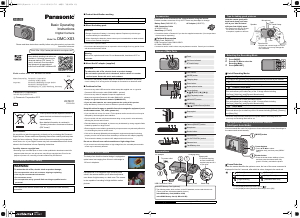
Basic Operating
Instructions
Digital Camera
Model No. DMC-XS3
Please read these instructions carefully before using this product, and save this
manual for future use.
Model number suffix “EB” denotes UK model.
More detailed operating instructions are
available in “Operating Instructions for
advanced features (PDF format)”. To
read it, download it from the website.
http://panasonic.jp/support/dsc/oi/
index.html?model=DMC-XS3&dest=EB
Web Site: http://www.panasonic-europe.com
EU
Panasonic Corporation
Web Site: http://panasonic.net
Panasonic Corporation 2013
Manufactured by: Panasonic Corporation
Kadoma, Osaka, Japan
Importer: Panasonic Marketing Europe GmbH
Panasonic Testing Centre
Winsbergring 15, 22525 Hamburg, Germany
Dear Customer,
We would like to take this opportunity to thank you for purchasing this Panasonic
Digital Camera. Please read these Operating Instructions carefully and keep them
handy for future reference. Please note that the actual controls and components,
menu items, etc. of your Digital Camera may look somewhat different from those
shown in the illustrations in these Operating Instructions.
Carefully observe copyright laws.
Recording of pre-recorded tapes or discs or other published or broadcast material for
purposes other than your own private use may infringe copyright laws. Even for the
purpose of private use, recording of certain material may be restricted.
These symbols indicate separate collection of
waste electrical and electronic equipment or
waste batteries.
More detailed information is contained in
“Operating Instructions for advanced features
(PDF format)”.
Information for Your Safety
WARNING:
To reduce the risk of fire, electric shock or product damage,
Do not expose this unit to rain, moisture, dripping or splashing.
Use only the recommended accessories.
Do not remove covers.
Do not repair this unit by yourself. Refer servicing to qualified service
personnel.
The socket outlet shall be installed near the equipment and shall be easily
accessible.
Product identification marking
About the battery pack
Do not heat or expose to flame.
Do not leave the battery(ies) in a car exposed to direct sunlight for a long period of time
with doors and windows closed.
About the AC adaptor (supplied)
The unit is in the standby condition when the AC adaptor is connected. The primary
circuit is always “live” as long as the AC adaptor is connected to an electrical outlet.
Cautions for Use
Do not use any other USB connection cables except the supplied one or a genuine
Panasonic USB connection cable (DMW-USBC1: optional).
Do not use any other AC adaptors except the supplied one.
Always use a genuine Panasonic AV cable (DMW-AVC1: optional).
Always use genuine Panasonic batteries (DMW-BCL7E).
If you use other batteries, we cannot guarantee the quality of this product.
Keep the Memory Card out of reach of children to prevent swallowing.
Keep this unit as far away as possible from electromagnetic equipment (such
as microwave ovens, TVs, video games etc.).
If you use this unit on top of or near a TV, the pictures and/or sound on this unit may be
disrupted by electromagnetic wave radiation.
Do not use this unit near cell phones because doing so may result in noise adversely
affecting the pictures and/or sound.
Recorded data may be damaged, or pictures may be distorted, by strong magnetic fields
created by speakers or large motors.
Electromagnetic wave radiation generated by microprocessors may adversely affect this
unit, disturbing the pictures and/or sound.
If this unit is adversely affected by electromagnetic equipment and stops functioning
properly, turn this unit off and remove the battery or disconnect AC adaptor (supplied).
Then reinsert the battery or reconnect AC adaptor and turn this unit on.
Do not use this unit near radio transmitters or high-voltage lines.
If you record near radio transmitters or high-voltage lines, the recorded pictures and/or
sound may be adversely affected.
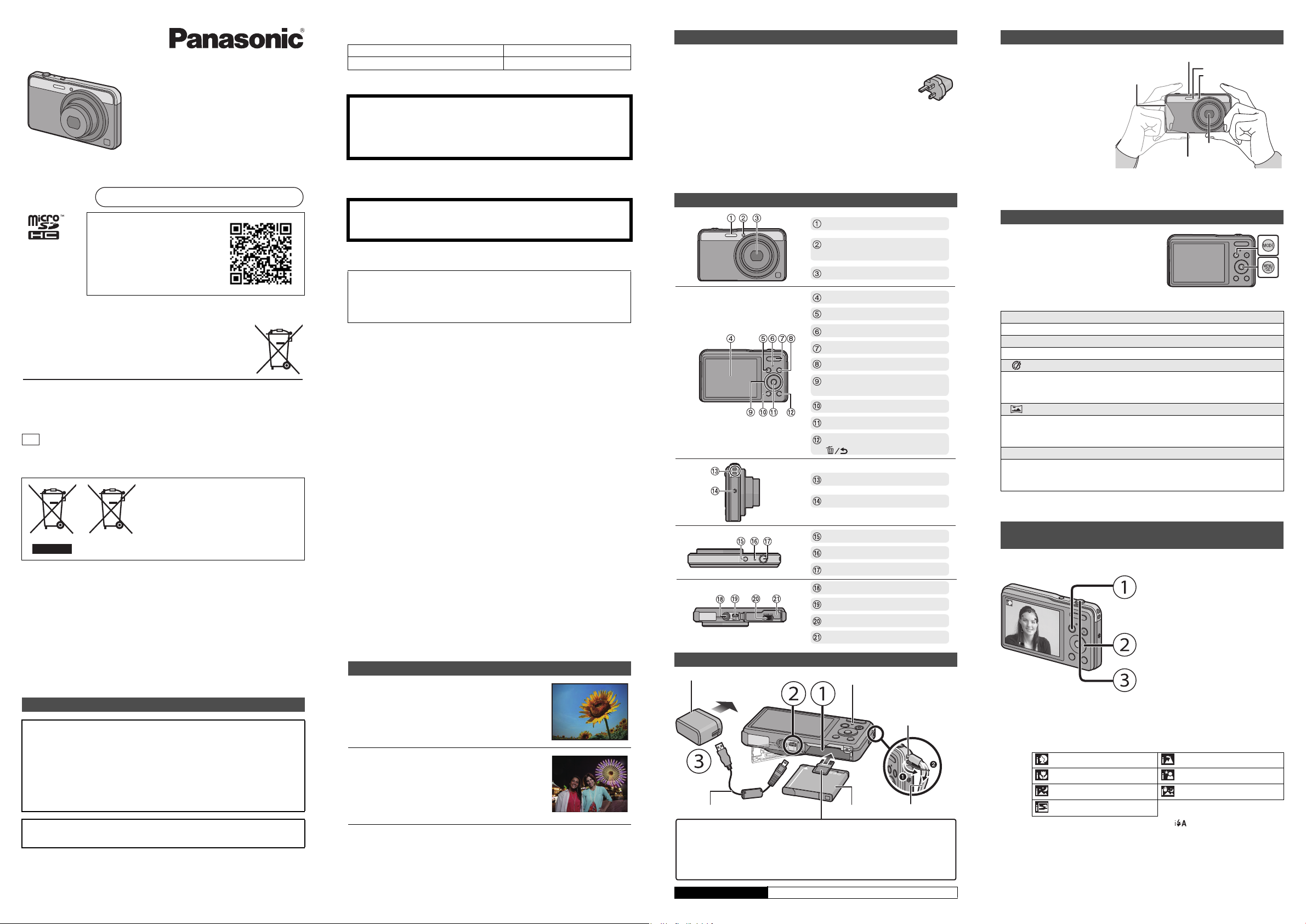
The body of an ultra-thin classical design is equipped an
optical zoom lens ranging from 24 mm in wide angle to
120 mm in telephoto.
Equipped with a 14-megapixel High Sensitivity MOS
sensor, the camera enables you to take clear pictures,
even those of night scenery or a dark room. The camera
is also capable of recording full high-definition motion
pictures.
Product Location
Digital Camera Bottom
CAUTION
Danger of explosion if battery is incorrectly replaced. Replace only with the type
recommended by the manufacturer.
When disposing the batteries, please contact your local authorities or dealer and ask
for the correct method of disposal.
Warning
Risk of fire, explosion and burns. Do not disassemble, heat above 60 xC or
incinerate.
CAUTION!
To reduce the risk of fire, electric shock or product damage,
Do not install or place this unit in a bookcase, built-in cabinet or in another
confined space. Ensure this unit is well ventilated.
Features of the Camera
Check that all the accessories are supplied before using the camera.
Product numbers correct as of July 2013. These may be subject to change.
Consult the dealer or Panasonic if you lose the supplied accessories. (You can purchase
the accessories separately.)
Optional Accessories
Battery Pack: DMW-BCL7
USB Connection Cable: DMW-USBC1
AV Cable: DMW-AVC1
Accessories and/or model numbers may vary between countries. Consult your local dealer.
List of Recording Modes
When the mode has been switched from Playback Mode to Recording Mode, the
previously set Recording Mode will be set.
We recommend this mode for beginners or those who want to leave the settings to
the camera and record casually.
Scene Detection
When the camera identifies the optimum scene, the icon of the scene concerned is
displayed in blue for 2 seconds, after which its colour changes to the usual red.
Accessories
Battery Pack (DMW-BCL7E) AC Adaptor (VSK0775)
USB Connection Cable
(K1HY08YY0031)
Hand Strap (VFC4297)
Names of Main Parts
Preparations
Charging time Approx. 150 min
Flash
Self-timer indicator/
AF Assist Lamp
Lens
LCD monitor
[MODE] button
Charging lamp
Zoom button
Motion picture button
Cursor buttons
3(
È
)/4(DISP.)/2(ë)/1()
[(] (Playback) button
[MENU/SET] button
[Q.MENU]/
[ ] (Delete/Cancel) button
Strap eyelet
Speaker
Camera [ON/OFF] button
Microphone
Shutter button
Tripod mount
[AV OUT/DIGITAL] socket
Release lever
Card/Battery door
To power outlet
microSD Memory Card (optional)
The following cards, which conform to the SD standard, can be used with this unit.
(These cards are indicated as card in the text.)
microSD Memory Card (64 MB to 2 GB)
microSDHC Memory Card (4 GB to 32 GB)
Battery PackUSB Connection Cable
AC Adaptor
Strap eyelet
To prevent dropping,
be sure to attach the
supplied strap and fit it
to your wrist.
Charging lamp
Hand Strap
Tips for taking good pictures
Hold the camera gently with
both hands, keep your arms
still at your side and stand
with your feet slightly apart.
Be careful not to put your fingers
on the flash, AF assist lamp,
microphone, speaker or lens etc.
Selecting the Recording Mode
1 Press [MODE].
2 Press 3/4/2/1 to select the
Recording Mode.
3 Press [MENU/SET].
¦
Intelligent Auto Mode
The subjects are recorded using settings automatically selected by the camera.
!
Normal Picture Mode
The subjects are recorded using your own settings.
Creative Control Mode
Record while checking the image effect.
This mode allows you to select any of the 13 image effects including
[Old Days], [High Key], and [Dynamic Monochrome].
Panorama Shot Mode
This mode allows you to take panorama pictures.
This mode allows you to select any of the 11 image effects including
[Old Days], [High Key], and [Dynamic Monochrome].
Û
Scene Mode
This mode allows you to take pictures that match the scene being recorded.
This mode allows you to select any of the 16 scenes including [Portrait], [Scenery],
and [Starry Sky].
Taking pictures using the automatic function
(Intelligent Auto Mode)
¦
>
[i-Portrait] [i-Scenery]
[i-Macro] [i-Night Portrait]
¢1
[i-Night Scenery] [iHandheld Nite Shot]
¢2
[i-Sunset]
¢1 Only displayed when the flash is set to [ ].
¢2 Only displayed when [iHandheld Nite Shot] is set to [ON].
Flash
Microphone
Tripod mount
A tripod with a screw length of 5.5 mm
(0.22 inch) or more may damage this
unit if attached.
Lens
Speaker
AF Assist Lamp
ISO
1/601/601/60
F2.8F2.8
F2.8
[MODE] button
Cursor buttons
Press 3/4/2/1 to select
[Intelligent Auto], and then press [MENU/
SET].
Shutter button
Press the shutter button halfway to focus,
and then press the shutter button fully
(push it in further), and take the picture.
until
2013/8/7
VQT5C11
F0713YS0
EB
VQT5C11_EB_mst.fm 1 ページ 2013年6月27日 木曜日 午前9時41分
Download de handleiding in het Nederlands en/of Engels (PDF, 1.13 MB)
(Denk aan het milieu en print deze handleiding alleen als dat echt noodzakelijk is)

Loading…

Meer over deze handleiding

We begrijpen dat het prettig is om een papieren handleiding te hebben voor je Panasonic DMC-XS3 Digitale camera. Je kunt de handleiding bij ons altijd downloaden en daarna zelf printen. Indien je graag een originele handleiding wilt hebben, raden we je aan contact op te nemen met Panasonic. Zij kunnen wellicht nog voorzien in een originele handleiding. Zoek je de handleiding van Panasonic DMC-XS3 Digitale camera in een andere taal? Kies op de homepage je taal naar keuze en zoek daarna op het modelnummer om te zien of we deze beschikbaar hebben.

Specificaties

Merk Panasonic
Model DMC-XS3
Categorie Digitale camera's
Bestandstype PDF
Bestandsgrootte 1.13 MB

Alle handleidingen voor Panasonic Digitale camera's
Meer handleidingen voor Digitale camera's

Veelgestelde vragen over Panasonic DMC-XS3 Digitale camera

Ons supportteam zoekt dagelijks naar nuttige productinformatie en antwoorden op veelgestelde vragen. Als er onverhoopt toch een onjuistheid tussen onze veelgestelde vragen staat, laat het ons dan weten via het contactformulier.

Hoe voorkom ik 'rode ogen' op mijn foto's? Geverifieerd

Het 'rode ogen' fenomeen wordt veroorzaakt doordat er te snel, te veel licht in de ogen van de personen op de foto komt. Dit is met name in een donkere ruimte het geval. De volgende dingen kunnen als oplossing dienen: Laat de mensen op de foto niet direct in de camera kijken, zorg voor meer licht, ga dichter op het onderwerp staan of zoom minder/niet in.

Ik vind dit nuttig (392) Lees meer

Wat is een megapixel? Geverifieerd

Een megapixel (MP) staat gelijk aan een miljoen pixels. Megapixels worden onder andere gebruikt om de resolutie van een digitale camera of camcorder weer te geven. Zo heeft een camera die beeld produceert van 1280x960 pixels een resolutie van ongeveer 1,3MP. Hoewel er heel veel factoren zijn die de kwaliteit van het beeld beïnvloeden kan over het algemeen gezegd worden dat meer megapixels zorgen voor een beter beeld.

Ik vind dit nuttig (369) Lees meer

Is het nodig om mijn lithium-ion batterij steeds helemaal leeg te laten lopen en weer volledig op te laden? Geverifieerd

Nee dit is niet nodig. Bij oudere type batterijen was dit het geval. Lithium-ion batterijen kun je gerust opladen na gebruik en uit de oplader halen wanneer je deze nodig hebt.

Ik vind dit nuttig (306) Lees meer

Waar staat SD voor? Geverifieerd

SD staat voor Secure Digital. SD kaarten zijn het standaard opslagmedium voor veel digitale camera's.

Ik vind dit nuttig (266) Lees meer

Er is een batterij in mijn apparaat gaan oxideren, kan ik het nog veilig gebruiken? Geverifieerd

Ja, het apparaat kan nog veilig gebruikt worden. Verwijder eerst de geoxideerde batterij. Doet dit niet met blote handen. Reinig daarna het batterijcompartiment met een wattenstaafje gedipt in azijn of citroensap. Laat het drogen en doe nieuwe batterijen in het apparaat.

Ik vind dit nuttig (240) Lees meer

Hoe kun je een lithium-ion batterij het beste voor langere tijd opslaan? Geverifieerd

Je kunt deze het beste opslaan bij een temperatuur tussen de 5 en 25 graden Celcius. Daarnaast is het raadzaam om de batterij op te laden tot ongeveer 67% voordat deze de kast in gaat.

Ik vind dit nuttig (227) Lees meer

Wat zijn goede condities voor lithium-ion batterijen? Geverifieerd

Lithium-ion batterijen functioneren het beste bij temperaturen tussen de 5 en 45 graden Celcius. Bij koud of warm weer kun je dan ook merken dat de batterij sneller leegloopt. Bij temperaturen lager dan 5 graden en hoger dan 45 graden Celcius wordt opladen afgeraden.

Ik vind dit nuttig (218) Lees meer

Beoordeling

Laat ons weten wat je van de Panasonic DMC-XS3 Digitale camera vindt door een beoordeling achter te laten. Wil je je ervaringen met dit product delen of een vraag stellen? Laat dan een bericht achter onderaan de pagina.
Bent u tevreden over de Panasonic DMC-XS3 Digitale camera?
Ja Nee
Beoordeel dit product als eerste
0 stemmen

Praat mee over dit product

Laat hier weten wat jij vindt van de Panasonic DMC-XS3 Digitale camera. Als je een vraag hebt, lees dan eerst zorgvuldig de handleiding door. Een handleiding aanvragen kan via ons contactformulier.

Handleiding Panasonic DMC-XS3 Digitale camera

Gerelateerde producten

Gerelateerde categorieën

×
Download