
Congratulations
on purchasing your new VTech product.
Before using this product, please read
Important safety instructions.
This manual has all the feature operations
and troubleshooting necessary to install and
operate your new VTech product. Please
review this manual thoroughly to ensure
proper installation and operation of this
innovative and feature rich VTech product.
For support, shopping, and everything new at
VTech, visit our website at
www.vtechphones.com.
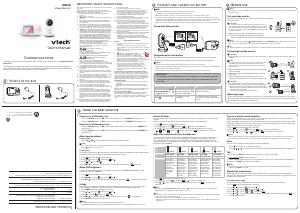
What’s in the box
1 set for VM3251
2 sets for VM3251-2
Install the battery
The parent unit runs on rechargeable battery
or AC power. To continuously monitor your
baby, make sure you use both battery and
AC power at the same time. With the battery
alone, the parent unit can cordlessly run for a
short time only.
Use only the battery supplied with this product.
The operating time for using the rechargeable
battery is short. If you want to monitor your baby
for a long time, we recommend you connect the
parent unit to AC power.
If the parent unit will not be used for a long time,
disconnect and remove the battery to prevent
possible leakage.
Install the battery as shown below.
Make sure the label THIS SIDE UP is facing up
while inserting the battery.
Replace the battery
To replace the battery, pull out the battery
compartment cover, and then lift up the
battery. Follow the steps above to install the
new battery.
•
•
•
•
Connect and charge the
battery
Use only the power adapters supplied with this
product.
Make sure the electrical outlets are not controlled
by wall switches.
The power adapters are intended to be correctly
oriented in a vertical or floor mount position. The
prongs are not designed to hold the plug in place
if they are plugged into a ceiling, under-the-table
or cabinet outlet.
Make sure the parent unit, the baby unit and the
power adapter cords are out of reach of children.
Connect the baby monitor
•
•
•
•
Charge the parent unit battery
When you have connected the parent unit
and installed its battery for the first time or
after power outage, the parent unit powers on
automatically. The battery icon indicates the
battery status (see the following table).
The parent unit battery is fully charged after
11 hours of continuous charging.
It takes longer to charge the battery when the
parent unit is turned on. To shorten the charging
time, turn the parent unit off while charging.
The standby time varies depending on the
volume level you set, your actual use and the
age of the battery.
Battery
indicators
Battery
status
Action
The battery
icon is off
and
displays.
No battery
is installed
but operates
using AC
power, or the
battery has
been installed
incorrectly.
Install the
parent unit
battery.
Charge
without
interruption
(at least
30 minutes).
The screen
displays
Battery low
at Parent
Unit and .
The lightlight
flashes.
The battery
has very little
charge and
may be used
for only a
short time.
Charge
without
interruption
(about
30 minutes).
The battery
icon
becomes
solid .
The battery is
fully charged.
To keep
the battery
charged,
connect it to
AC power
when not in
use.
•
•
•
Before use
This baby monitor is intended as an aid. It is not a
substitute for proper adult supervision, and should
not be used as such.
Test your baby monitor
You may test the baby monitor before initial
use, and at regular times thereafter.
For hearing protection, make sure the parent
unit is more than 1 meter (3 feet) away from
both baby units. If you hear any high-pitched
noise, move the parent unit further until the
noise stops. You can also press VOL- on
the parent unit to lower or mute the noise.
Make sure your baby units and parent unit
are on.
The parent unit displays images from the
baby unit.
Speak towards the microphone of the
baby unit. You will hear the sound at the
parent unit.
If you have more than one baby unit, press
at the right side of your parent unit. The
screen switches to other baby units. Then,
repeat step 2.
When the parent unit displays No link to
Camera, and the LINK LED light flashes, move
the parent unit closer to the baby units (observe
the minimum distance of 1 meter/ 3 feet). You
can also check if the baby monitor is connected to
a live power socket and switched on.
Increase the speaker volume of the parent unit if
you cannot hear the sounds transmitted from the
baby units.
•
•
1.
2.
•
3.
•
•
Positioning the baby monitor
Keep the baby unit out of the reach of your baby.
Never place or mount the baby unit inside the
baby’s crib or playpen.
To avoid interference from other electronic
devices, place your baby monitor far away from
devices such as wireless routers, microwaves,
cell phones and computers.
Place the baby units more than 1 meter
(3 feet) away from your baby.
Place the parent unit more than 1 meter
(3 feets) away from the baby units.
3. Flip down the camera on the baby unit
to adjust the angle according to your
preference.
The default volume of your parent unit is level 4.
If you experience high-pitched screeching noise
from your baby monitor while positioning:
Make sure your baby units and parent unit are
more than 1 meter (3 feet) apart, OR
Turn down the volume of your parent unit.
•
•
1.
2.
•
-
-
Operating range
The operating range of the baby monitor is
up to 300 meters (1,000 feet) outdoors or
50 meters (160 feet) indoors. The actual
operating range may vary depending on
the environmental conditions and other
interferences such as walls, doors and other
obstructions.
Overview
Baby unit overview
1
Light sensor
2
Camera
3
Infrared LEDs
4
-/VOLUME/+
Press to adjust the speaker volume.
It determines the talkback volume
transmitted from your parent unit.
•
5
Microphone
6
ON/OFF LED light
On when the baby unit is turned on
and is paired to the parent unit.
Flashes when the baby unit is not
being viewed; or when the link to the
parent unit is lost.
•
•
7
ON/OFF switch
Slide to turn on or off the baby unit.•
8
Temperature sensor
9
Speaker
10 Threaded socket
For wall mount installation use.•
11
Power Jack
12
PAIR
Your baby units and parent unit
provided are already paired.
Press on the accessory baby units
(VM3211, purchased separately) to
pair to the parent unit.
•
•
Parent unit overview
1
LCD display
2
Zoom
Press to zoom in or out while
viewing image in SINGLE-CAM or
PATROL mode.
•
3
Press to change the screen to view
images from different baby units.
•
4
• Turn up the volume when the
speaker is on.
While in a menu, press to scroll up,
or to enter an item’s sub-menu.
While zooming in SINGLE-CAM or
PATROL mode, press and hold to
move the zoomed image upward.
• Turn down the volume when the
speaker is on.
While in a menu, press to scroll
down.
While zooming in SINGLE-CAM or
PATROL mode, press and hold to
move the zoomed image downward.
•
•
•
•
5
MENU/SELECT
Press to enter/exit the menu.
While in a sub-menu, press to
choose an item, or save a setting.
•
•
6
While in a menu, press to choose
the next item on the left, or enter
into the submenu, if any.
While zooming in SINGLE-CAM
and PATROL mode, press and hold
to move the zoomed image leftward.
While in a menu, press to choose
the next item on the right, or return
to the main menu while in submenu.
While zooming in SINGLE-CAM or
PATROL mode, press and hold to
move the zoomed image rightward.
•
•
•
•
7
On/off
Press and hold to power on.
Press and hold again to power off.
•
•
8
TALK
Press and hold to talk to the
selected baby unit in SINGLE-CAM
or PATROL mode.
•
9 PATROL
Press to turn on or off the PATROL
mode.
•
10 LCD ON/OFF
Press to turn on or off the
LCD screen.
•
11
Speaker
12
Power jack
13
Battery compartment cover
14
Stand
Parent unit lights
LINK
On when the parent unit is linked to
the baby unit.
Flashes quickly when the link to
the baby unit is nearly lost. Flashes
when the link to at least one of the
baby units is lost.
On when the parent unit is
connected to AC power, or the
battery is charging.
Flashes when the parent unit
battery is low and needs charging.
Off when the parent unit is
disconnected from AC power.
TALK
On when the parent unit is talking to
the baby unit.
On when the speaker volume of the
parent unit is turned off.
Parent unit status icons
Connection status
or displays when strong
signal strength is detected
between the baby unit and the
parent unit.
or displays when moderate
or low signal strength is detected
between the baby unit and the
parent unit.
displays when the link between
the baby unit and the parent unit
is lost.
•
•
•
Patrol mode
Displays when the parent unit is in
PATROL mode.
•
or
or
or
Current view status
Displays the number of the baby
unit that is being viewed when in
SINGLE-CAM or PATROL mode.
•
Zoom
Displays when the camera at the
baby unit has zoomed in.
•
Night vision
Displays when the baby unit being
viewed has activated the night
vision feature.
•
Lullaby
Displays when a lullaby is playing.•
Talkback
Displays when talking back to the
baby units from parent unit.
•
6-level sound indicator
Displays the sound level according
to the scales of loudness when there
is sound transmitted from the baby
unit.
(1 to 2 bars) indicates low sound
level detected by the baby unit.
(3 to 4 bars) indicates
moderate sound level detected by
the baby unit.
(5 to 6 bars) indicates high
sound level detected by the baby
unit (e.g. baby crying loudly).
•
•
•
Mute alert
Displays when the parent unit
speaker volume is set to off.
•
or
Real-time temperature
Displays the real-time temperature
detected by the baby unit in
Fahrenheit (
o
F) or Celsius (
o
C)
(e.g. 57
o
F or 14
o
C).
•
Battery status
animates
when the battery is charging.
displays solid when the
battery is fully charged.
displays when the battery is
low and needs charging.
•
•
•
AC power without battery
Displays when the parent unit is
connected to AC power without
the battery.
•
Speaker volume
Displays the parent unit speaker
volume level while adjusting.
•
Parent unit main menu icons
Brightness
You can change the brightness of
the parent unit screen.
Pairing baby unit
The baby unit and parent unit
provided are already paired. You
can add or replace baby units
(VM3211, purchased separately)
to your baby monitor system.
Unpairing baby unit
You can remove the paired baby
units.
LCD screen off timer
You can set a specific time to
screen off your parent unit.
Temperature
You can turn on the Temperature
alert tone so that the parent
unit beeps whenever the room
temperature detected by the baby
unit falls outside of the desired
temperature range.
Lullaby
You can select, play, or stop a
lullaby.
Parent unit warning icons and
messages
/No link to
Camera
The selected baby unit is
out of range or is turned
off.
/Battery low
at Parent Unit
The battery is empty and
needs to be recharged.
Pairing or unpairing is
completed.
Camera switching,
pairing or unpairing is in
progress.
Camera switching,
pairing or unpairing is
failed.
/Temperature
too high
or
/Temperature
too low
The temperature
detected by the baby unit
is higher/lower than the
desired temperature alert
range.
or or
or
or
The baby unit is unpairing
from the parent unit.
The parent unit is
searching for baby units.
* # represents the selected baby unit number.
Using the baby monitor
Power on or off the baby unit
Slide the ON/OFF switch up to turn on
the baby unit. The ON/OFF LED light turns
on.
Slide the ON/OFF switch down to turn
off the baby unit. The ON/OFF LED light
turns off.
Power on or off the parent unit
Press and hold to turn on the parent unit.
The screen turns on.
Press and hold again to turn off the
parent unit. The screen turns off.
Turn on or off the parent unit
screen
You can turn on or off the parent unit screen
without powering off the parent unit. You can
still hear sound from the baby unit.
Press LCD ON/OFF on the parent unit to
turn off the screen.
Press any key on the parent unit to turn on
the screen again.
Adjust speaker volume
For parent unit:
Press VOL+/VOL- on the parent unit to
adjust the speaker volume.
When the parent unit speaker volume is set to
zero, appears on the screen and the light
turns on.
For baby unit:
The baby unit speaker volume determines the
talkback volume transmitted from your parent
unit.
Press +/VOLUME/- on the baby unit to
adjust the speaker volume.
•
•
•
•
•
•
•
•
•
Adjust LCD brightness
You can change the brightness of the parent
unit screen from Level 1 to Level 5. The LCD
brightness is preset to Level 3.
Press MENU when the parent unit is idle.
Press or to choose , then press .
Press or to choose the desired level of
brightness, then press SELECT to confirm
your selection.
Monitoring mode
Every time the parent unit is turned on, it
displays a baby unit in SINGLE-CAM mode.
If there are more than one baby units in your
system, you can also monitor your baby in
PATROL mode.
SINGLE-CAM
The screen displays
image of a single baby
unit in full screen.
PATROL
A single cam view that
transits to a different baby
unit every 10 seconds.
In SINGLE-CAM mode:
Press to switch to another camera if
you are in SINGLE-CAM mode.
1.
2.
3.
•
In PATROL mode:
Press PATROL to switch to PATROL mode
if you are in SINGLE-CAM mode, and vice
versa.
Zoom
You can zoom in while viewing images from
the baby unit in SINGLE-CAM and PATROL
mode.
Press to zoom in.
Press or to move the zoomed image
upward or downward.
Press or to move the zoomed image
leftward or rightward.
Press again to zoom out.
Talk
You can use the TALK function of the parent
unit to comfort your baby in SINGLE-CAM and
PATROL mode.
Press and hold TALK on the parent unit.
The TALK light turns on.
Speak towards the microphone on the
parent unit. Your voice is broadcast to the
baby unit.
Release the TALK key to stop the
broadcast. The TALK light goes off.
•
•
•
•
•
1.
2.
3.
Lullaby
You can play the lullabies on the baby unit
from the parent unit. On the baby unit, you
can control the volume level of the lullabies.
Playing lullabies
Press MENU when the parent unit is idle.
Press or to choose , then press .
Press or to choose a lullaby, or
choose to stop playing.
Press SELECT to confirm your selection.
Volume level control on baby unit
Press VOL+ to increase the volume level of
the lullaby on the baby unit.
Press VOL- to decrease the volume level of
the lullaby on the baby unit.
Once the lullabies are played, the setting will be
applied to the last viewed camera.
The lullaby stops when you started using TALK
function of the parent unit to comfort your
baby. It will resume in a few seconds after the
broadcast is ended.
1.
2.
3.
4.
•
•
•
•
BC
User’s manual
VM3251
VM3251-2
Video Monitor
with Adjustable Lens
Go to www.vtechphones.com
to register your product for
enhanced warranty support and
the latest VTech product news.
DC 6V 500mA
MANUFACTURED IN CHINA
www.vtechphones.com
VTech Customer Service
1-800-595-9511
FCC ID: EW780-0617-00
IC: 1135B-80061700
4H20
I.T.E.
PAIR
e
d
a
b
c
h
i
f
g
j
k
l
10s
> 1m (3ft)
Press .



Praat mee over dit product
Laat hier weten wat jij vindt van de Vtech VM3251-2 Babyfoon. Als je een vraag hebt, lees dan eerst zorgvuldig de handleiding door. Een handleiding aanvragen kan via ons contactformulier.