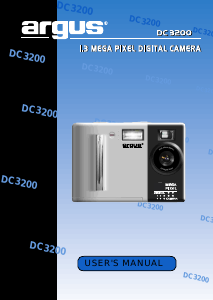
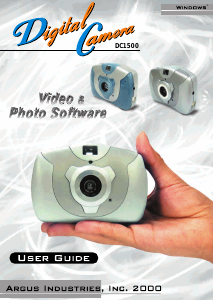
Handleiding Argus DC 1500 Digitale camera

Handleiding voor je Argus DC 1500 Digitale camera nodig? Hieronder kun je de handleiding gratis bekijken en downloaden als PDF in het Nederlands en/of Engels. Dit product heeft 7 veelgestelde vragen, 0 comments en heeft 0 stemmen. Is dit niet de handleiding die je zoekt, neem dan contact met ons op.

Is je product kapot en biedt de handleiding geen oplossing meer? Dan kun je voor reparatie gratis terecht bij Repair Café.

Handleiding

Loading…

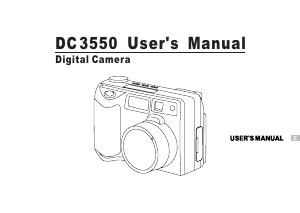
Digital Camera DC1500 User Guide
License Agreement
ColorMOS is a trademark of VLSI Vision Ltd., UK. Microsoft, Windows, Windows 95, Windows 98,
Windows NT, are registered trademark of Microsoft Corporation. Pentium is a registered trademark
of Intel Corporation. The TWAIN driver and the AVI Creator is developed by VLSI Vision Ltd.,UK.
The Photo Fantasy, Photo Printer and Photo Studio is licensed by Arcsoft, USA.
All other product names mentioned here in are trademarks or registered trademarks of their
respective owners.
Electromagnetic Compatibility Notice
This device complies with Part 15 of the FCC Rules. Operation is subject to the following two
conditions: (1) This device may not
cause harmful interference, and (2) This device must accept any interference received, including
interference that may cause undesired operation.
Warning: Changes or modifications to this unit not expressly approved by the party responsible
for compliance could void the user's anthority to operate the equipment.
NOTE: This equipment has been tested and found to comply with the limits for a Class B digital
device, pursuant to Part 15 of the FCC Rules. These limits are designed to provide reasonable
protection against harmful interference in a residential installation. This equipment generates uses
and can radiatc radio frequency and, if not installed and used in accordance with the instructions,
may cause harmful interference to radio communications.
However, there is no guarantee that interference will not occur in a particular installation. If this
equipment does cause harmful interference to radio or television reception. which can be determined
by turning the equipment off and on, the user is encouraged to try to correct the interference by
one or more of the following measures:
Reorient or relocate the receiving antenna.
Increase the separation between the equipment and receiver.
Connect the equipment into an outlet on a circuit different from that to which the receiver
is needed.
Consult the dealer or an experienced radio/TV technician for help.
Caution
In order to maintain compliance with FCC regulations, shielded cables must be used with
this equipment. Operation with non-approved equipment or unshielded cables is likely to
result in interference to radio and TV reception.
To comply with the limits for a class B digital device, pursuant to part 15 of the FCC rules, this
device must only be installed on computer equipment certified to comply with the Class B limits.
In addition, only the supplied power cables should be used with the product. Operation with non-
certified computers, use of a cable other than that supplied, or modification of the device may result
in interference to radio or television reception and could void the user’s authority to operate this
device.
Attention
Thank you for selecting Digital Camera DC1500. Please read the instructions carefully for a
thorough understanding before taking pictures.
This camera is not resistant to water and should not be used outdoors in snow or rain. If
accidentally dropped in water, please quickly pour out the water. Let it to dry by sunlight or
by air-blower.
Protect it from excessive humidity. It will wet the lens and picture will be blured.
Do not attempt to disassemble the camera yourself. Always take it to an authorized service
facility for repair.
Remove the batteries if you do not expect to use the camera for 1 month or longer.
To store the camera, wrap it in a clean, soft cloth and place in a cool, dry, dust-free place.
Also it should not be placed in a very hot temperature condition or in direct sun light.
The battery may explode or cause burns if disassembled, recharged, shorted, exposed to high
temperature, or disposed of in fire.
Take care on the lens. Use special cloth to clean it.
Condensation is a problem when bringing cold equipment into a warm room. Try to put the
camera in plastic bag so condensation forms on the outside of the bag.
If nothing at all is displayed in the LCD panel, the battery may be inserted in opposite polarity.
Opening the battery door will cause the loss of all stored photos. Make sure you have uploaded
the photos to the PC before opening the battery door.
1
Download de handleiding in het Nederlands en/of Engels (PDF, 0.99 MB)
(Denk aan het milieu en print deze handleiding alleen als dat echt noodzakelijk is)

Loading…

Meer over deze handleiding

We begrijpen dat het prettig is om een papieren handleiding te hebben voor je Argus DC 1500 Digitale camera. Je kunt de handleiding bij ons altijd downloaden en daarna zelf printen. Indien je graag een originele handleiding wilt hebben, raden we je aan contact op te nemen met Argus. Zij kunnen wellicht nog voorzien in een originele handleiding. Zoek je de handleiding van Argus DC 1500 Digitale camera in een andere taal? Kies op de homepage je taal naar keuze en zoek daarna op het modelnummer om te zien of we deze beschikbaar hebben.

Specificaties

Merk Argus
Model DC 1500
Categorie Digitale camera's
Bestandstype PDF
Bestandsgrootte 0.99 MB

Alle handleidingen voor Argus Digitale camera's
Meer handleidingen voor Digitale camera's

Veelgestelde vragen over Argus DC 1500 Digitale camera

Ons supportteam zoekt dagelijks naar nuttige productinformatie en antwoorden op veelgestelde vragen. Als er onverhoopt toch een onjuistheid tussen onze veelgestelde vragen staat, laat het ons dan weten via het contactformulier.

Hoe voorkom ik 'rode ogen' op mijn foto's? Geverifieerd

Het 'rode ogen' fenomeen wordt veroorzaakt doordat er te snel, te veel licht in de ogen van de personen op de foto komt. Dit is met name in een donkere ruimte het geval. De volgende dingen kunnen als oplossing dienen: Laat de mensen op de foto niet direct in de camera kijken, zorg voor meer licht, ga dichter op het onderwerp staan of zoom minder/niet in.

Ik vind dit nuttig (392) Lees meer

Wat is een megapixel? Geverifieerd

Een megapixel (MP) staat gelijk aan een miljoen pixels. Megapixels worden onder andere gebruikt om de resolutie van een digitale camera of camcorder weer te geven. Zo heeft een camera die beeld produceert van 1280x960 pixels een resolutie van ongeveer 1,3MP. Hoewel er heel veel factoren zijn die de kwaliteit van het beeld beïnvloeden kan over het algemeen gezegd worden dat meer megapixels zorgen voor een beter beeld.

Ik vind dit nuttig (369) Lees meer

Is het nodig om mijn lithium-ion batterij steeds helemaal leeg te laten lopen en weer volledig op te laden? Geverifieerd

Nee dit is niet nodig. Bij oudere type batterijen was dit het geval. Lithium-ion batterijen kun je gerust opladen na gebruik en uit de oplader halen wanneer je deze nodig hebt.

Ik vind dit nuttig (307) Lees meer

Waar staat SD voor? Geverifieerd

SD staat voor Secure Digital. SD kaarten zijn het standaard opslagmedium voor veel digitale camera's.

Ik vind dit nuttig (268) Lees meer

Er is een batterij in mijn apparaat gaan oxideren, kan ik het nog veilig gebruiken? Geverifieerd

Ja, het apparaat kan nog veilig gebruikt worden. Verwijder eerst de geoxideerde batterij. Doet dit niet met blote handen. Reinig daarna het batterijcompartiment met een wattenstaafje gedipt in azijn of citroensap. Laat het drogen en doe nieuwe batterijen in het apparaat.

Ik vind dit nuttig (240) Lees meer

Hoe kun je een lithium-ion batterij het beste voor langere tijd opslaan? Geverifieerd

Je kunt deze het beste opslaan bij een temperatuur tussen de 5 en 25 graden Celcius. Daarnaast is het raadzaam om de batterij op te laden tot ongeveer 67% voordat deze de kast in gaat.

Ik vind dit nuttig (227) Lees meer

Wat zijn goede condities voor lithium-ion batterijen? Geverifieerd

Lithium-ion batterijen functioneren het beste bij temperaturen tussen de 5 en 45 graden Celcius. Bij koud of warm weer kun je dan ook merken dat de batterij sneller leegloopt. Bij temperaturen lager dan 5 graden en hoger dan 45 graden Celcius wordt opladen afgeraden.

Ik vind dit nuttig (220) Lees meer

Beoordeling

Laat ons weten wat je van de Argus DC 1500 Digitale camera vindt door een beoordeling achter te laten. Wil je je ervaringen met dit product delen of een vraag stellen? Laat dan een bericht achter onderaan de pagina.
Bent u tevreden over de Argus DC 1500 Digitale camera?
Ja Nee
Beoordeel dit product als eerste
0 stemmen

Praat mee over dit product

Laat hier weten wat jij vindt van de Argus DC 1500 Digitale camera. Als je een vraag hebt, lees dan eerst zorgvuldig de handleiding door. Een handleiding aanvragen kan via ons contactformulier.

Handleiding Argus DC 1500 Digitale camera

Gerelateerde producten

Gerelateerde categorieën

×
Download