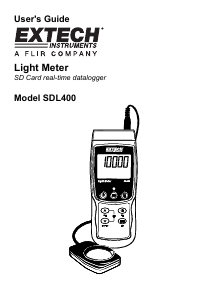
Handleiding Extech SDL400 Lichtmeter

Handleiding voor je Extech SDL400 Lichtmeter nodig? Hieronder kun je de handleiding gratis bekijken en downloaden als PDF in het Nederlands en/of Engels. Dit product heeft 0 veelgestelde vragen, 0 comments en heeft 0 stemmen. Is dit niet de handleiding die je zoekt, neem dan contact met ons op.

Is je product kapot en biedt de handleiding geen oplossing meer? Dan kun je voor reparatie gratis terecht bij Repair Café.

Handleiding

Loading…

3 SDL400-EU-EN-V1.1-6/11
Getting Started
Power ON-OFF
Power the meter by pressing and holding the power button
for at least 1.5 seconds.
Press and hold the power button for at least 1.5 seconds to power OFF the meter.
This meter is powered by six (6) 1.5VDC ‘AA’ batteries or by optional AC adaptor. If the meter
will not switch ON please check that fresh batteries are installed in the rear battery compartment
or, in the case of the AC adaptor, check that the adaptor is connected correctly to the meter and
to an AC source.
Display Backlight
To turn the display backlight ON or OFF, press and hold the backlight
button for at least 1.5
seconds. The meter will beep when switching the backlight ON or OFF unless the beeper is
disabled as described in the Setup Mode section of this user guide.
Light Meter Sensor Connection
The supplied light sensor is connected to the meter via the DIN jack at the top right of the meter.
When taking measurements snap off the light sensor’s protective cover and then replace the cover
when finished.
Light Meter Units of Measure
The currently selected unit of measure is shown to the left of the light measurement reading on the
meter’s LCD. To change the unit of measure, press and hold the UNIT button until the desired unit
of measure appears and then release the UNIT button. The available light measurement units are
LUX and FOOT CANDLE (ft-cd).
Thermocouple Temperature Sensor Connection
A type K or J thermocouple temperature sensor can be connected via the sub-miniature
thermocouple jack at the top left of the meter. The display icon for the type of thermocouple
selected (J or K) is shown on the meter’s LCD to the left of the temperature measurement. To
change the type, use the Setup Mode.
Temperature Measurement Units of Measure
The currently selected unit of measure is shown below the temperature measurement reading on
the meter’s LCD. To change the unit of measure, press and hold the UNIT button until the desired
unit of measure appears and then release the UNIT button. The available temperature
measurement units are °C and °F.
Download de handleiding in het Nederlands en/of Engels (PDF, 0.26 MB)
(Denk aan het milieu en print deze handleiding alleen als dat echt noodzakelijk is)

Loading…

Meer over deze handleiding

We begrijpen dat het prettig is om een papieren handleiding te hebben voor je Extech SDL400 Lichtmeter. Je kunt de handleiding bij ons altijd downloaden en daarna zelf printen. Indien je graag een originele handleiding wilt hebben, raden we je aan contact op te nemen met Extech. Zij kunnen wellicht nog voorzien in een originele handleiding. Zoek je de handleiding van Extech SDL400 Lichtmeter in een andere taal? Kies op de homepage je taal naar keuze en zoek daarna op het modelnummer om te zien of we deze beschikbaar hebben.

Specificaties

Merk Extech
Model SDL400
Categorie Lichtmeters
Bestandstype PDF
Bestandsgrootte 0.26 MB

Alle handleidingen voor Extech Lichtmeters
Meer handleidingen voor Lichtmeters

Beoordeling

Laat ons weten wat je van de Extech SDL400 Lichtmeter vindt door een beoordeling achter te laten. Wil je je ervaringen met dit product delen of een vraag stellen? Laat dan een bericht achter onderaan de pagina.
Bent u tevreden over de Extech SDL400 Lichtmeter?
Ja Nee
Beoordeel dit product als eerste
0 stemmen

Praat mee over dit product

Laat hier weten wat jij vindt van de Extech SDL400 Lichtmeter. Als je een vraag hebt, lees dan eerst zorgvuldig de handleiding door. Een handleiding aanvragen kan via ons contactformulier.

Handleiding Extech SDL400 Lichtmeter

Gerelateerde producten

Gerelateerde categorieën

×
Download