Handleiding Insignia NS-HBTSS116 Luidspreker

Handleiding voor je Insignia NS-HBTSS116 Luidspreker nodig? Hieronder kun je de handleiding gratis bekijken en downloaden als PDF in het Nederlands en/of Engels. Dit product heeft 5 veelgestelde vragen, 0 comments en heeft 0 stemmen. Is dit niet de handleiding die je zoekt, neem dan contact met ons op.

Is je product kapot en biedt de handleiding geen oplossing meer? Dan kun je voor reparatie gratis terecht bij Repair Café.

Handleiding

Loading…

FIND YOUR USER GUIDE ONLINE!
Go to www.insigniaproducts.com, then click
Support & Service.
Enter NS-HBTSS116 in the box under Manual,
Firmware, Drivers & Product Information, then click .
QUICK SETUP GUIDE
Bluetooth
Shelf
Speakers
NSHBTSS116
RECONNECTING TO A PAIRED DEVICE
When your speaker is not paired to a device, the LED
blinks blue slowly.
PAIRING A BLUETOOTH DEVICE
SUPPORTING NFC
If your Bluetooth device supports Near Field
Communication (NFC), make sure that the NFC feature
is active. Touch the NFC area of your Bluetooth device
to the top of your NS-HBTSS116 speaker to
automatically pair.
Note: If your phone has NFC support but it is running an OS
below Android 4.1, you need to download an NFC Bluetooth
app from Google Play or a similar online store.
LISTENING TO MUSIC
1 Make sure that the speaker is paired with your
Bluetooth device (the LED indicator is solid blue).
2 Begin playback on your Bluetooth device.
3 Adjust the volume on your speaker by rotating the
Volume Standby/source knob, or pressing the + or
buttons on your remote control or your Bluetooth
device.
Note: Use the controls on your Bluetooth device or on
the remote control to control playback.
CONNECT THE SPEAKERS
Connect the power cable
Plug the power cable into a power outlet or surge
protector.
Connect the speakers
Speakers are connected using the speaker wire that is
provided. Connect the red wire to the red (+) terminals
and the white wire to the black (-) terminals. Use enough
wire to position the speakers where you want them.
TURNING YOUR SPEAKER ON AND OFF
Toggle the ON/OFF switch on the side of your speaker to
the ON position. The LED indicator blinks. Press the
Volume Standby/source knob repeatedly to cycle
through the available modes (AUX, RCA, and Bluetooth),
or press the button on the remote control to select the
mode you want.
CONNECTING WITH BLUETOOTH
1 Make sure that your Bluetooth device is turned on and
within 33 feet (10 meters) of your speaker.
2 Press the Volume Standby/source knob on the side
of your speaker to cycle to Bluetooth mode or press
the Bluetooth button on the remote control to enter
Bluetooth mode. Your speaker enters pairing mode
and the LED indicator blinks blue.
3 Turn on your Bluetooth device and turn on Bluetooth.
Set your device to pairing mode, then select
NS-HBTSS116. See the instructions that came with
your Bluetooth device for information about pairing.
4 If you are asked for a password, enter 0000. When
pairing is complete, the LED indicator lights solid blue.
5 To disconnect from the paired Bluetooth device, press
and hold (Bluetooth button) on your remote
control for three seconds. Your speaker disconnects
from the Bluetooth device and enters pairing mode
again.
OVERVIEW
Remote control
Your speaker loses
the Bluetooth
connection if you...
Turn o your speaker
or put in standby/AUX/RCA
mode
Move the Bluetooth device out
of range.
Turn o your Bluetooth device.
Turn o Bluetooth on your
Bluetooth device.
Connect your Bluetooth device
to another Bluetooth device.
To reconnect...
Turn on your speaker and cycle to Bluetooth
mode. Your speaker searches for the last
connected Bluetooth device and reconnects.
Make sure that your Bluetooth device is within
33 feet of your speaker.
Turn on your Bluetooth device, then make sure
that Bluetooth is turned on.
Turn on Bluetooth on your Bluetooth device.
Disconnect your Bluetooth device from the other
Bluetooth device, then set your device to pairing
mode. Select NS-HBTSS116 on your Bluetooth
device.
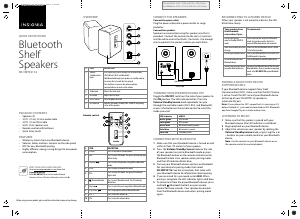
# ITEM
1 Volume
Standby/source
knob
2 Treble knob
3 Bass knob
4 On/O switch
5 LED Indicator
DESCRIPTION
Press repeatedly to cycle through the available modes
(AUX [default], RCA, and Bluetooth).
Hold down knob to put your speakers in standby mode or
to resume the last mode that was played.
Turn clockwise to increase the volume and turn
counterclockwise to decrease the volume.
Adjusts the treble level.
Adjusts the bass level.
Turns the power on or o.
Indicates the mode (Standby, AUX, and RCA) and pairing
status of the speakers.
POWER
MUTE
VOL
AUX
RCA
SOURCE
Before using your new product, please read these instructions to prevent any damage.
# ITEM
1 POWER
2 AUX
3 Previous
4 MUTE
5 RCA
6 Bluetooth button
7 Next
8 Play/Pause
9 VOL +
10 VOL -
DESCRIPTION
Press to turn on/o standby mode.
Press to enter AUX mode. The green LED indicator light
blinks slowly.
Press to select the previous song while in Bluetooth
mode.
Press to mute or unmute the sound.
Press to enter RCA mode. The green LED indicator
lights solid.
Press to enter Bluetooth mode. The LED indicator
blinks blue.
Press to select the next song while in Bluetooth mode.
Press to play/pause while in Bluetooth mode.
Press to turn the volume up.
Press to turn the volume down.
LED indicator
Blinks green
Solid green
Blinks blue
Solid blue
Solid red
MODE
AUX mode
RCA mode
Bluetooth pairing mode
Bluetooth is paired
Standby mode
Power cable
Speaker Wire
USB 5V 1A
120V~ 60Hz
0.6A
INPUT
L SPEAKER
OUTPUT
AUX
OUTPUT
SUB
L
R
RCA
NSHBTSS116RC
Standby/source
PACKAGE CONTENTS
• Speakers (2)
4.9 ft. (1.5 m) 3.5 mm audio cable
4.9 ft. (1.5 m) RCA cable
6.6 ft. (2 m) speaker wire
Remote control with batteries
Quick Setup Guide
FEATURES
Wirelessly stream from any Bluetooth device
Volume, treble, and bass controls on the side panel
NFC for easy Bluetooth pairing
Highly ecient, energy saving design for low power
consumption
Flat size (W×H): 16.58 × 11.69 in (421.22 × 296.93 mm.)
Final folded size: 4.145 × 11.69 in (105.305 × 296.93 mm.)
NS-HBTSS116_21-0353_QSG_V5_EN.ai 1 4/6/2021 11:08:53 AMNS-HBTSS116_21-0353_QSG_V5_EN.ai 1 4/6/2021 11:08:53 AM
Download de handleiding in het Nederlands en/of Engels (PDF, 0.23 MB)
(Denk aan het milieu en print deze handleiding alleen als dat echt noodzakelijk is)

Loading…

Meer over deze handleiding

We begrijpen dat het prettig is om een papieren handleiding te hebben voor je Insignia NS-HBTSS116 Luidspreker. Je kunt de handleiding bij ons altijd downloaden en daarna zelf printen. Indien je graag een originele handleiding wilt hebben, raden we je aan contact op te nemen met Insignia. Zij kunnen wellicht nog voorzien in een originele handleiding. Zoek je de handleiding van Insignia NS-HBTSS116 Luidspreker in een andere taal? Kies op de homepage je taal naar keuze en zoek daarna op het modelnummer om te zien of we deze beschikbaar hebben.

Specificaties

Merk Insignia
Model NS-HBTSS116
Categorie Luidsprekers
Bestandstype PDF
Bestandsgrootte 0.23 MB

Alle handleidingen voor Insignia Luidsprekers
Meer handleidingen voor Luidsprekers

Veelgestelde vragen over Insignia NS-HBTSS116 Luidspreker

Ons supportteam zoekt dagelijks naar nuttige productinformatie en antwoorden op veelgestelde vragen. Als er onverhoopt toch een onjuistheid tussen onze veelgestelde vragen staat, laat het ons dan weten via het contactformulier.

Ik wil een speaker aansluiten op mijn televisie via HDMI, welke poort moet ik gebruiken? Geverifieerd

Hiervoor dient de HDMI-ARC poort gebruikt te worden, die specifiek gemaakt is voor het aansluiten van audioapparatuur.

Ik vind dit nuttig (1477) Lees meer

Wat zeggen de frequenties over mijn luidspreker? Geverifieerd

Het bereik aan frequenties van een luidspreker geeft aan hoe vol het geluid zal zijn. Hoe groter het bereik, des te groter de variatie in geluid en hoe natuurlijker het geluid overkomt.

Ik vind dit nuttig (787) Lees meer

Wanneer staat mijn muziek te hard? Geverifieerd

Geluid vanaf 80 decibel (dB) kan gehoorschade opleveren. Geluiden vanaf 120 dB levert direct gehoorschade op. Hoeveel schade hangt af van hoe vaak en hoe lang je het geluid hoort.

Ik vind dit nuttig (470) Lees meer

Werkt bluetooth door muren en plafonds heen? Geverifieerd

Een bluetooth signaal kan door muren en plafonds heen, tenzij deze van metaal zijn. Afhankelijk van de dikte en het materiaal van de muur zal het signaal wel in sterkte afnemen.

Ik vind dit nuttig (230) Lees meer

Tot welk geluidsniveau is het veilig voor kinderen? Geverifieerd

Kinderen kunnen sneller gehoorschade oplopen dan volwassenen. Het is daarom belangrijk kinderen nooit bloot te stellen aan geluid harder dan 85dB. In het geval van koptelefoons zijn er speciale modellen voor kinderen. Bij luidsprekers of andere situaties moet er zelf opgelet worden dat het geluid dit niveau niet overstijgt.

Ik vind dit nuttig (207) Lees meer

Beoordeling

Laat ons weten wat je van de Insignia NS-HBTSS116 Luidspreker vindt door een beoordeling achter te laten. Wil je je ervaringen met dit product delen of een vraag stellen? Laat dan een bericht achter onderaan de pagina.
Bent u tevreden over de Insignia NS-HBTSS116 Luidspreker?
Ja Nee
Beoordeel dit product als eerste
0 stemmen

Praat mee over dit product

Laat hier weten wat jij vindt van de Insignia NS-HBTSS116 Luidspreker. Als je een vraag hebt, lees dan eerst zorgvuldig de handleiding door. Een handleiding aanvragen kan via ons contactformulier.

Handleiding Insignia NS-HBTSS116 Luidspreker

Gerelateerde producten

Gerelateerde categorieën

×
Download