Handleiding Karlsson KA6020GR Wekker

Handleiding voor je Karlsson KA6020GR Wekker nodig? Hieronder kun je de handleiding gratis bekijken en downloaden als PDF in het Nederlands en/of Engels. Dit product heeft 0 veelgestelde vragen, 0 comments en heeft 0 stemmen. Is dit niet de handleiding die je zoekt, neem dan contact met ons op.

Is je product kapot en biedt de handleiding geen oplossing meer? Dan kun je voor reparatie gratis terecht bij Repair Café.

Handleiding

Loading…

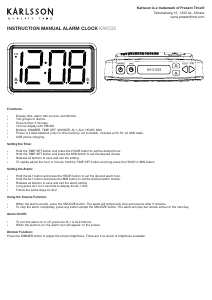
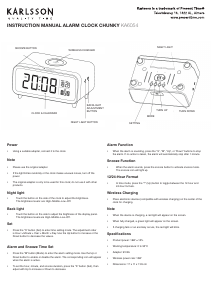
INSTRUCTION MANUAL ALARM CLOCK KA6020
Time Setting:
In normal mode, long press the “Time” key to enter the
Hour setting.
Short press the “+” or “-” buttons to increase or decrease
the digits.
Press the “Time” key again to enter the Minute setting.
Short press “+” or “-” to adjust the minutes.
Finally, press the “Time” key to exit and save the setting.
Note:
If there is no operation during setting, it will auto-save and
exit after 10 seconds.
Long pressing the “+” or “-” keys will change the digits
faster.
In normal mode, short pressing the “Time” key switches
between 12-hour and 24-hour time format.
Date Setting:
In normal mode, long press the “Date” key to enter the date
setting. The year will appear (e.g., 2023) and start ashing.
Use the “+” or “-” buttons to adjust the year.
Press the “Date” key again to move to the Month setting
(which will then ash). Adjust with “+” or “-”.
Press the “Date” key again to move to the Day setting.
Adjust as needed.
Press the “Date” key one nal time to exit and save the
date setting.
Note:
If there is no operation during setting, it will auto-save and
exit after 10 seconds.
Long pressing the “+” or “-” keys will change the digits
faster. There is no need to set the day of the week.
Alarm Setting
Check Alarm / Turn Alarm On:
In normal display mode, short press the “Alarm” key to
activate the alarm function and view the alarm time.
The alarm time will display for 5 seconds, then return to
normal mode.
Within those 5 seconds, you can press any button (except
the Alarm button) to return to the main time display
immediately.
Turn Alarm Off:
When the alarm is active, short press the “Alarm” key to
deactivate it. The alarm icon will disappear.
Set Alarm Time:
When the alarm is on, long press the “Alarm” key to enter
alarm time setting.
The hour will ash — use the “+” and “-” buttons to set
the hour.
Press the “Alarm” key again to move to the minute setting
and adjust in the same way.
Press the “Alarm” key again to save and exit.
Alarm Sound:
When the alarm is sounding, it will stop automatically after
3 minutes if no button is pressed.
You can also stop the sound immediately by pressing any
button.
Temperature Unit Switch
While the temperature is displayed, short press the “+”
button to switch between °C and °F.
The default unit is °C.
Short press the “-” button to select the display mode.
DST (Daylight Saving Time) Function
The time will automatically increase by 1 hour on the rst
Sunday of March, and decrease by 1 hour on the rst
Sunday of November each year. During this period, the
icon “Auto DST” will be shown on the display.
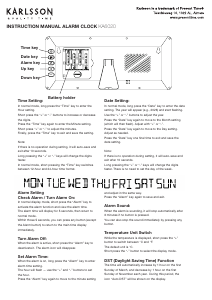
Time key
Date key
Alarm key
Up key
Down key
Battery holder
Download de handleiding in het Nederlands en/of Engels (PDF, 0.81 MB)
(Denk aan het milieu en print deze handleiding alleen als dat echt noodzakelijk is)

Loading…

Meer over deze handleiding

We begrijpen dat het prettig is om een papieren handleiding te hebben voor je Karlsson KA6020GR Wekker. Je kunt de handleiding bij ons altijd downloaden en daarna zelf printen. Indien je graag een originele handleiding wilt hebben, raden we je aan contact op te nemen met Karlsson. Zij kunnen wellicht nog voorzien in een originele handleiding. Zoek je de handleiding van Karlsson KA6020GR Wekker in een andere taal? Kies op de homepage je taal naar keuze en zoek daarna op het modelnummer om te zien of we deze beschikbaar hebben.

Specificaties

Merk Karlsson
Model KA6020GR
Categorie Wekkers
Bestandstype PDF
Bestandsgrootte 0.81 MB

Alle handleidingen voor Karlsson Wekkers
Meer handleidingen voor Wekkers

Beoordeling

Laat ons weten wat je van de Karlsson KA6020GR Wekker vindt door een beoordeling achter te laten. Wil je je ervaringen met dit product delen of een vraag stellen? Laat dan een bericht achter onderaan de pagina.
Bent u tevreden over de Karlsson KA6020GR Wekker?
Ja Nee
Beoordeel dit product als eerste
0 stemmen

Praat mee over dit product

Laat hier weten wat jij vindt van de Karlsson KA6020GR Wekker. Als je een vraag hebt, lees dan eerst zorgvuldig de handleiding door. Een handleiding aanvragen kan via ons contactformulier.

Handleiding Karlsson KA6020GR Wekker

Gerelateerde producten

Gerelateerde categorieën

×
Download