Handleiding Macally MVKEYB Toetsenbord

Handleiding voor je Macally MVKEYB Toetsenbord nodig? Hieronder kun je de handleiding gratis bekijken en downloaden als PDF in het Nederlands en/of Engels. Dit product heeft 2 veelgestelde vragen, 1 comment en heeft 0 stemmen. Is dit niet de handleiding die je zoekt, neem dan contact met ons op.

Is je product kapot en biedt de handleiding geen oplossing meer? Dan kun je voor reparatie gratis terecht bij Repair Café.

Handleiding

Loading…

8
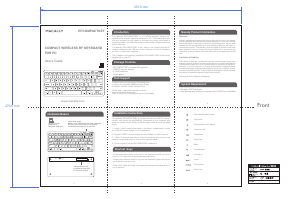
Front180.0 mm
300.0 mm
MVKEYB
www.macally.com
Keyboard Shortcuts for MacOS X
Keyboard Setup Assistant
Shortcut Keys
USB Keyboard
User’s guide
Package Contents
Introduction
Macally Product Information
Technical Support
Please E-mail us at techsupport@macally.com,
In U.S.A. please call 1-909-230-6888
Mon-Fri 8:30 AM - 5:30 PM, Pacific Standard Time
Macally Product Information
Warranty
Macally peripherals warrants that this product will be free from defects
in title, materials and manufacturing workmanship for two year from the
date of purchase. If the product is found to be defective then, as your sole
remedy and as the manufacturer’s only obligation, Macally will repair or
replace the product. This warranty shall not apply to products that have
been subject to abuse, misuse, abnormal electrical or environmental
conditions, or any condition other than what can be considered as normal
use.
Limitation of Liability
The liability of Macally Peripherals arising from this warranty and sale
shall be limited to a refund of the purchase price. In no event shall Macally
Peripherals be liable for costs of procurement of substitute products or
services, or for any lost profit, or for any consequential, incidental, direct
or indirect damages, however caused and on any theory of liability, arising
from this warranty and sale. These limitations shall apply not with standing
any failure of essential purpose of any limited remedy.
Copyright® 2018 by Macally Peripherals
21 3
6 7
4 5
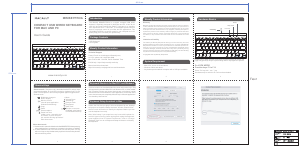
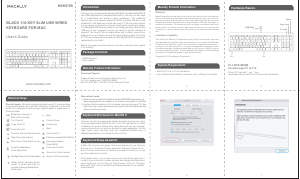
BLACK 110-KEY SLIM USB WIRED
KEYBOARD FOR MAC
Users Guide
Press Fnkey with esc key
simultaneously to switch to Fn Lock mode as default.
Fn LOCK MODE
Hardware Basics
Function keys F1 to F16
USB Plug
Brightness change to
Mac built-in display
Cut (Cmd-X)
Copy (Cmd-C)
Paste (Cmd-V)
Previous Track (Cmd-Left Arrow)
Play/Pause (Spacebar)
Next Track (Cmd-Right Arrow)
Mute
Eject
Full screen capture(Cmd-Shift-3)
Area screen capture
(Cmd-Shift-4)
Print (Cmd-P)
File save (Cmd-S)
Zoom Out (Cmd-(minus))
Zoom In (Cmd=(equal))
Force Quit Application
(Cmd-Option-Esc)
Spotlight Search (Cmd-Spacebar)
Volume Down
Volume Up
Shortcut mode - Shortcut mode is the default mode.If Fn and esc keys
are pressed together, Fn Lock LED is turned on, keyboard is in Fn Lock
mode. You can press Fn and esc keys together again to toggle back to
Shortcut mode.
In Mac, the first time you plug in this new keyboard to use, desktop
will pop out a Keyboard Setup Assistant window, Please follow
the on-screen instruction to identify the keyboard before you can
use the keyboard correctly.
After initial setup, if you experience any issue with keyboard or
couldnt type correctly, please unplug and replug the keyboard,
open keyboard icon in System Preferences, click on Change
Keyboard Type icon to run Keyboard Setup Assistant to re-identify
the keyboard.
System Requirement
Mac OS X 10.6 to 10.13 and above
Any desktop and notebook computer with a USB port available
More about mode
1. Shortcut mode is restored to default mode after MVKEYB loses power, e.g.
when unplugged from a computer or a computer is shut down or restarted.
2. In either Shortcut mode or Fn Lock mode, one can also press Fn key
with one of top row key simultaneously to perform the secondary function
without switching mode.
Previous section has described default shortcuts and function keys.
They are supported in MacOS X from 10.3 to 10.13 and above, no driver
installation is needed. Please note, these shortcuts are not universal,
certain shortcuts do not work as defined in some application. On the
other hand, some shortcuts may act completely different way in
different applications. You should try them out first.
In Mac, press 1 second to turn off
screen, or press and hold 2-3
seconds to bring up Restart/Shut-
Down menu
Caps Lock
Power
Fn Lock
Thank you for purchasing the Macally MVKEYB. The Macally MVKEYB
slim USB keyboard has a standard layout with 110 full size, yet thin, keys
for a comfortable and efficient typing experience. The additional
shortcut keys and numeric keyboard further increase efficiency and
productivity. This keyboard is ultra slim (only 0.7"/18 mm) and compact
to save space on the desk and easily store inside a keyboard drawer.
The Macally MVKEYB is very easy to use. Simply plug the cable into the
USB port of your computer and you are ready to go! No software is
required! The long 5ft/150 cm cable allows you to easily connect your
keyboard to your computer, even if its underneath your desk. Thin (only
0.7"/18 mm), compact and versatile, the Macally MVKEYB is the perfect
companion for your Mac!
Before you begin using this product, be sure to read this users guide
in its entirety.
Fn Fn
Download de handleiding in het Nederlands en/of Engels (PDF, 0.38 MB)
(Denk aan het milieu en print deze handleiding alleen als dat echt noodzakelijk is)

Loading…

Meer over deze handleiding

We begrijpen dat het prettig is om een papieren handleiding te hebben voor je Macally MVKEYB Toetsenbord. Je kunt de handleiding bij ons altijd downloaden en daarna zelf printen. Indien je graag een originele handleiding wilt hebben, raden we je aan contact op te nemen met Macally. Zij kunnen wellicht nog voorzien in een originele handleiding. Zoek je de handleiding van Macally MVKEYB Toetsenbord in een andere taal? Kies op de homepage je taal naar keuze en zoek daarna op het modelnummer om te zien of we deze beschikbaar hebben.

Specificaties

Merk Macally
Model MVKEYB
Categorie Toetsenborden
Bestandstype PDF
Bestandsgrootte 0.38 MB

Alle handleidingen voor Macally Toetsenborden
Meer handleidingen voor Toetsenborden

Veelgestelde vragen over Macally MVKEYB Toetsenbord

Ons supportteam zoekt dagelijks naar nuttige productinformatie en antwoorden op veelgestelde vragen. Als er onverhoopt toch een onjuistheid tussen onze veelgestelde vragen staat, laat het ons dan weten via het contactformulier.

De letters op het toetsenbord zitten niet op de plek waar ik ze gewend ben, hoe kan dit? Geverifieerd

De meeste toetsenborden hebben een QWERTY layout, wat staat voor de volgorde van de eerste zes letters op het toetsenbord. Er bestaan echter ook andere toetsenbord layouts, die beter aansluiten op de specieke behoeften van een bepaalde taal. Het is ook mogelijk dat de toetsen verwisseld zijn, iets wat vooral met oude toetsenborden makkelijk te doen is.

Ik vind dit nuttig (1354) Lees meer

Hoe maak ik mijn toetsenbord het beste schoon? Geverifieerd

Steek in geen geval objecten tussen de randen van de toetsen, hiermee wordt vooral vuil naar binnen geduwd en kan het toetsenbord beschadigen. Het is het best om het toetsenbord met perslucht te reinigen terwijl het toetsenbord ondersteboven gehouden wordt. Met een licht vochtige doek kan de bovenkant van de toetsen schoongemaakt worden.

Ik vind dit nuttig (198) Lees meer

Beoordeling

Laat ons weten wat je van de Macally MVKEYB Toetsenbord vindt door een beoordeling achter te laten. Wil je je ervaringen met dit product delen of een vraag stellen? Laat dan een bericht achter onderaan de pagina.
Bent u tevreden over de Macally MVKEYB Toetsenbord?
Ja Nee
Beoordeel dit product als eerste
0 stemmen

Praat mee over dit product

Laat hier weten wat jij vindt van de Macally MVKEYB Toetsenbord. Als je een vraag hebt, lees dan eerst zorgvuldig de handleiding door. Een handleiding aanvragen kan via ons contactformulier.

Martie Dekkers 21-08-2023
goedemorgen, waar kan ik de hashtag vinden op het toetsenbord?

beantwoord | Ik vind dit nuttig (0)
Handleiding Macally MVKEYB Toetsenbord

Gerelateerde producten

Gerelateerde categorieën

×
Download