Handleiding Mavic Wintech Alti Fietscomputer

Handleiding voor je Mavic Wintech Alti Fietscomputer nodig? Hieronder kun je de handleiding gratis bekijken en downloaden als PDF in het Nederlands en/of Engels. Dit product heeft 3 veelgestelde vragen, 0 comments en heeft 0 stemmen. Is dit niet de handleiding die je zoekt, neem dan contact met ons op.

Is je product kapot en biedt de handleiding geen oplossing meer? Dan kun je voor reparatie gratis terecht bij Repair Café.

Handleiding

Loading…
3
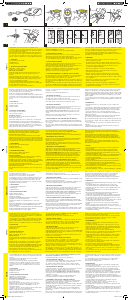
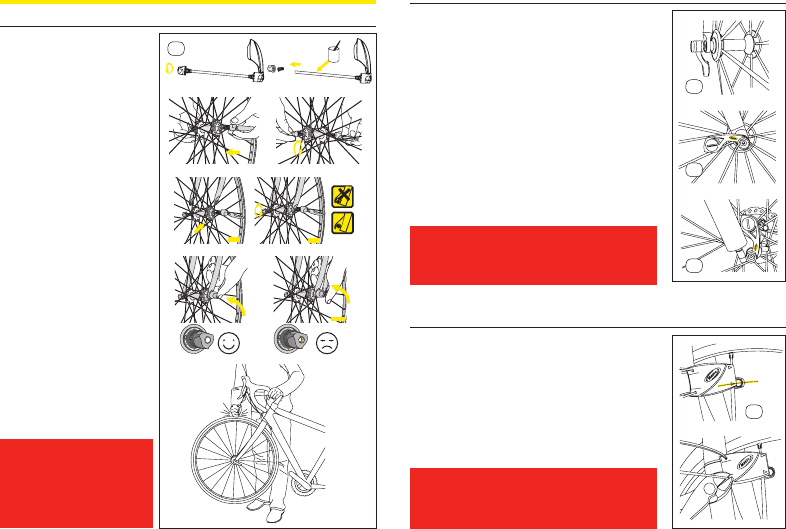
4. INSTALLING THE SPEED SENSORS
4.1 E-Skewer
Fit the quick-release lever to the hub,
with the lever to the left (to the right
when using disc brakes).
Position of the locking lever
Adjust the tension on the adjusting
nut so that sucient force is applied
when the locking lever is moved to
the “CLOSE” position (consult your
retailer).
If the quick release lever can be
moved too easily to the CLOSE
position, there will be insucient
force holding the wheel. If this is the
case, place the quick release lever in
the OPEN position again and tighten
the adjusting nut to increase the force.
Then, push again the quick release
lever to the CLOSE position.
If too much force is needed to
move the quick release lever to
the CLOSE position, place the lever
in the OPEN position again, and
unscrew the adjustment nut to reduce
the force. Then, push again the quick
release lever to the CLOSE position.
Once the adjustment nut has been
set, the end of the quick release shaft
must not be sunk more than
2 mm in from the outside edge of the
adjustment nut.
Make sure the wheel is securely
tightened: raise the front wheel o
the ground and strike the top of
the wheel sharply in a downward
direction. The wheel must remain
rmly in place.
IMPORTANT:
At this point, your computer
is not yet ready to work. You
still need to set the necessary
programs, and then perform
the pairing operation of your
device.
4.2. E-Bolt
The speed sensor is integrated into a xing nut compatible with
all quick-releases on the market.
To install it, unscrew the xing nut on your quick-release.
Insert the quick release from the left-hand side of your bike and
tighten the electronic xing nut from the right-hand side.
Adjust the tightness of the nut according to the
recommendation described in section 4.1 of this user
guide.
4.2.1 Road bike
Once suciently tightened, position the sensor towards the
rear before closing the quick-release.
4.2.2. Mountain bike.
Once suciently tightened, position the sensor towards the top
before closing the quick-release.
IMPORTANT:
At this point, your computer is not yet ready to work.
You still need to set the necessary programs, and
then perform the pairing operation of your device.
4.3 Fork Sensor
To install the Fork sensor, the wheel magnet must be installed
rst. Read section 5 of this user guide rst.
Adjust the position of the speed sensor so the center of the
magnet is aligned with one of the arrows on the sensor. The
distance between the magnet and the sensor must be between
5 - 10 mm. 5.4 Tighten the wire tires and cut them ush.
IMPORTANT:
At this point, your computer is not yet ready to work.
You still need to set the necessary programs, and
then perform the pairing operation of your device.
OK
OPEN
OPEN
CLOSE
OK
OPEN
OPEN
CLOSE
OK
OPEN
OPEN
CLOSE
OK
OPEN
OPEN
CLOSE
4.2.1
4.2
4.3
4.2.2
OK
OPEN
OPEN
CLOSE
4.1
Download de handleiding in het Nederlands en/of Engels (PDF, 5.15 MB)
(Denk aan het milieu en print deze handleiding alleen als dat echt noodzakelijk is)

Loading…

Meer over deze handleiding

We begrijpen dat het prettig is om een papieren handleiding te hebben voor je Mavic Wintech Alti Fietscomputer. Je kunt de handleiding bij ons altijd downloaden en daarna zelf printen. Indien je graag een originele handleiding wilt hebben, raden we je aan contact op te nemen met Mavic. Zij kunnen wellicht nog voorzien in een originele handleiding. Zoek je de handleiding van Mavic Wintech Alti Fietscomputer in een andere taal? Kies op de homepage je taal naar keuze en zoek daarna op het modelnummer om te zien of we deze beschikbaar hebben.

Specificaties

Merk Mavic
Model Wintech Alti
Categorie Fietscomputers
Bestandstype PDF
Bestandsgrootte 5.15 MB

Alle handleidingen voor Mavic Fietscomputers
Meer handleidingen voor Fietscomputers

Veelgestelde vragen over Mavic Wintech Alti Fietscomputer

Ons supportteam zoekt dagelijks naar nuttige productinformatie en antwoorden op veelgestelde vragen. Als er onverhoopt toch een onjuistheid tussen onze veelgestelde vragen staat, laat het ons dan weten via het contactformulier.

Waarom moet ik de maat van mijn fietsband invoeren? Geverifieerd

Om de afgelegde afstand te berekenen gebruikt de fietscomputer het aantal omwentelingen van de band. Door dit te vermenigvuldigen met de bandmaat, kan de afstand worden berekend.

Ik vind dit nuttig (4395) Lees meer

Er is een batterij in mijn apparaat gaan oxideren, kan ik het nog veilig gebruiken? Geverifieerd

Ja, het apparaat kan nog veilig gebruikt worden. Verwijder eerst de geoxideerde batterij. Doet dit niet met blote handen. Reinig daarna het batterijcompartiment met een wattenstaafje gedipt in azijn of citroensap. Laat het drogen en doe nieuwe batterijen in het apparaat.

Ik vind dit nuttig (767) Lees meer

Hoeveel mijl is een kilometer? Geverifieerd

Eén kilometer is gelijk aan 0,621 mijl. Tien kilometer is daarmee 6,21 mijl. Andersom is één mijl 1,609 kilometer. Tien mijl is daarmee 16,09 kilometer.

Ik vind dit nuttig (766) Lees meer

Beoordeling

Laat ons weten wat je van de Mavic Wintech Alti Fietscomputer vindt door een beoordeling achter te laten. Wil je je ervaringen met dit product delen of een vraag stellen? Laat dan een bericht achter onderaan de pagina.
Bent u tevreden over de Mavic Wintech Alti Fietscomputer?
Ja Nee
Beoordeel dit product als eerste
0 stemmen

Praat mee over dit product

Laat hier weten wat jij vindt van de Mavic Wintech Alti Fietscomputer. Als je een vraag hebt, lees dan eerst zorgvuldig de handleiding door. Een handleiding aanvragen kan via ons contactformulier.

Handleiding Mavic Wintech Alti Fietscomputer

Gerelateerde producten

Gerelateerde categorieën

×
Download