Switches
The Genesis features switches for
both bass roll-off, and a -10dB pad.
The bass roll-off is set to 6dB per
octave at 150 Hz. This can reduce
proximity effect if required.
Proximity effect is the change of
frequency response as the recorded
source is brought closer to the
microphone. With vocals, this usually
manifests itself as an increase in
low frequency content as one gets
closer to the microphone. The -10dB
pad effectively reduces possible
overloading of the microphones
internal circuitry at high Spl’s.
Power Requirements
IMPORTANT -This unit requires the
use of the dedicated power supply
included in the package. This supply
is switchable between 115 volts and
230 volts AC. In North America the
microphone ships in the 115 volts AC
position and in the 230 Volts AC
position for export. However, you
always want to ensure that the power
supply voltage is correctly set for your
local voltage as permanent damage to
the microphone and/or power supply
may occur if the incorrect voltage setting
is selected. Every Marshall Electronics
MXL
®
microphone has been thoroughly
checked before shipping; so if you hear
no sound, check that the power supply is
switched on.
Caution
Do not “hot plug” the mic. Always
ensure that the power supply is off
when plugging and unplugging the
included seven-pin cable from the
microphone to avoid damaging the
microphone and power supply.
Care
Dust and foreign material can degrade
the performance of a microphone over
time so always store the unit in its
case. It is highly recommended to use
the specially designed Genesis pop
lter when recording vocals.
Features
Accessories
Continued on page 3
2
Pop Filter
The Genesis comes with a custom
24k gold-plated pop lter which
should be used anytime the microphone
is being used to record vocals. The pop
lter not only eliminates plosives (those
“popping Ps”), it helps collect
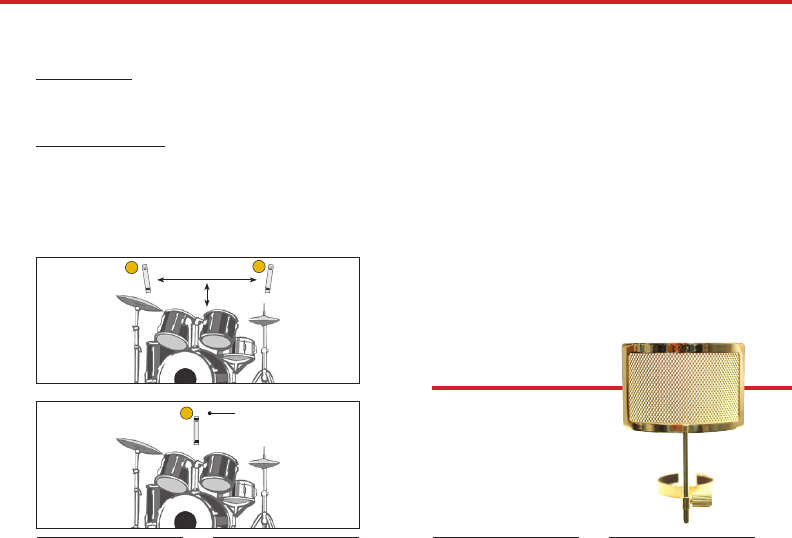
Recording a Drum Set
Like the piano, capturing the drums can be quite a challenge, if for no other
reason than the fact that you must be very careful to avoid positioning the
microphone(s) where they could be hit! Ideally you’ll want a minimum of two
microphones for this job, though a single microphone can be employed.
Stereo Overhead Pair: Position the two microphones approximately 16 - 20
inches above the performer’s head - separated laterally by roughly 2 - 3 feet and
placed 5 – 6 feet out in front of the drum kit. Adjust the two microphone’s Pan
position so that you achieve a good stereo spread, though generally not hard left
and right. (see Fig. 5A)
Single Overhead Microphone: Position the microphone approximately 16 - 20
inches above the performer’s head - centered in front of the drum set, and placed
5 - 6 feet out in front. The microphone’s Pan position should be centered for
mono drums. (see Fig. 5B)
For best results, record the drums in as acoustically “dead” a room as you can. If
the room is live, the sharp attack transients of the drum kit will only become that
much more difcult to capture if the room has hard, reective surfaces - result-
ing in a muddy sound without any real denition. Further, you should always
record the drums dry and add signal processing after the fact.
9
2
1
1
Fig. 5A
2-3 Ft. apart
16-20” above performers head
Front View
Fig. 5B
16-20” above performers head
Front View




Praat mee over dit product
Laat hier weten wat jij vindt van de MXL Genesis Microfoon. Als je een vraag hebt, lees dan eerst zorgvuldig de handleiding door. Een handleiding aanvragen kan via ons contactformulier.