3
5 6
8
4
2
Item
User manual
USB cable AUX cable
Quantity
1
1 1
Accessories
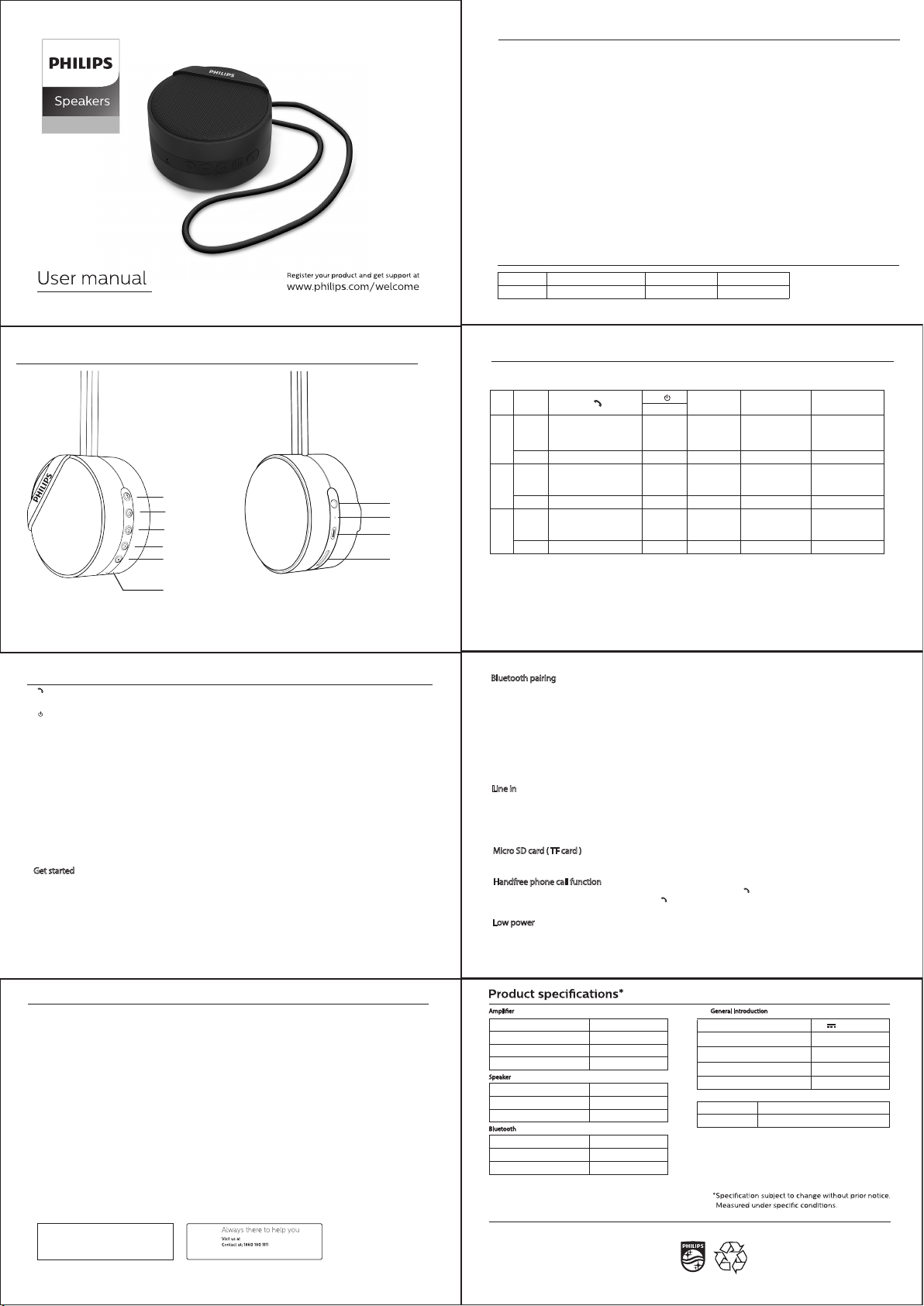
Top & Back panel
BT40BK
7
This Philips Bluetooth Speaker is warranted against any defect due to defective materials or
workmanship for 12 months from the date of purchase, should a defect develop during the period of warranty,
Gibson Innovations India Private Limitedundertake to replace the apparatus FREE OF CHARGE at the dealer point from where the product was purchased or any of
the Philips Authorised Service Centres.
The warranty is not valid in case :
1. Proof of purchase is not accompanied with this warranty card.
2. The warranty card is not completed immediately after purchase.
3. The apparatus is not used according to this manual.
4. Defects are caused by improper or reckless use.
5. Any repairs are done by persons other than Philips Authorised service centre.
6. The serial number is tampered with.
7. Defects due to causes beyond control like lightning, abnormal voltage, acts of God or while in
transit to the purchaser’s residence.
All consumables and parts susceptible to normal wear and tear are not covered under warranty.
Warranty
The Philips trademark and Philips shield emblem are
registered trademarks of koninklijke Philips N.V. used
under license.
This product has been manufactured by and sold
under the responsibility of Gibson Innovation India
Private Ltd. and Gibson Innovations India private Ltd.
is the warrantor in relation to this product.
Over view of the speaker
Place the speaker on a at surface.
Charge the built in battery
Notes for charging
a) Before use, fully charge the built in battery.
b) The micro USB socket is for charging only.
c) Rechargeable battery has a limited number of charge cycles.
Battery life and number of charge cycle vary by use & settings.
Connect the USB cable between DC in socket on the speaker and USB Socket of a computer.
Power on/o/Play/ Pause
Turn the speaker on or o with long press.
Answer or reject an incoming call
End the current call
1.
2.
•
•
•
•
•
•
•
•
•
•
•
Get started
3.
Select source by short pressing Bluetooth/ micro SD card (TF card)/ Line in (line in is available only when stereo cable is connected.)
Connect and disconnect the bluetooth by long press.
4."-"
Volume decrease -long press
Previous song-short press in bluetooth & TF mode .
5. "+"
Volume increase -long press
Next song/short press in bluetooth & TF mode .
6.Reset
Reset unit
7. Micro SD card (TF card).
8.DC in- Recharging the built in battery.
9.Mic
10. Line in- Connect an external audio device.
General information
Warnings
• Only use attachments or accessories specied by manufacturer.
• The battery shall not be exposed to excessive heat such as sunshine, re etc.
• Unit can use indoor /outdoor.
Care and safety information
Avoid high temperatures, moisture, water and dust
•
•
• Apparatus should not be exposed to dripping or splashing of liquid.
Do not place any source of danger on the speaker (e.g.liquid lled objects lighted candles).
Do not install near heat sources.
Place the apparatus in a location with adequate ventilation to prevent internal heat build up.
Allow at least 10cm (4 inches) of free space all around the apparatus for adequate ventilation.
•
•
•
•
Do not block any ventilation opening
Care of the cabinet
Use a soft cloth slightly moistened to clean the cabinet.
Do not use a solution containing alcohol, spirits, ammonia or abrasives to clean the cabinets.
Side panel operation
A. Switch operation
In case of laptop BT connection, this will work with windows media player.
a) Red LED :charging in o position
b) Red LED with blue ickering :charging in on position
while unit is not connected
c) Blue LED ickering :not connected
d) Solid Blue LED :speaker unit connected
e) Red & solid bLue LED :charging in on positon & unit
connected
f) Once fully charged ,red LED will not glow
B. LED
10. [AUX]:3.5mm AUX socket.
8. [MICRO USB ]socket for charging the unit .
9. Mic
6. Reset
7. [MICRO SD Card/TF Card ]
C. Back panel
Connect a stereo cable (audio input cable) on both ends to connct
Line in socket of speaker
The headphone socket on the external device
Speaker will automatically go into line in mode
Without Audio cable, speaker cannot go into line in mode.
When inserting micro SD card (TF card) it will automatically switch to micro SD mode.
when there is an incoming call, the speaker will also come out with 'Ring tone' sound, press button [ ] to answer the phone call.
to decrease or increase volume by pressing “VOL-"/"VOL+", press [ ] to disconnect.
•
•
•
•
•
•
•
•
Entering bluetooth mode with “single Beep ”sound ,blue LED ickering.
Turn on Bluetooth device like mobile, computer and search the Bluetooth name "Philips BT40BK"
Press pair in the device to connect with the speaker, it will give out a “double Beep” sound after pairing successfully,blue LED will become solid .
After pairing successfully, the device will connect with speaker automatically next time. In case does not connect automatically ,long
press “
M
” to connect it .
Long press "
M
" to disconnect current device, speaker enters in pairing mode.
If the unit not working continuously 5minutes ,it will go in o mode .
Bluetooth pairing
Line in
Micro SD card ( TF card )
Handfree phone call function
When it comes to low power, the speaker will come out with "double Beep" sound, at the same time volume will be decreased to keep perfect playback,
The speaker will shutdown if no power ,led will grow solid red while charging .
if you are not using the speaker for long time, ensure that it is being fully charged once every month in order to protect the battery.
Low power
M
Gibson Innovations India Private Limited 4th Floor, Block-1, Vatika Business Park, Sector 49, Sohna Road,
Gurgaon-122018, Haryana, India
Model No.
Inv. No.
Customer’s name and address:
___________________________________________________________
__________________________________________________________
__________________________________________________________
__________________________________________________________
__________________________________________________________
__________________________________________________________
Date of Purchase
Product SI No.
Dealer Signature & Stamp
www.india.philips.com
Question?
Contact
Philips
Amplier
Rated output power
Signal to Noise Ratio
3W RMS
Audio input
Frequency Response
Speaker
Bluetooth
>75dB
600mV
80Hz~15KHz
3 ohm(±5%ohm)
1.5 inch/40mm
80 dBm
Speaker Impedance
Speaker Driver
Sensitivity
Bluetooth version
Bluetooth freg
Bluetooth range
V 4.1
2.4GHz~248GHz
Upto 10M (freespaee)
General Introduction
Dimension main unit (LxWxH)mm 72x72x41mm
Power supply
Built in Battery Li-polymer battery
Weight 140g
battery capacity 400mAh
5V 1A
Micro SD (TF card)
Connectivity mirco SD (TF-Card), line-in, Bluetooth
up to 32GB
①
②
③
④
⑤
⑥
⑩
⑨
⑧
⑦
•
4.
-
short press
long press
BT
mode.
AUX
mode.
short press
Volume decreases,
when it reaches lower
volume it will make single
beep sound
Volume decreases,
when it reaches lower
volume it will make single
beep sound
Volume decreases,
when it reaches lower
volume it will make single
beep sound
TF
mode.
short press
3. M
+
5.
Volume increases,
when it reaches higher
volume it will make double
beep sound
Volume increases,
when it reaches higher
volume it will make double
beep sound
Volume increases,
when it reaches higher
volume it will make double
beep sound
Next Song/Track*
Next Song/Track*
long press
power/function
connect /disconnect
2
.
play/pause
on/o
select source
select source
accept or reject an incoming call
1.
long press
on/o
play/pause
on/o
Prev Song/Track*
Prev Song/Track*
play/pause


Praat mee over dit product
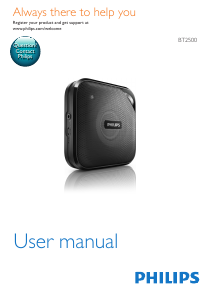
Laat hier weten wat jij vindt van de Philips BT40BK Luidspreker. Als je een vraag hebt, lees dan eerst zorgvuldig de handleiding door. Een handleiding aanvragen kan via ons contactformulier.