Handleiding SentrySafe MS0100 Kluis

Handleiding voor je SentrySafe MS0100 Kluis nodig? Hieronder kun je de handleiding gratis bekijken en downloaden als PDF in het Nederlands en/of Engels. Dit product heeft 3 veelgestelde vragen, 0 comments en heeft 2 stemmen met een gemiddelde score van 0/100. Is dit niet de handleiding die je zoekt, neem dan contact met ons op.

Is je product kapot en biedt de handleiding geen oplossing meer? Dan kun je voor reparatie gratis terecht bij Repair Café.

Handleiding

Loading…
2-English
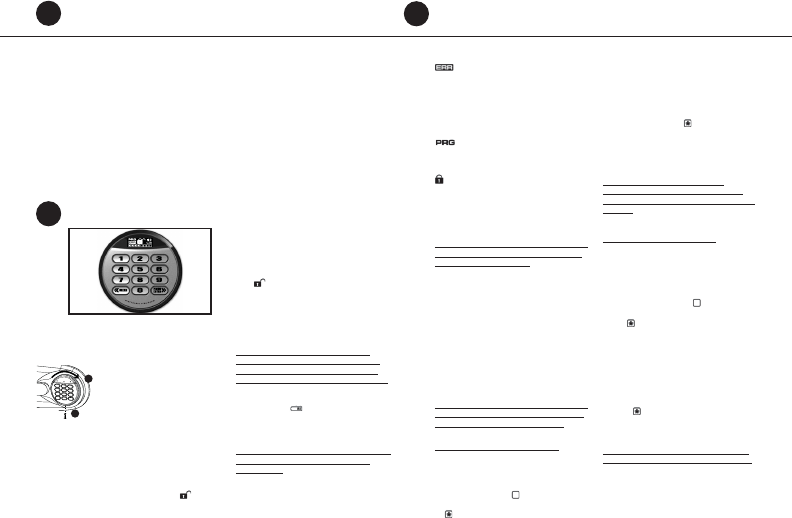
Opening your safe for the fi rst time (keep
door open during setup):
1. Remove and discard the screw (if equipped) at
the base of the lock case.
2. Turn the electronic lock case to the
right (clockwise), from 12 o’clock to
2 o’clock, and remove.
• Insert 4 new AA batteries (not
included) to power this lock.
• Replace the electronic lock case and
turn to the left (to 12 o’clock) to reassemble.
3. Turn the key (if your safe is equipped with a key
lock) to the right so that the lock cylinder pops
out.
4. Enter the factory code (printed on the fi rst page
of this guide), then press the Prog/Enter key.
When the unlocked padlock icon (
) appears,
you have four seconds to turn the handle down
to open. Try this several times before proceeding
to the next step.
To unlock safe:
Enter the 5-digit factory code, a pre-programmed
manager code, or a pre-programmed user code
(programming instructions to follow), then press
the Prog/Enter key. When the unlocked padlock
icon (
) appears, you have four seconds to turn
the handle down to open.
To lock safe:
Close the door and return the handle to the
horizontal position. For greatest security, depress
the key lock (if equipped) with your fi nger.
NOTE: If your unit is equipped with a water-
resistant gasket. Additional pressure to the left
corner of the door may be required before the
handle can be returned to the horizontal position.
Battery replacement
The battery icon (
) will light when the
batteries need to be replaced. No codes are erased
when old batteries are removed for replacement.
See “Opening your safe for the fi rst time”.
NOTE: If your safe does not appear to be working,
please check batteries before calling Sentry
Customer Care.
Gain entry with basic electronic lock cont.
2
1
2
Gain entry with advanced electronic lock
3
Gain entry with advanced electronic lock cont.
3
Signals
Your electronic-lock safe communicates by means
of several audio/visual signals.
Red (Error) LED + three beeps indicates
one of the following:
1. You have pressed Program key out of sequence.
2. You have entered an invalid code or user pin.
3. You have let 5 seconds or more elapse between
key presses.
4. Lights after three consecutive invalid codes are
input (2-minute delay mode).
Green LED only:
1. Comes ON after you enter a valid code and
remains lit during the 4-second period in which
the safe can be opened.
2. Comes ON in the Programming mode and
remains lit until you have fi nished entering
a 5-digit code.
Yellow LED only:
1. Comes ON when the batteries need to be
replaced.
Icon identifi cation
(Error) indicates one of the following:
1. You have pressed Program key out of sequence.
2. You have entered an invalid code.
3. You have let 5 seconds or more elapse between
key presses.
4. You have pressed a key while in delay mode.
(Program) Lights after pressing the Program
key and stays lit while programming a manager or
user code.
(Delay Mode) Lights after three consecutive
invalid codes are input and stays lit during the
2-minute delay mode.
Access codes
There are 3 possible ways to unlock and access
the safe:
NOTE: Maintain a record of the factory code, user,
and manager codes, and store them in a secure
location other than in this safe.
1. Factory code
(Found on the fi rst page of this guide) You can
always open the safe by entering the pre-set 5-digit
factory code. This code cannot be deleted.
2. Manager code
If you prefer to employ your own code, you can
program the safe to open to a 4-8 digit manager
code of your choice.
3. User code
If you wish to give someone else temporary access
to the safe, you can program a 4-8 digit user code
that can later be erased.
NOTE: Remember, once you have decided on your
access codes, open the unit fi rst then test it with
the door open. All zeros is an invalid code.
Programming the manager code
NOTE: One (1) manager code is allowed.
To add:
1. Press the Prog/Enter key , then enter the 5-digit
factory code and then press the Prog/Enter key .
2. An empty lit box icon (
) means no manager
code is programmed. A boxed lighted * icon
(
) means a manager code is programmed.
3. Enter a 4 to 8 digit code and press the Prog/
Enter key to fi nish programming the code into
the unit.
To delete:
1. Press the Prog/Enter key, then enter the 5-digit
factory code and then press the Prog/Enter key.
2. A boxed lighted * icon (
) indicates there is a
code programmed and can be deleted.
3. Press 0, 0, 0, 0, then the Prog/Enter key to
delete the manager code. (0, 0, 0, 0, Prog/
Enter).
NOTE: To return to the beginning when
programming a manager or user code, wait 5
seconds and the lock will time-out. You may then
start over.
Programming user code
NOTE: Six (6) user codes are allowed.
To add:
1. Press the Prog/Enter key 2 times, enter the
manager code and then press the Prog/Enter
key.
2. Use the << or >> to scroll between the lighted
boxes. An empty box icon (
) means it is
available for a code entry; a boxed lighted *
icon (
) means it is being used.
3. Enter a 4 to 8 digit code in the selected position
and press the Prog/Enter key to fi nish.
To delete:
1. Press the Prog/Enter key 2 times, enter the
manager code and then press the Prog/Enter
key.
2. Use the << or >> to scroll to the boxed lighted
* icon (
) to be removed.
3. Press 0, 0, 0, 0, then the Prog/Enter key to
delete the selected user. (0, 0, 0, 0, Prog/Enter).
NOTE: To turn the beeper on or off, press the 0
key and then the Prog/Enter key. (0, Prog/Enter).
Download de handleiding in het Nederlands en/of Engels (PDF, 0.42 MB)
(Denk aan het milieu en print deze handleiding alleen als dat echt noodzakelijk is)

Loading…

Meer over deze handleiding

We begrijpen dat het prettig is om een papieren handleiding te hebben voor je SentrySafe MS0100 Kluis. Je kunt de handleiding bij ons altijd downloaden en daarna zelf printen. Indien je graag een originele handleiding wilt hebben, raden we je aan contact op te nemen met SentrySafe. Zij kunnen wellicht nog voorzien in een originele handleiding. Zoek je de handleiding van SentrySafe MS0100 Kluis in een andere taal? Kies op de homepage je taal naar keuze en zoek daarna op het modelnummer om te zien of we deze beschikbaar hebben.

Specificaties

Merk SentrySafe
Model MS0100
Categorie Kluizen
Bestandstype PDF
Bestandsgrootte 0.42 MB

Alle handleidingen voor SentrySafe Kluizen
Meer handleidingen voor Kluizen

Veelgestelde vragen over SentrySafe MS0100 Kluis

Ons supportteam zoekt dagelijks naar nuttige productinformatie en antwoorden op veelgestelde vragen. Als er onverhoopt toch een onjuistheid tussen onze veelgestelde vragen staat, laat het ons dan weten via het contactformulier.

Het slot van mijn elektronische kluis opent niet, terwijl ik zeker weet dat mijn code juist is, wat kan ik doen? Geverifieerd

Dit kan komen doordat de batterijspanning te laag is. Dit komt voor bij goedkope batterijen of batterijen die bijna leeg zijn. Vervang de batterijen en probeer het opnieuw. Als dit het probleem niet oplost, neem dan contact op met de fabrikant.

Ik vind dit nuttig (1498) Lees meer

Ik ben de code van mijn kluis kwijt, wat kan ik doen? Geverifieerd

In het geval van een kluis met een elektronisch slot is er vaak een meegeleverde noodsleutel waarmee de kluis alsnog geopend kan worden. Als er geen noodsleutel of andere oplossing voorhanden is, dan zijn er gespecialiseerde bedrijven die kunnen helpen. In het geval een kleine kluis kunnen de kosten van een specialist echter hoger zijn dan die van een nieuwe kluis. In dat geval is de laatste optie om de kluis zelf open te breken.

Ik vind dit nuttig (723) Lees meer

Wanneer is het nuttig om mijn kluis te verankeren? Geverifieerd

Over het algemeen is het aan te raden een kluis van minder dan 1000 kilo te verankeren. Dit voorkomt dat een dief de kluis in zijn geheel meeneemt. Ook kan het zijn dat een verzekeraar eist dat een kluis verankerd is. Laat het verankeren altijd uitvoeren door een specialist.

Ik vind dit nuttig (204) Lees meer

Beoordeling

Laat ons weten wat je van de SentrySafe MS0100 Kluis vindt door een beoordeling achter te laten. Wil je je ervaringen met dit product delen of een vraag stellen? Laat dan een bericht achter onderaan de pagina.
Bent u tevreden over de SentrySafe MS0100 Kluis?
Ja Nee
0%
100%
2 stemmen

Praat mee over dit product

Laat hier weten wat jij vindt van de SentrySafe MS0100 Kluis. Als je een vraag hebt, lees dan eerst zorgvuldig de handleiding door. Een handleiding aanvragen kan via ons contactformulier.

Handleiding SentrySafe MS0100 Kluis

Gerelateerde producten

Gerelateerde categorieën

×
Download