Handleiding SentrySafe S8371 Kluis

Handleiding voor je SentrySafe S8371 Kluis nodig? Hieronder kun je de handleiding gratis bekijken en downloaden als PDF in het Nederlands en/of Engels. Dit product heeft 3 veelgestelde vragen, 0 comments en heeft 0 stemmen. Is dit niet de handleiding die je zoekt, neem dan contact met ons op.

Is je product kapot en biedt de handleiding geen oplossing meer? Dan kun je voor reparatie gratis terecht bij Repair Café.

Handleiding

Loading…
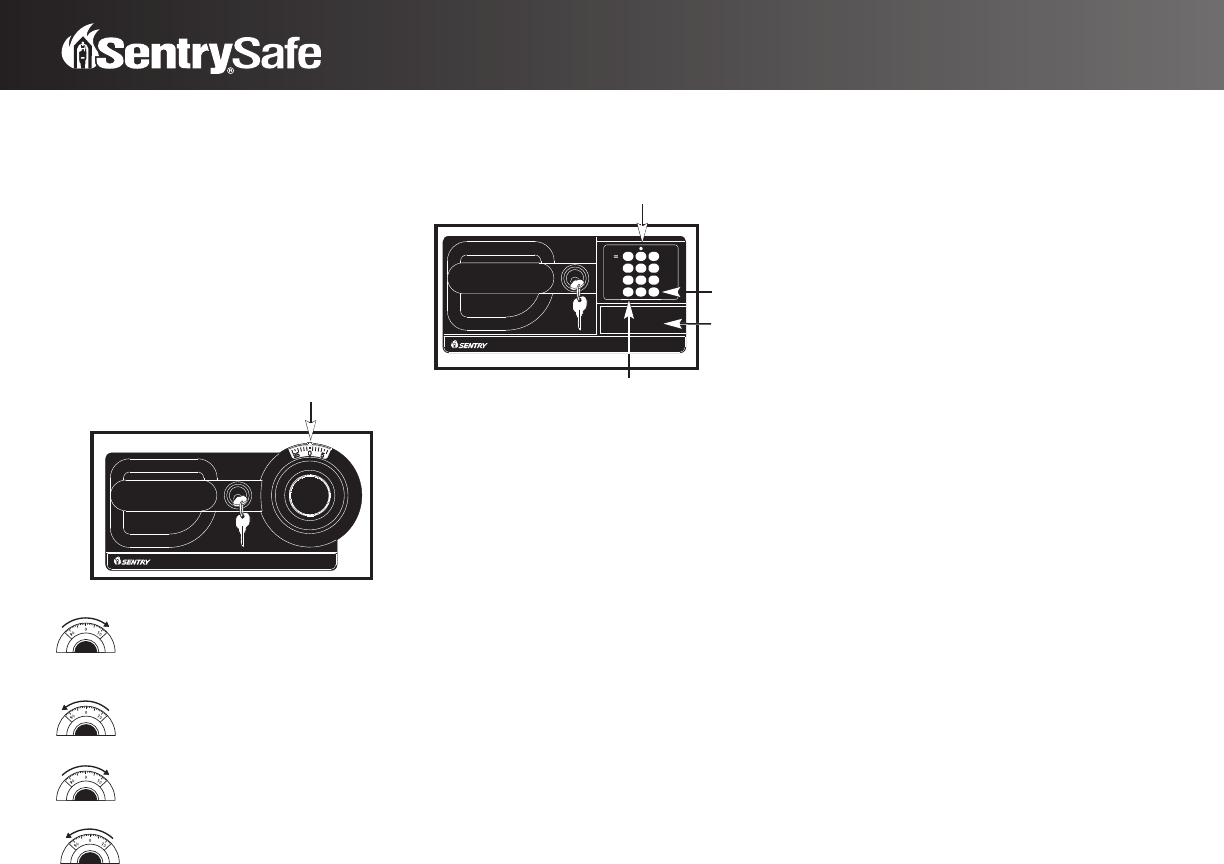
For safes with combination
and key lock
T
o unlock and open
I
t is necessary to accurately dial the four numbers shown on the
f
ront cover of this manual:
in the correct sequence
in the correct rotation
for the correct number of turns
Test first with door open!
(See cover of this manual for your combination.)
Turn the dial to the right. Make sure the first
number passes the opening index mark at least FOUR times.
Then stop at the first number of your combination.
Turn the dial to the left. Stop the THIRD time you
reach the second number of your combination.
Turn the dial to the right. Stop the SECOND time you
reach the combination’s third number.
Turn the dial to the left. Stop the FIRST time you
reach the last number of your combination.
Now turn the key in the cylinder lock to the right and open
the door.
To close and lock
1. Close the door.
2. Turn and remove the key.
3. Spin the combination lock more than three times in
either direction.
For safes with an
electronic lock and a key lock
To unlock and open
Please check first that there are four alkaline AA batteries in the
battery housing. The
Initial Code from the factory is: 1 2 3 4.
1. Turn the key in the cylinder lock to the right.
2. Press Start button: C (LED flickers with Bi sound)
3. Press Initial Code: 1 2 3 4 in sequence (LED flickers
with Bi sound)
4. Press Finish button: # (Melody rings)
5. Turn handle counterclockwise and open the door while the
melody rings.
(Model S6520 ONLY: No key in handle,
and handle turns clockwise to open.)
NOTE:
• If an incorrect code is entered, a Bi Bi Bi Bi sound
is emitted.
• If an incorrect code is entered more than 5 times,
the lock becomes paralyzed and will not work.
To release the lock: Enter the original code twice
consecutively, using the opening procedure above.
The LED flickers but no sound is emitted when
the buttons are pressed. If the procedure is followed
correctly, the melody rings and the lock is released.
i.e.: C 1 2 3 4 # C 1 2 3 4 # (Melody rings)
Personal and User codes
You may program two different codes, one personal code and
one user code.
T
o enter your personal code:
1.
Press Memory button: M in the back of door (LED
flickers and it sounds Bi)
2. Enter first Personal Code (Minimum of 4 digits,
maximum of 16 digits)
3. Press Finish button: # (Melody rings)
i.e.: Personal Code 2000, press: M 1 # 2 0 0 0 #
To change your personal first code without
opening the door:
1.
Press Finish button: # (LED flickers and it sounds Bi)
2. Press your current Personal Code (LED flickers and it
sounds Bi)
3. Press Finish
button: #
(LED goes on and melody rings)
4. Enter new Personal Code (Minimum of 4 digits,
maximum of 16 digits)
5. Press Finish
button: #
(Melody rings)
i.e.: To change present personal code 1234 to
new personal code 2000, press:
# 1 2 3 4 # 2 0 0 0 #
CAUTION: To confirm that the new personal code
is properly entered, press buttons in opening
procedures prior to closing door. For example, if
your new personal code is 2000, push C 2 0 0 0 #.
I
f the procedures are properly followed, the melody
r
ings for 4 seconds.
To enter a user code:
1.
Press Memory button: M in the back of door (LED flickers
and it sounds Bi)
2. Press Button 2 (LED flickers and it sounds Bi)
3
.
P
ress
F
inish button: #
(
LED goes on and it sounds Bi –––)
4. Enter second Personal Code (Minimum of 4 digits,
maximum of 16 digits)
5. Press Finish button: # (Melody rings)
i.e.: Personal Code 8001, press: M 2 # 8 0 0 1 #
To erase a user code:
1.
Press Memory button: M in the back of the door (LED
flickers with Bi sound)
2. Press Finish button: # (Bi sound)
3. Press button 2 (LED flickers with Bi sound)
4. Press Finish button: # (Bi sound)
Battery replacement
If, after performing the opening procedure, the LED flickers
and the melody rings but the the door does not open, it is time
to replace the batteries. To power the lock, four alkaline
AA batteries
(not included) are required.
NOTE: The personal code is not erased, even if the
battery is completely exhausted.
Battery life span: 3 years (Based on door
opening three times a day)
Lost keys or combination
First, find your safe’
s Serial Number. The Serial Number is
printed on the small label on the left and right side of safe
(outside). Send this, a notarized letter stating you are the safe’s
owner
, and a check or money order for $12.00 (U.S. funds)
to: Sentry Group, Dept. 200, 900 Linden Avenue,
Rochester, NY 14625-2784, USA.
2
1
23
456
789
C0
#
Opening Index Mark
Start Button
Finish Button
Battery
Housing
L
ED
Download de handleiding in het Nederlands en/of Engels (PDF, 0.16 MB)
(Denk aan het milieu en print deze handleiding alleen als dat echt noodzakelijk is)

Loading…

Meer over deze handleiding

We begrijpen dat het prettig is om een papieren handleiding te hebben voor je SentrySafe S8371 Kluis. Je kunt de handleiding bij ons altijd downloaden en daarna zelf printen. Indien je graag een originele handleiding wilt hebben, raden we je aan contact op te nemen met SentrySafe. Zij kunnen wellicht nog voorzien in een originele handleiding. Zoek je de handleiding van SentrySafe S8371 Kluis in een andere taal? Kies op de homepage je taal naar keuze en zoek daarna op het modelnummer om te zien of we deze beschikbaar hebben.

Specificaties

Merk SentrySafe
Model S8371
Categorie Kluizen
Bestandstype PDF
Bestandsgrootte 0.16 MB

Alle handleidingen voor SentrySafe Kluizen
Meer handleidingen voor Kluizen

Veelgestelde vragen over SentrySafe S8371 Kluis

Ons supportteam zoekt dagelijks naar nuttige productinformatie en antwoorden op veelgestelde vragen. Als er onverhoopt toch een onjuistheid tussen onze veelgestelde vragen staat, laat het ons dan weten via het contactformulier.

Het slot van mijn elektronische kluis opent niet, terwijl ik zeker weet dat mijn code juist is, wat kan ik doen? Geverifieerd

Dit kan komen doordat de batterijspanning te laag is. Dit komt voor bij goedkope batterijen of batterijen die bijna leeg zijn. Vervang de batterijen en probeer het opnieuw. Als dit het probleem niet oplost, neem dan contact op met de fabrikant.

Ik vind dit nuttig (1498) Lees meer

Ik ben de code van mijn kluis kwijt, wat kan ik doen? Geverifieerd

In het geval van een kluis met een elektronisch slot is er vaak een meegeleverde noodsleutel waarmee de kluis alsnog geopend kan worden. Als er geen noodsleutel of andere oplossing voorhanden is, dan zijn er gespecialiseerde bedrijven die kunnen helpen. In het geval een kleine kluis kunnen de kosten van een specialist echter hoger zijn dan die van een nieuwe kluis. In dat geval is de laatste optie om de kluis zelf open te breken.

Ik vind dit nuttig (723) Lees meer

Wanneer is het nuttig om mijn kluis te verankeren? Geverifieerd

Over het algemeen is het aan te raden een kluis van minder dan 1000 kilo te verankeren. Dit voorkomt dat een dief de kluis in zijn geheel meeneemt. Ook kan het zijn dat een verzekeraar eist dat een kluis verankerd is. Laat het verankeren altijd uitvoeren door een specialist.

Ik vind dit nuttig (204) Lees meer

Beoordeling

Laat ons weten wat je van de SentrySafe S8371 Kluis vindt door een beoordeling achter te laten. Wil je je ervaringen met dit product delen of een vraag stellen? Laat dan een bericht achter onderaan de pagina.
Bent u tevreden over de SentrySafe S8371 Kluis?
Ja Nee
Beoordeel dit product als eerste
0 stemmen

Praat mee over dit product

Laat hier weten wat jij vindt van de SentrySafe S8371 Kluis. Als je een vraag hebt, lees dan eerst zorgvuldig de handleiding door. Een handleiding aanvragen kan via ons contactformulier.

Handleiding SentrySafe S8371 Kluis

Gerelateerde producten

Gerelateerde categorieën

×
Download