Handleiding Sony NWZ-E583 Walkman Mp3 speler

Handleiding voor je Sony NWZ-E583 Walkman Mp3 speler nodig? Hieronder kun je de handleiding gratis bekijken en downloaden als PDF in het Nederlands en/of Engels. Dit product heeft 4 veelgestelde vragen, 0 comments en heeft 0 stemmen. Is dit niet de handleiding die je zoekt, neem dan contact met ons op.

Is je product kapot en biedt de handleiding geen oplossing meer? Dan kun je voor reparatie gratis terecht bij Repair Café.

Handleiding

Loading…

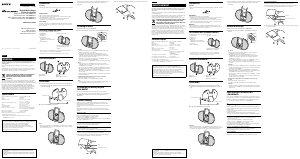
Installing WALKMAN Guide and Media Go (for
Windows)
1 Connect your Walkman to a running
computer using the USB cable (supplied).
USB cable (supplied)
2 Select the following order with the
computer.
Windows 7 or earlier: Select [Start] – [Computer] or [My
Computer] – [WALKMAN] – [Storage Media] – [FOR_
WINDOWS].
Windows 8: Select [Desktop] from [Start screen] to open
[File Explorer]. In the [Computer] list, select [WALKMAN] –
[Storage Media] – [FOR_WINDOWS].
3 Double-click [Setup.exe].
The install wizard appears.
When you execute [Setup.exe], the [Setup.exe] file stored in
the [FOR_WINDOWS] folder of your Walkman is copied to
your computer for backup, and WALKMAN Guide and Media
Go are installed to your computer.
If [Setup.exe] does not start, copy the [Setup.exe] file to your
desktop, then double-click it.
Contents
Please check the items in the package.
“WALKMAN” (1)
Headphones (1)
Earbuds (1 set)
USB cable (1)
Quick Start Guide (this manual)
About the Operating System
Make sure that the OS is Windows XP*
1
(Service Pack 3 or later), Windows
Vista*
2
(Service Pack 2 or later), Windows 7*
2
(Service Pack 1 or later), or
Windows 8.
*
1
Excluding 64-bit OS versions.
*
2
[Compatibility mode] for Windows XP is not supported.
For a Mac computer, make sure that the OS is Mac OS X v10.6 or later.
Not supported by OSs other than above
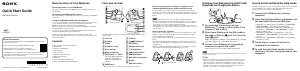
HOLD switch
BACK/HOME button
5-way button
OPTION/PWR OFF button
Charging the Battery
The battery for your Walkman is recharged while the Walkman is
connected to a running computer.
About
4hours
Charging
Fully-charged
Charging...
When your Walkman has been fully charged, disconnect it from the
computer.
For a Mac computer, click the [WALKMAN] eject icon in the sidebar of
Finder to disconnect your Walkman.
Note
To prevent battery deterioration, charge the battery at least once every six
months or every year.
4 Follow the on-screen instructions.
After the install wizard finishes, the WALKMAN Guide and
Media Go shortcuts appear on the desktop of your computer.
The Help Guide is included in the WALKMAN Guide.
Installing the Help Guide and the Content Transfer
software (for Mac)
1 Connect your Walkman to a running
computer using the USB cable (supplied).
2 On the computer, select [WALKMAN] in the
sidebar of Finder, then open the [FOR_MAC]
folder.
3 Double-click the installer icon of the desired
software:
To install the Help Guide: [Help_Guide_Installer_for_Mac]
To install the Content Transfer software: [ContentTransfer.pkg]
4 Follow the on-screen instructions.
After the installer finishes, the alias (shortcut) of the installed
software (Help Guide or the Content Transfer software)
appears on the desktop of your computer.
Hint
Before you attempt to delete the software from your Walkman, copy the
[FOR_MAC] folder to your Mac computer as a backup if necessary.
How to Install the Supplied Software
About the manuals
This Quick Start Guide only describes the basic operating instructions
and how to install the supplied software.
For detailed information and operating instructions, refer to the Help
Guide (HTML document) included in the supplied software after
installation.
How to Use your “WALKMAN
Quick Start Guide
©2013 Sony Corporation Printed in Malaysia
How to Install the Bundled Software
How to Use Your “WALKMAN
NWZ-E583/E584/E585
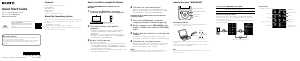
Turning your “WALKMAN” On and Off
To turn on Slide the HOLD switch in the direction opposite to that
of the arrow and press any button.
To turn off Press and hold the OPTION/PWR OFF button.
How to use the Home menu
The Home menu appears when you press and hold the BACK/HOME
button. The Home menu is the starting point to play audio, search for
songs, changing settings, etc.
From the Home menu, you can select the desired item on the screen by
using the 5-way button.
Confirm.
Return to the previous screen.
Home menu
SensMe™ Channels
FM Radio
Photos
Settings
Voice Recording
Videos
Music
Go to song
playback screen
Podcasts
Noise Canceling
Playlists
4-466-634-11(1)
Access to the online Help Guide (Full version).
For PC or Smart phones
While browsing is free, you may charge the
communication fee according to your carrier
contract.
http://rd1.sony.net/help/dmp/nwze580/en/
Download de handleiding in het Nederlands en/of Engels (PDF, 0.12 MB)
(Denk aan het milieu en print deze handleiding alleen als dat echt noodzakelijk is)

Loading…

Meer over deze handleiding

We begrijpen dat het prettig is om een papieren handleiding te hebben voor je Sony NWZ-E583 Walkman Mp3 speler. Je kunt de handleiding bij ons altijd downloaden en daarna zelf printen. Indien je graag een originele handleiding wilt hebben, raden we je aan contact op te nemen met Sony. Zij kunnen wellicht nog voorzien in een originele handleiding. Zoek je de handleiding van Sony NWZ-E583 Walkman Mp3 speler in een andere taal? Kies op de homepage je taal naar keuze en zoek daarna op het modelnummer om te zien of we deze beschikbaar hebben.

Specificaties

Merk Sony
Model NWZ-E583 Walkman
Categorie Mp3 spelers
Bestandstype PDF
Bestandsgrootte 0.12 MB

Alle handleidingen voor Sony Mp3 spelers
Meer handleidingen voor Mp3 spelers

Veelgestelde vragen over Sony NWZ-E583 Walkman Mp3 speler

Ons supportteam zoekt dagelijks naar nuttige productinformatie en antwoorden op veelgestelde vragen. Als er onverhoopt toch een onjuistheid tussen onze veelgestelde vragen staat, laat het ons dan weten via het contactformulier.

Als ik een koptelefoon op mijn apparaat aansluit dan doet deze het niet goed, wat kan ik doen? Geverifieerd

Het is mogelijk dat er opgehoopt vuil in de opening zit waarop de koptelefoon wordt aangesloten en dat deze hierdoor slecht contact maakt. De beste manier om dit te reinigen is door middel van perslucht. Laat dit in geval van twijfel doen door een professional.

Ik vind dit nuttig (52) Lees meer

Wat is het verschil tussen Mp3, WAV, AIFF en FLAC? Geverifieerd

Het verschil is dat WAV, AIFF en FLAC lossless formaten zijn, terwijl Mp3 een lossy formaat is. Dit betekent dat er voor Mp3 een hogere mate van compressie wordt gebruikt. Hierdoor zijn de bestanden kleiner, maar is de kwaliteit ook lager.

Ik vind dit nuttig (38) Lees meer

Waar staat Mp3 voor? Geverifieerd

Mp3 is een afkorting voor MPEG3. Dit staat voor Moving Picture Experts Group Layer-3 Audio. Mp3 is het meest gebruikte bestandsformaat voor het opslaan en afspelen van muziek en andere vormen van audio.

Ik vind dit nuttig (27) Lees meer

Hoeveel zijn kilobyte, megabyte, gigabyte en terabyte? Geverifieerd

Een kilobyte (KB) bestaat uit 1000 bytes. 1 megabyte (MB) = 1000 kilobyte. 1 gigabyte (GB) = 1000 megabyte. 1 terabyte (TB) = 1000 gigabyte.

Ik vind dit nuttig (23) Lees meer

Beoordeling

Laat ons weten wat je van de Sony NWZ-E583 Walkman Mp3 speler vindt door een beoordeling achter te laten. Wil je je ervaringen met dit product delen of een vraag stellen? Laat dan een bericht achter onderaan de pagina.
Bent u tevreden over de Sony NWZ-E583 Walkman Mp3 speler?
Ja Nee
Beoordeel dit product als eerste
0 stemmen

Praat mee over dit product

Laat hier weten wat jij vindt van de Sony NWZ-E583 Walkman Mp3 speler. Als je een vraag hebt, lees dan eerst zorgvuldig de handleiding door. Een handleiding aanvragen kan via ons contactformulier.

Handleiding Sony NWZ-E583 Walkman Mp3 speler

Gerelateerde producten

Gerelateerde categorieën

×
Download