MENU/INFO
TUN/CH
MODE
SELECT
PRESET
STANDBY
- VOL +
DR1703
Digital Radio
User guide
IMPORTANT SAFETY INFORMATION
The DR1703 is a full-function portable DAB and FM
radio, powered by batteries (not supplied), or from the
supplied AC adapter.
INTRODUCTION
UNPACKING
Carefully unpack the unit. If it is damaged, please
return it to your nearest Tesco store for replacement.
Remember to take your purchase receipt with you.
Retain the User Handbook. If you pass the unit on to a
third party make sure you pass on the handbook.
We suggest you retain the packaging. If you dispose of
it, do so having regard to any recycling regulations in
your area.
CONTENTS
The carton should contain:
The DR1703 portable radio•
AC adapter•
Operating Manual•
If any items are missing or damaged, contact your
nearest TESCO store for a replacement. Have your
receipt ready when you call. Retain the packaging. If
you dispose of it, do so having regard to any recycling
regulations in your area.
LOCATION
Place the unit on dry stable surface away from heat
and damp and where it is unlikely to fall or be knocked
over.
PRELIMINARIES
GETTING STARTED
DAB/FM AERIAL
Before using your radio for DAB or FM reception, always
fully extend the telescopic aerial. The telescopic aerial
has a swivel base to enable it to be adjusted to dierent
positions for the clearest sound.
CONNECTING POWER
Before connecting the power, check that the mains
voltage on the rating plate of the AC adapter is the same
as the voltage in your area.
Connect the AC adapter cable to the DC 6V jack on •
the side of the unit.
Plug the AC adapter into the wall socket and switch •
the mains power on.
The unit is now ready for use.
NOTE:- The AC adapter may become warm during
operation - this is normal.
SETTING THE CLOCK
The clock on your radio is automatically set when rst
used from the time signal broadcast with DAB radio
stations.
If a DAB station is not available, the clock may be set
manually via the Settings menu (see page 7).
CONTROLS AND CONNECTIONS
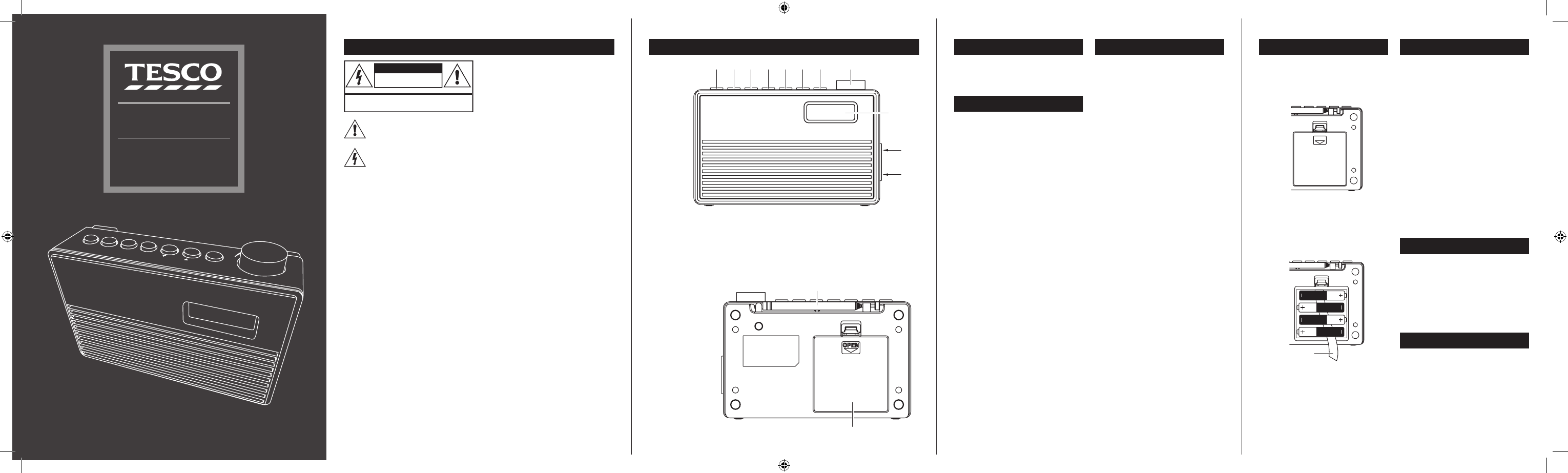
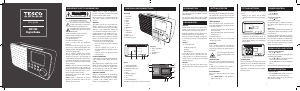
FRONT VIEW
Standby1.
Preset recall/Hold to save2.
Select3.
DAB/FM mode4.
Previous/down5.
Next/up6.
BACK VIEW
Aerial1.
Battery compartment2.
To turn the radio on
Press the • STANDBY button.
The radio will switch on.
To set the radio to Standby
Press the • STANDBY button.
The radio will set to Standby.
The display will remain on to display the time and date
unless battery powered.
INITIAL SCAN
When your radio is switched on for the rst time the
scanning display will be shown while the scanning
process takes place:
The radio scans all usable stations (full scan) and stores
them alphanumerically - 1 Radio, 2 Radio, AA Radio, AB
Radio... The initial scan will take a few minutes. After
the scan, the clock will be set and the radio will play
the rst station in the sequence. To browse for another
station, refer to the next section.
POWER CONTROL
To browse for another DAB station
Press the • TUNE/CHp or TUNE/CHq button
repeatedly.
The stations in the station list will be displayed in sequence.
Press the • SELECT button to select the displayed
station.
After a short delay, the radio will tune to the station.
BROWSING FOR A DAB STATION
Display info/Hold for Menu7.
Volume control8.
Display9.
Headphone socket (on side)10.
DC 6V socket (on side)11.
FITTING BATTERIES
You can t a set of batteries for fully portable
operation.
Referring to the diagram, press the catch and lift •
o the battery compartment lid.
BATTERY DISPOSAL
Dispose of used batteries with regard to the recycling
regulations in your area. Do NOT short circuit batteries
or throw them into water, the general rubbish or in a
re.
Weak batteries can leak and damage the radio. Replace
them in good time!
Ribbon
Fit 4 x AA batteries (not supplied) into the battery •
compartment, observing polarity as shown. Lay
the batteries over the ribbon as shown to help
with removal.Alkaline batteries are recommended
for best performance.
Re-t the battery cover.•
VOLUME CONTROL
To increase the volume
Turn and • hold the Volume control clockwise.
The volume level will increase.
To decrease the volume
Turn and • hold the Volume control anti-clockwise.
The volume level will decrease.
When the volume is adjusted the display will change to
show the current volume setting on a bargraph.
Read these instructions. Keep these instructions.
Heed all warnings. Follow all instructions.
Do not use this apparatus near water.
Clean only with a dry cloth.
Do not block any ventilation openings.
Install in accordance with the manufacturer’s
instructions.
Do not install or operate near any heat sources such as
radiators, stoves, or other apparatus that produce heat.
Unplug this apparatus during lightning storms or when
unused for long periods of time.
Refer all servicing to qualied service personnel.
Servicing is required when the apparatus has been
damaged in any way, such as the power-supply cord
or plug is damaged, liquid has been spilled or objects
have fallen into the apparatus, the apparatus has been
exposed to rain or moisture, does not operate normally,
or has been dropped.
Warning: To reduce the risk of re or electrical shock,
do not expose this product to rain or moisture. The
product must not be exposed to dripping and splashing
and no object lled with liquids such as a vase of
owers should be placed on the product.
No naked ame sources such as candles should be
placed on the product.
Caution: Changes or modications not expressly
approved by the manufacturer could void the user’s
authority to operate this device.
Caution: Usage of controls or adjustments or
performance of procedures other than those specied
herein may result in hazardous exposure.
Batteries (a battery pack or installed batteries) shall
not be subject to excessive heat such as sunshine, re
or the like.
IMPORTANT
This equipment generates, uses and can radiate radio
frequency energy and, if not installed and used in
accordance with the instructions, may cause harmful
interference to radio communication. However, this
is no guarantee that interference will not occur in a
particular installation. If this equipment does cause
harmful interference to radio or television reception,
which can be determined by turning the equipment
o and on, the user is encouraged to try to correct the
interference by one of the following measures:
- Reorient or relocate the receiving antenna.
- Increase the separation between the equipment
and receiver.
- Connect the equipment into an outlet on a
circuit dierent from that to which the receiver is
connected.
- Consult the dealer or an experienced radio/TV
technician for help.
ELECTRICAL INFORMATION
Use this appliance only with the supplied AC Adapter.
Using non-approved power supplies will void the
warranty.
Mains Supply: The mains operating voltage of the AC
Adapter is marked on a rating plate on the AC Adapter.
The means of disconnecting this appliance from
the mains supply is the mains plug. This should be
unobstructed and readily operable at all times.
COMPLIANCE STATEMENT
Hereby, Tesco declares that the radio equipment type
DR1703 is in compliance with Directive 2014/53/
EU. The full text of the EU declaration of conformity
is available at the following internet address:
www.tesco.com/productsupporttesco.
This symbol indicates that there are important
operating and maintenance instructions in
the literature accompanying this unit.
This symbol indicates that dangerous voltage
constituting a risk of electric shock is present
within this unit.
CAUTION!
RISK OF ELECTRIC SHOCK
DO NOT OPEN
TO REDUCE THE RISK OF ELECTRIC SHOCK
DO NOT REMOVE COVER (OR BACK)


Praat mee over dit product
Laat hier weten wat jij vindt van de Tesco DR1703 Radio. Als je een vraag hebt, lees dan eerst zorgvuldig de handleiding door. Een handleiding aanvragen kan via ons contactformulier.
beantwoord | Ik vind dit nuttig (1) (Vertaald door Google)
beantwoord | Ik vind dit nuttig (0) (Vertaald door Google)