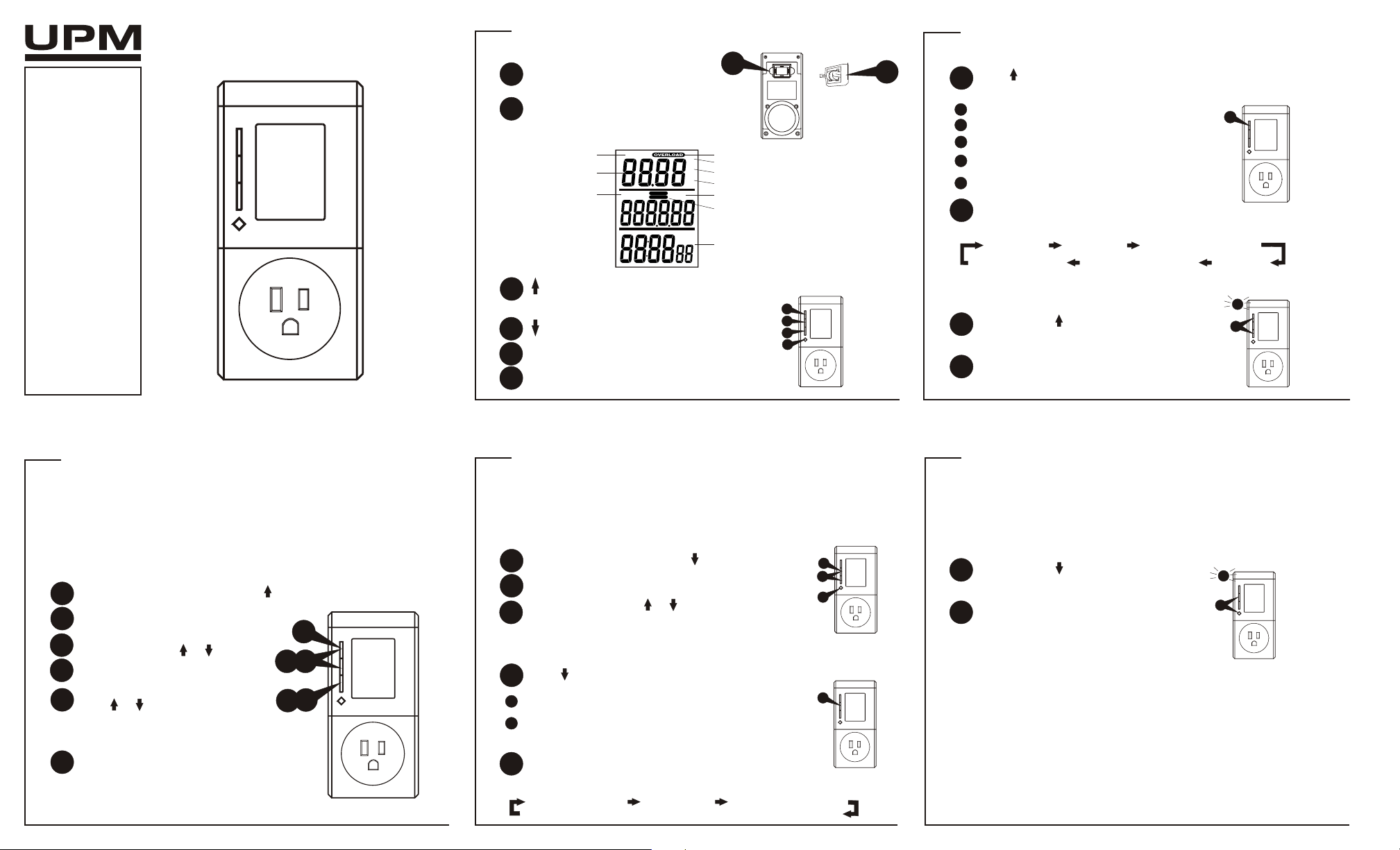
Top portion of the LCD
- scrolls through line voltage, line
current, max current, wattage, max
wattage and overload warning mode
EM100
electronic energy meter
OWNERS
MANUAL
Congratulations on your
purchase of a UPM energy
meter. Please take the
time to read and
understand this manual so
you can begin to enjoy the
energy saving benefits this
product has to offer.
FEATURES
! Overload warning
! Energy monitor and
energy consumption
tracking
! Maximum current and
wattage readings
! Energy cost calculation
! Energy usage time
GETTING STARTED
battery installation
OVERLOAD WARNING
setting the overload parameter
display
1
2
1
2
remove the battery cover
from the back of the unit
place 2 button cell batteries between
terminals observing proper polarity
then replace cover
TECHNICAL SPECIFICATIONS
Ratings: 120 V AC, 15 A
Max Load: 1800 W
1
4
2
5
Press OVERLOAD
Toggle between overload in wattage (W)
or current (A) using or
Press OVERLOAD
Adjust the desired parameter value
using or . Press OVERLOAD to
set each digit.
3
MAX
V
A
W
KWh
PM
$
TOTAL
PRICE/KWh
Overload indicator
Wattage (Watt)
Current (Ampere)
Voltage (Volt)
Maximum load
Energy monitor display
Total energy consumption
Total energy cost
Price of energy
Energy usage time
The overload warning function allows you to safeguard against exceeding
a preset load capacity. The ‘overload’ indicator will flash and the alarm
will sound continuously to warn you in the case of an overload.
Select overload warning mode using
4
2
53
1
*
ATTENTION:
This energy meter is NOT a surge protector.
OVERLOAD - overload set
1
2
- scrolls through total energy, total
cost, and energy price mode
3
button placement
PRICE - price set
4
1
2
3
4
Voltage (V) Current (A) Maximum Current (A)
Overload Warning Maximum Wattage (W) Power (W)
Middle portion of the LCD
Total Energy (kWh) Total Cost ($) Energy Price ($/kWh)
ENERGY CONSUMPTION AND COST
The price setting function allows you to input the electrical rate in $/kWh to
calculate the total cost of energy consumption.
setting the price of energy
1
2
Press PRICE
Adjust the value using or .
Press PRICE to set each digit.
3
Select energy price mode using
3
2
3
1
*
total energy used and total cost
Press to view total energy used and total cost incurred
1
3
1
Modes are arranged in a circular pattern:
Total Energy - Total accumulated energy used by the load (kWh)
Total Cost - Total accumulated energy cost incurred by the load ($)
based on the user-set price ($/kWh) and total energy (kWh)
ENERGY MONITOR
Press to view the line voltage, line current, max current, wattage
and max wattage readings; displayed in the top portion of the LCD
1
Line Voltage - voltage (V)
Line Current - current (A)
Max Current - max current (A)
Wattage - real power (W)
where power = voltage x current x power factor
Max Wattage - maximum wattage (W)
MIDDLE PORTION OF LCD DISPLAY
TOP PORTION OF LCD DISPLAY
TOP PORTION OF LCD DISPLAY
*
Modes are arranged in a circular pattern:
1
to clear max load
Press and hold and OVERLOAD
together for 3 seconds to clear max
current and max wattage readings
1
The bottom portion of the LCD display keeps track of the accumulated
energy usage time - “power on” time.
2
3
2
1
ENERGY USAGE TIME
BOTTOM PORTION OF LCD DISPLAY
Beep indicates that max current and
max wattage readings are cleared
Press and hold and PRICE together
for 3 seconds to clear energy usage
time and total energy used (kWh)
1
2
Beep indicates that energy usage time
and total energy used are cleared
2
1
to clear energy usage time/total energy used


Praat mee over dit product
Laat hier weten wat jij vindt van de UPM EM100 Energiemeter. Als je een vraag hebt, lees dan eerst zorgvuldig de handleiding door. Een handleiding aanvragen kan via ons contactformulier.