
ENGLISH
ENGLISH
Vorago,S.A.deC.V.
FranciscoVillaNo.3
Col.SanAgustín, C.P.45645
TlajomulcodeZúñiga,
Jalisco, México.
Tel.(33) 3044 6666
Importadora Global Rida S.A. de C.V.
Matilde Márquez No. 68
Colonia Peñón de los Baños C.P. 15520
Alcaldía Venustiano Carranza, CDMX
RFC: IGR1510164C2
Limited product warranty
Vorago equipment and / or accessories are covered by a limited
warranty for the time indicated in the annexed validity table, counting
from the date of acquisition, against any manufacturing and operation
defect, provided they have been used under normal conditions of use
during the warranty period and for which it was manufactured. Vorago
warranty the buyer the absence of anomalies regarding the materials.
Products Validity
PC, tablets, cell phones, audio, keyboards, mouse, networks and accessories 12 Months
LCD Monitor
* Except in panel (screen display) for which it will only be 12 months.
36 Months*
Computer equipment 3 years including Nanobay 3.
* Except computer equipment where the processor is integrated
36 Months *
on the motherboard it will only be 12 months.
Important warranty policy: Please read and complete this warranty policy and
seal it in the store when purchasing the product.
Product: Karaoke Speaker
Model:
KSP-455 Dealer stamp
Brand: Vorago
Serial number:
Invoice number:
Delivery date:
Responsibilities
The total responsibility of Vorago will be to repair or replace the product,
including labor and parts, at no cost to the buyer when it is returned to
the point of sale, presenting this warranty policy properly completed and
stamped by the establishment where it was purchased. The product or
copy of the receipt or receipt or invoice, in which data of the product the
date of purchase is specified, to verify the times within the
warranty.
Vorago may use new parts, restored or used in good condition to repair
or replace any product, at no additional cost to the consumer. In the case
of equipment and / or accessories that can not be repaired, the change
will be generated by a similar product or with superior characteristics. This
warranty covers the transportation expenses of the product derived from
its fulfillment; which will be directly attributable to the supplier of the
product. In all replacement products, the original warranty period will be
renewed. Vorago is governed by international standards for the
manufacture of products.
How to obtain warranty support
Warranty claims are processed through the point of sale, during the first 15 days
after the purchase, as long as they meet the requirements. Guarantee claims that
can not be processed through the point of sale and any concerns related to the
product purchased should be sent with the prepaid guide by Vorago to the
address of the Vorago headquarters in Francisco Villa No. 3, Col. San Agustín, CP
45645, Tlajomulco de Zúñiga, Jalisco, Mexico.
Except in situations of force majeure or fortuitous event, the repair time in no
case will be greater than 30 calendar days from the date of receive of the
equipment in Vorago.
Exclusions
This warranty is has valid in the following cases:
a) When the product had been used in conditions other than normal.
b) When the product has not been operated in accordance with the instructions
for use.
c) When the product has been altered or repaired by unauthorized persons by
Vorago.
Vorago does not oer any other express warranty for this product.
To make the warranty valid, as well as the acquisition of parts, components,
consumables and accessories
To validate a warranty, the following information must be sent to the email:
1.- Model and color
2.- Product failure
3.-Ticket or purchase invoice (digitized)
4.-Your address with CP, telephone and full Name.
Available in the establishment where the product was purchased and / or in our
central oces:
Returns
In the case of product return, it will only be the place of purchase by the end
customer. Subject to the return policies established by the same seller
.
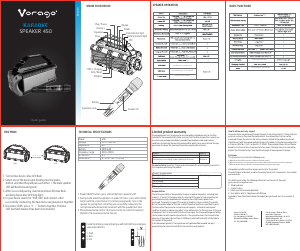
KNOW YOUR SPEAKER
1. Power/Modes Button: Long press to power on/o; Short
press to select the following modes: LINE (Aux-In)/USB/TF
card/FM/wireless BT.
2. Previous sound (under USB/TF/BT mode) ; Long press can
fast backward.
3. Short press to pause & play, long press to enter TWS
function.
4. Next sound (under USB/TF/BT mode) ; Long press can fast
forward.
5. Light mode switching and on/o button.
6. Volume+
7. Volume-
8. Bass Boost: Short press to make heavy bass eect; Long
press to choose indoor and outdoor mode
9. Power Indicator: Charge full- Green; Low power/charging - Red
10. DC 9V input(charging slot)
11. USB slot: Insert U disk to play.
12. TF Card Input: Insert TF card to play.
13. LINE IN
14. MIC Input x2
1.- Mute
Available to be mute at any mode
2.- Previous Song/station
Under USB/TF card mode - previous
song.
Under BT connection mode- previous
song.
Under FM mode- previous station.
3.- Mode
Press shortly to skip to Wireless
BT/LINE IN/USB/TF/FM mode.
4.Record function
Under USB/TF card mode,press “REC”
button to record the sound through
wired or wireless mic.
5.- Echo-
6.- BASS+/-
7.- EQ function
8.- Microphone Volume+/-
9.- Stand by
10.- Pause&Play
11.- Next song/station
Under USB/TF card mode - next song.
Under BT connection mode- next song.
Under FM mode- next station.
12.- Light mode
13.- Repeat function
14.- Record play
15.- Record delete
16.- Echo+
17.- Microphone priority
18.- Treble+/-
19.- Main Volume+/-
20.- Number buttons
Under USB/TF mode to choose songs.
INSTRUCTIONS FOR USE AND CARE
Safety Information
Please read this manual carefully before using the
product.
keep it in a safe place for future reference.
a. There are high voltage zones inside this unit that
can cause injuries. Please do not open the unit. In
case of technical failure, please contact the
authorized service centre.
b. Never place the unit in the rain or in moist zones
so as to avoid a fire or an electric shock.
c. This device uses a laser system. To prevent direct
exposure to the laser beam, please do not open the
unit or stare at the laser beam.
d. If technical maintenance is required, please
contact the authorized service centre.
e. If the supply cord is damaged in any way, please
have it replaced by the manufacturer, supplier or a
qualified electrician.
Caution
a. Do not place the unit on an unstable surface as it
may fall and break or cause damage to people or
pets.
b. Disconnect the unit from the mains before
cleaning it. Do not use cleaning liquids or sprays.
Use only a soft, damp cloth.
c. To avoid possible damage to the equipment,
please unplug it during storms or when it will not be
used for a long time.
d. Do not insert any object into the unit through the
ventilation
openings as this could cause a short circuit and start
a fire. Do not pour liquid on the speaker.
Please Do not charge the speaker while playing the music
otherwise the charging device will be damaged and it is not in
warranty.
OPERATING INSTRUCTIONS
Wireless BT
Press MODE until you enter BT Paring Mode.
- Once entering Bluetooth mode, your speaker will
automatically enter pairing mode if not already
paired to another device.
- Search for the model number Y6-1 on your Bluetoo-
th settings on your smart device, and select it.
- Once selected, your smart device and speaker will
connect. Once connected you can control your
speaker through top panel controls or your smart
device.
Line in mode
Press MODE until you enter AUX
- Make sure you have a 3.5mm AUX cable plugged
into your audio device from the AUX port on the
back of Speaker.
- In AUX mode, you can only control the functions
through the audio device. Though you can adjust the
volume on either device.
FM Radio
Press MODE until you enter FM Radio
- Press the P/P (Play/Pause) button to auto scan FM
Radio stations and store it automatically.
- Press the NEXT or PREVIOUS buttons to navigate
through FM Radio Stations.
USB and TF card
NOTE: Please make sure you connect a USB or TF Card drive
into the USB/TF Card port located on the back of the speaker.
- Press MODE until you enter USB/TF Card mode.
- You can use the control on the top of your speaker
to navigate through songs (tracks), play/pause,
volume.
TWS
NOTE: In order for TWS Mode to work, you must have 2 of the
same speakers next to each other:
On both speakers, please action the below:
- Press MODE until you enter BT mode.
- On one of the speakers, Press and hold TWS button
for three seconds.
- On your smart device, search for KSP-455 within
Bluetooth settings and connect to it.
- You will now be able to play music from your smart
device to both speakers.
TECHNICAL SPECIFICATION
Input line
RMS Power
(Speakers)
Frequency Range (Speakers)
Sensitivity (Speakers)
Impedance (Speakers)
Battery
THD
(Speakers)
Connector
Frequency
(Microphone)
DC 9V/2A
40W
40Hz-20KHz
≥75 dB
4 Ω
3.7V cc / 3600mAh
≤1%
3.5mm, USB, TF, BT,FM
267.3M
DC 9V
USB
TF CARD LINE IN
MIC 1 MIC 2
9 10 11 12 13 14
BT AUX
TWS
BASS
1 5
2 3 4
8 7 6
OUT/IN
FMMP3








Praat mee over dit product
Laat hier weten wat jij vindt van de Vorago KSP-455 Luidspreker. Als je een vraag hebt, lees dan eerst zorgvuldig de handleiding door. Een handleiding aanvragen kan via ons contactformulier.