User Manual
• Please read and follow all safety rules and instructions
in this manual before operating.
• The product warranty is printed on the back of this guide,
so please keep it in a safe place for future use.
T500(AU)Model
Use & Care
Guide
To expedite service, please specify the model name and number,
the nature of the problem, your contact information, and your address.
Contact for product
related inquiries and
customer service
After sales and warranty enquiries, visit website
Website : www.ausclimate.com.au / www.ausclimate.co.nz
Distributed by the
CDB Group
COMPACT 5-STAGE AIR
PURIFIER
2610-0262-05 Rev.00
PRODUCT WARRANTY
The terms of the warranty are as follows.
1.
This product is manufactured under stringent
quality control and inspections.
2.
The warranty will be voided if product failure is a
result of negligence or misuse by the consumer,
shipping and service fees may be incurred even
during the warranty period.
3.
A proof of purchase must be presented upon
claiming a Product Warranty.
4.
Store the proof of purchase in a safe place.
5.
This warranty is valid only in Australia or
NewZealand.
For more information, visit:
www.ausclimate.com.au
www.ausclimate.co.nz
Product Name
Compact 5-Stage Air Purifier
Model Name T500(AU)
Purchase Date
Warranty Period Two (2) years
Place of Purchase
Place of
Purchase Tel.
Customer
Address
Name
Tel.
After purchase, be sure to complete all of the above
information.
FREQUENTLY ASKED QUESTIONS
Problem Check / Actions to take
The unit does not
turn on at all
• Is the plug securely attached
to the outlet?
- Make sure the outlet has
power going to it, and
ensure the plug is secured.
• Is there a power outage?
- Check to see if other lights
and electrical equipment
are working and try again.
The unit doesn’t
work in Auto Mode
• Has Auto Mode been
selected?
- Press the Fan Speed
button until Auto Mode is
selected.
• Is the sensor blocked or
clogged?
- Clean Smart Sensor with
vacuum cleaner.
It vibrates and
makes a lot of
noise
• Is it running on a slanted or
uneven surface?
- Move the unit to a hard, flat,
even area.
Problem Check / Actions to take
The power plug
and outlet feel hot
• Is the plug securely plugged
in?
- Make sure the plug is
properly plugged into the
outlet.
There is a strange
smell
• Is it being used in a place with
a lot of smoke, dust, or odours?
- Clean the air intakes on and
clean the Pre-Filter.
- Replace the 360º All-in-One
True HEPA Filter.
The fan strength
is weak. The unit
is not purifying
the air
• Is the Check Filter Indicator
light on?
- Change the filters as
required.
UNIT SPECIFICATIONS
Model Name T500(AU)
Power Voltage AC 220 - 240 V, 50 / 60 Hz
Power Rate 55W
Verified Room Size 59 m
2
Dimensions 241 mm (W) x 241 mm (D) x 371 mm (H)
Weight 3.1 kg
Replacement Filter FILTER XQ / SKU : 1712-0110-18
The exterior, design, and product specifications may be changed without prior notice to improve product performance.
WINIX REPLACEMENT FILTER CLUB
For exclusive savings on replacement filters
AUSTRALIA NEW ZEALAND
After replacing a filter,
press the RESET button
for at least 5 seconds.
REPLACING FILTERS
CLEANING CARE
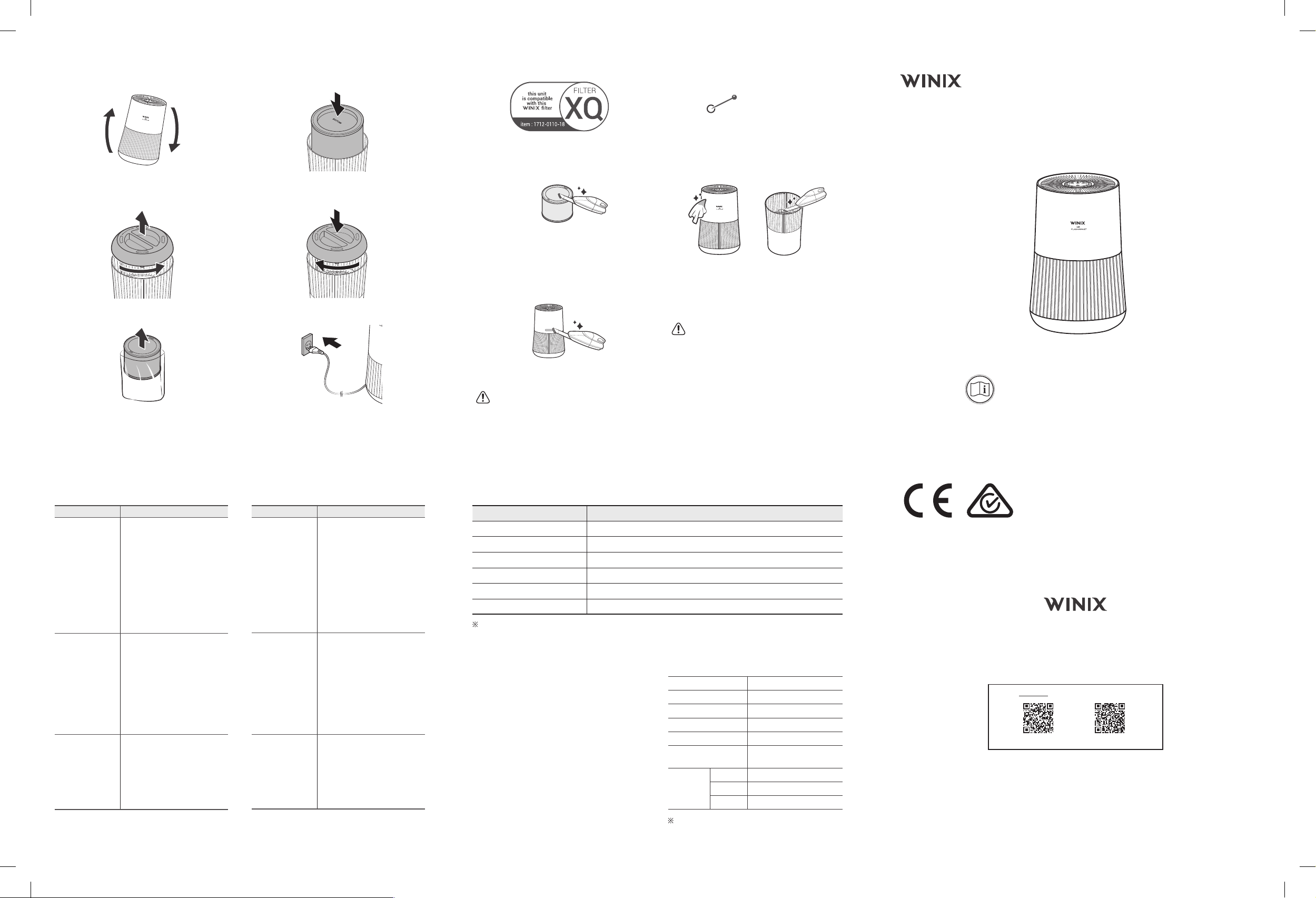
Cleaning the Filters:
Clean with a vacuum or a soft brush.
• Only clean the Pre-Filter.
• This filter CAN NOT be washed.
• Intervals between filter cleaning may vary
depending on the air quality.
Cleaning the Smart Sensor
Clean Smart Sensor with vacuum cleaner.
• Cleaning interval : EVERY 2 MONTHS.
NOTICE
• Do not use benzene, alcohol, or other volatile fluids,
which may cause damage or discoloration.
Cleaning the Exterior & Interior:
Wipe with a soft damp cloth using room temperature
water. Afterwards, wipe it down with a clean dry cloth.
After turning the product upside down, remove the filter
cover and clean the interior with a vacuum cleaner.
• For optimal performance, clean every 14 days.
NOTICE
• When cleaning the unit, always unplug the power cord
first and then wait until the unit has cooled down.
• Never disassemble, repair, or modify this unit yourself.
• Do not use flammable sprays or liquid detergents.
• Do not allow children to clean or maintain the unit.
• Before cleaning or maintaining, ensure unit is unplugged.
INITIAL OPERATION
1.
Turn the product upside down.
2.
Grab the handle at the bottom of the product, turn
anticlockwise, and pull out the filter cover.
3.
Remove the protective vinyl from the filter
installed inside the product.
4.
Install the filter, top side down, into the bottom of unit,
until it is fully inserted. The top of the filter shows the
opening and the bottom of the filter is solid.
5.
After installing the filter, turn the handle clockwise
to close the filter cover.
6.
Return the product to an upright position and
resume normal operation.


Praat mee over dit product
Laat hier weten wat jij vindt van de Winix T500(AU) Luchtreiniger. Als je een vraag hebt, lees dan eerst zorgvuldig de handleiding door. Een handleiding aanvragen kan via ons contactformulier.