User’s Guide 5544 (MTG)
E-15
Configuring City Settings
Important!
x In order to prevent loss of water resistance and damage due to impact, make sure that the crown is
fully pushed in to its normal position after operating it.
x For details about summer time settings and time zone settings, refer to the Operation Guide available
at the CASIO website.
http://world.casio.com/manual/wat/
E-14
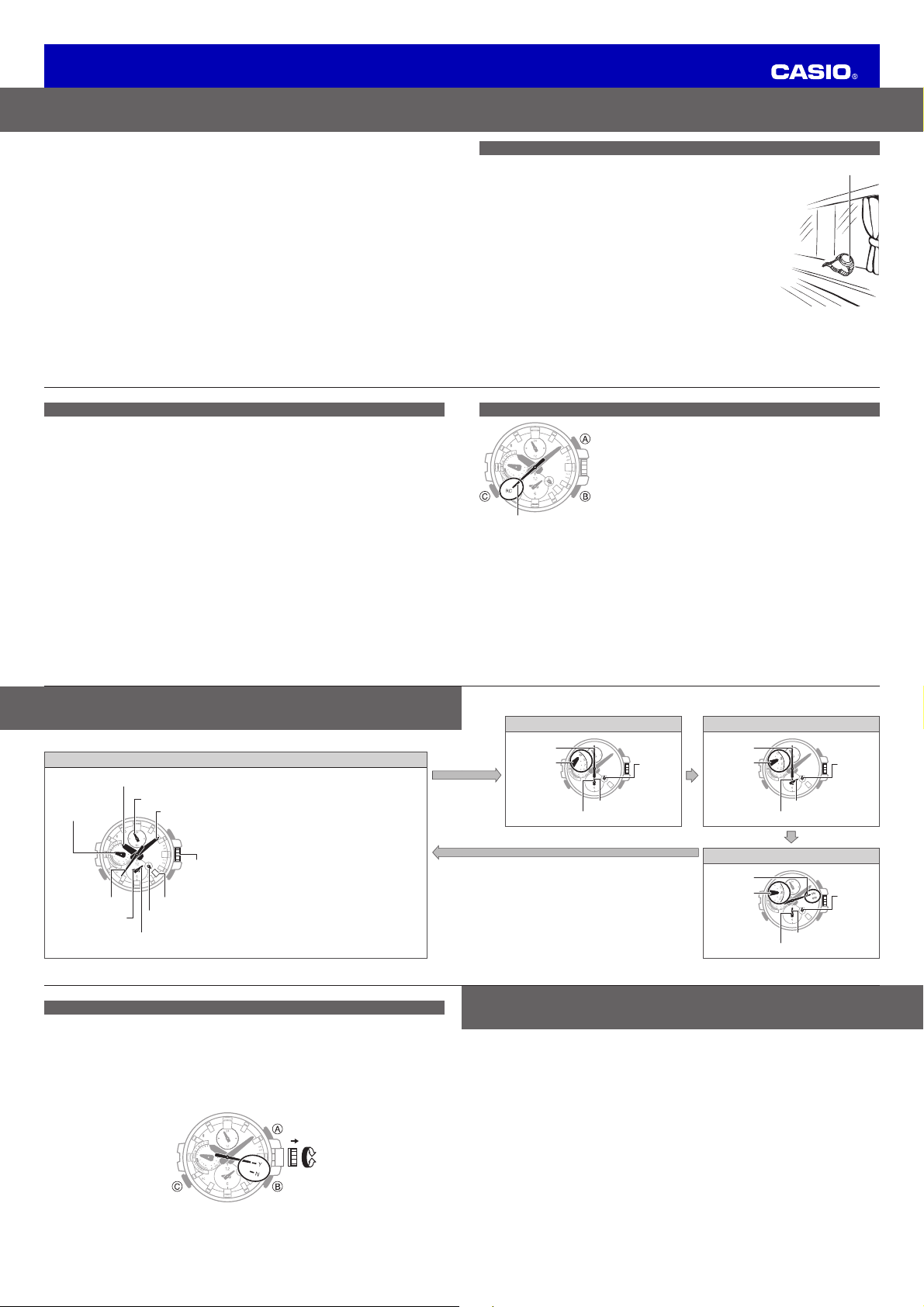
Using the Watch in a Medical Facility or Aircraft
x Disable auto time adjustment whenever you are in a medical facility, and aircraft, in any other area
where radio wave reception and connection with a phone are prohibited or restricted.
x Disabling auto time adjustment disables time calibration signal auto receive and auto connection with
a phone.
x In the Timekeeping Mode, press B once and then pull out the crown to the first click. The second
hand will move to Y (YES) (auto receive enabled) or N (NO) (auto receive disabled). To disable
auto time adjustment, rotate the crown to move the second hand to N (NO). To enable auto time
adjustment, rotate the crown to move the second hand to Y (YES). After the setting is the way you
want, push the crown back in to its normal position.
30
E-13
C
Stopwatch Mode Countdown Timer Mode
30
x Start
x Stop
Seconds
x Reset
x Enters the
Countdown
Timer Mode
Points to ST
Hours
Minutes
Hours
(0 to 24)
C
30
x Start
x Stop
Seconds
x Reset
x Enters the
Alarm Mode
Points to TR
Hours
Minutes
Hours
(0 to 24)
C
Alarm Mode
* The A-side of the dial indicates an a.m. time, while
the P-side indicates a p.m. time.
x Hold down C for about four seconds to establish
a Bluetooth connection with a phone. For details,
refer to the Operation Guide available at the CASIO
website.
http://world.casio.com/manual/wat/
30
x Illumination
Alarm on
x Alarm on/off
x Enters the
Timekeeping
Mode
Points to AL
Hours
Minutes
Hours
(0 to 24)
x Holding down C for two seconds in any mode returns to the Timekeeping Mode.
E-12
Mode Reference Guide
x Use C to navigate between modes.
Timekeeping Mode
30
Minute hand
Day of the week
hand
24-hour hand
Hour hand
Second hand Day Indicator
Crown
C
B
A
World time hour hand
World time 24-hour hand*
World time minute hand
x Pressing A turns on the illumination.
x To swap your Home Time with the World
time, hold down A for threeseconds.
x To view the result of last time calibration by
time signal reception or Mobile Link, press
B once.
x To trigger a time calibration by Mobile Link
manually, hold down B for 0.5seconds.
x To trigger a time calibration signal reception
operation manually, hold down B for
1.5seconds.
x To search for the phone paired with the
watch, hold down B for 3.5 seconds.
C
E-11
Time Calibration Signal Manual Receive
1. Hold down B for 1.5seconds until the second hand moves to RC
(Receive). If the second hand is a position other than RC, keep B
depressed until it moves to RC.
2. Place the watch near a window.
x The time setting will be adjusted automatically when a signal receive
operation is successful.
x Calibration signal reception normally takes anywhere from about two
to 10 minutes. It can take as long as 20 minutes.
x Best reception is in the middle of the night.
x If you are unable to receive a signal, check the Operation Guide
available at the CASIO website to ensure the watch is in a suitable
location.
http://world.casio.com/manual/wat/
30
Second hand
E-10
Time Calibration Signal Auto Receive
Important!
x To perform time calibration signal auto receive, the watch must be in the Timekeeping Mode. See
“Mode Reference Guide” (page E-12).
●
Leave the watch in a location that is appropriate for time calibration signal reception between
the hours of midnight and 5:00 a.m. See “Appropriate Signal Reception Location (Time
Calibration Signal)” (page E-9).
x The second hand will point to RC while time calibration signal reception is in progress.
x Reception normally takes anywhere from about two to ten minutes, but it can take as long as
20minutes.
x When the receive operation is successful, the time and day settings will be adjusted automatically.
E-9
Timekeeping (Based on a Time Calibration Signal)
Appropriate Signal Reception Location (Time Calibration Signal)
x Keep the watch away from metal and position it so its 6 o’clock side is
facing a window. Avoid moving the watch as much as possible and do
not perform any watch operations while a signal receive operation is in
progress.
●
You may experience time calibration signal reception problems in
the areas described below.
- Among or near buildings
- While riding in a vehicle
- Near household appliances, office machines, mobile phones, etc.
- On a construction site, in an airport, or any other location where radio
wave interference occurs
- Near high-voltage lines
- In mountainous areas or behind a mountain
x Always check the time setting on the day there should be a switch
between standard time and summer time (DST). If the setting is not
correct (due to signal reception failure), turn DST on or off manually as
required.
6 o’clock
E-8
Timekeeping (Current Time and Day Adjustment)
●
Timekeeping is kept accurate using information provided by a time calibration signal and by
communication with a mobile phone.
x Time calibration signals can be received using Auto Receive or Manual Receive (page E-9).
x To set the current time and day, normally use the procedure under “Time Calibration Signal Auto
Receive” (page E-10).
x For information about how to adjust time using a phone, refer to the Operation Guide available at
the website below.
http://world.casio.com/manual/wat/
x If you are in an area where a time calibration signal cannot be received or if you cannot connect
with a phone for some reason, adjust time and date settings manually (page E-18).
Important!
x If you feel that the current time and/or day indicator are not in the correct positions, you can adjust
their alignment. For details, see the Operation Guide available at the CASIO website.
x Time calibration signal reception is normally possible in the areas below.
Japan, China, North America, Europe
For details, see the Operation Guide available at the CASIO website.
x For details about how to configure the following settings manually, refer to the Operation Guide
available at the CASIO website: Home Time summer time setting, current time setting, date setting.
http://world.casio.com/manual/wat/


Praat mee over dit product
Laat hier weten wat jij vindt van de Casio 5544 Uurwerk. Als je een vraag hebt, lees dan eerst zorgvuldig de handleiding door. Een handleiding aanvragen kan via ons contactformulier.