User’s Guide 5544 (MTG)
E-20
Data Communication Specifications
Bluetooth
®
Frequency Band: 2400MHz-2480MHz
Maximum Transmission: 0 dBm (1 mW)
Communication range: 2 meters max. (depends on environment)
Stopwatch:
Measuring unit: 1 second
Measuring capacity: 23 hours 59 minutes, 59 seconds (24 hours)
Measuring mode: Elapsed time
Countdown Timer:
Setting unit: 1 minute
Countdown range: 24 hours
Measuring unit: 1 second
Time up alert duration: 10 seconds
Alarm:
Setting unit: hour, minute
Alarm tone duration: 10 seconds
Other: LED light; Power Saving; Battery level indicator; Auto Correction of Hand Home Positions
Power Supply: Solar panel and one rechargeable battery
Approximately 5 months
Not exposed to light under the conditions below.
x Auto time adjustment: 4 times/day
x Light: 1 operation/day
x Alarm: 1 operation/day
x Power saving: 6 hours/day
Specifications are subject to change without notice.
E-19
Specifications
Accuracy at normal temperature: ±15 seconds a month (When receive of a calibration signal or
communication with a phone for time adjustment is not possible.)
Timekeeping : Hour, minutes, seconds, day, day of the week
Calendar system: Full Auto-calendar pre-programmed from the year 2000 to 2099
World Time: Current time in 27 cities (39 time zones), UTC (Coordinated Universal Time), Daylight
Saving Time (summer time)/Standard Time auto switching, Home City/World Time City
swapping
Signal receive function: Auto receive, manual receive
Auto transmitter selection (for JJY, MSF/DCF77)
Receivable call signs: JJY (40 kHz/60 kHz), BPC (68.5 kHz), WWVB (60 kHz), MSF (60 kHz),
DCF77 (77.5 kHz)
Manual and auto standard time/summer time switching
Mobile Link Functions:
Auto Time Adjustment
Time setting automatically adjusted during a fixed time period.
One-touch Time Correction
Manual connection and time adjustment
Phone Finder
Watch operation sounds a tone on the connected phone.
Home City/World Time City swapping
Auto summer time switching
Automatic switching between standard time and summer time.
Hand position correction
E-18
Configuring Time and Date Settings Manually
●
Pull out the crown to the second click. After holding down C for about one second, adjust the
time and date settings.
C
(Example: Setting to June 30, 2019)
C
(Hour)
Current time and
date setting (+)
Current time and
date setting (–)
(Month)(Day) (Year 1’s digit)
CC C
(Hour, minute)
C
(Year 10’s digit)
30
00
60
90 30
20
10
80 40
70 50
0
6
93
2
1
84
75
12
6
93
2
1
84
75
10
11
30
x Operation details: Operation Guide available at the CASIO website.
http://world.casio.com/manual/wat/
E-17
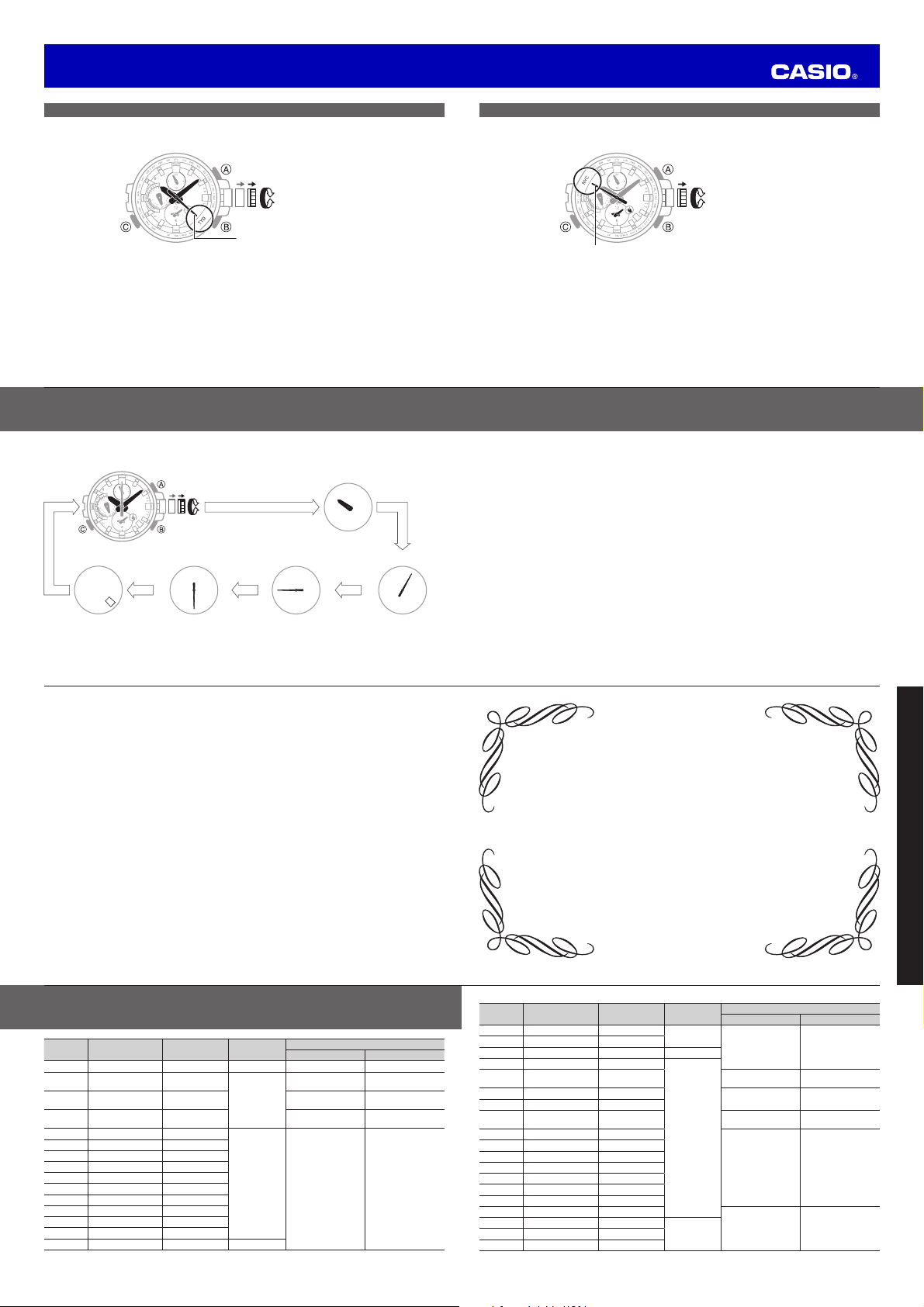
To specify the World Time City
1. In the Timekeeping Mode, pull the crown out to the first click.
Example: To select New York (UTC Offset: –5 hours)
30
Changes city setting (+)
Changes city setting (–)
New York (NYC)
x You can view the current time in your current location, plus the time in another city.
x Rotate the crown to move the second hand to the city you want. See the City List (page L-1) for a
list of cities that can be selected.
E-16
To specify the Home City
1. Pull the crown out to the second click.
Example: To select Tokyo (UTC Offset: +9 hours)
30
Changes city setting (+)
Changes city setting (–)
Tokyo (TYO)
x Rotate the crown to move the second hand to the city you want. See the City List (page L-1) for a
list of cities that can be selected.
L-3
City Code City
UTC Offset/GMT
Differential
Radio wave to
be received
Summer Time Period
Summer Time Start Summer Time End
– – +8.5
–
None None
– – +8.75
TYO TOKYO* +9 JJY
– – +9.5
–
SYD SYDNEY +10
02:00, fi rst Sunday in
October
03:00, fi rst Sunday
in April
– – +10.5
None None
NOU NOUMEA +11
WLG WELLINGTON +12
02:00, last Sunday in
September
03:00, fi rst Sunday
in April
– – +12.75
None None
TBU NUKUALOFA +13
CXI KIRITIMATI +14
BAR BAKER ISLAND –12
PPG PAGO PAGO –11
HNL HONOLULU –10
– – –9.5
ANC ANCHORAGE –9
02:00, second
Sunday in March
02:00, fi rst Sunday in
November
LAX LOS ANGELES* –8
WWVBDEN DENVER* –7
CHI CHICAGO* –6
L-2
City (Time Zone) List
City Code City
UTC Offset/GMT
Differential
Radio wave to
be received
Summer Time Period
Summer Time Start Summer Time End
UTC 0 None None
LON LONDON* 0
MSF/DCF77
01:00, last Sunday
in March
02:00, last Sunday in
October
PAR PARIS* +1
02:00, last Sunday
in March
03:00, last Sunday in
October
ATH ATHENS* +2
03:00, last Sunday
in March
04:00, last Sunday in
October
JED JEDDAH +3
–
None None
– – +3.5
DXB DUBAI +4
– – +4.5
–– +5
DEL DELHI +5.5
– – +5.75
DAC DHAKA +6
– – +6.5
BKK BANGKOK +7
HKG HONG KONG* +8 BPC
L-1
City (Time Zone) List


Praat mee over dit product
Laat hier weten wat jij vindt van de Casio 5544 Uurwerk. Als je een vraag hebt, lees dan eerst zorgvuldig de handleiding door. Een handleiding aanvragen kan via ons contactformulier.