Handleiding Lava KKT Connect Mobiele telefoon

Handleiding voor je Lava KKT Connect Mobiele telefoon nodig? Hieronder kun je de handleiding gratis bekijken en downloaden als PDF in het Nederlands en/of Engels. Dit product heeft 15 veelgestelde vragen, 0 comments en heeft 0 stemmen. Is dit niet de handleiding die je zoekt, neem dan contact met ons op.

Is je product kapot en biedt de handleiding geen oplossing meer? Dan kun je voor reparatie gratis terecht bij Repair Café.

Handleiding

Loading…
1
User Manual
KKT connect
2
All rights are reserved. No part of this document may be
reproduced without permission.
While all efforts have been made to ensure the accuracy of all
the contents in this manual, we assume no liability for errors or
omissions or statements of any kind in this manual, whether
such errors or omissions or statements resulting from
negligence, accidents, or any other cause. The contents of this
manual are subject to change without notice.
Protect our environment! We strive to produce products in
compliance with global environmental standards. Please consult
your local authorities for proper disposal.
Note: User Manual is just to guide the user about the
functionality of the phone. This does not seem any certificate of
technology. Some functions may vary due to modifications and
upgrade of software, or due to print mistake.
3
Table of Contents
1. Precautions ................................................................................... 5
2. Know your phone........................................................................... 7
2.1 Keys and parts .............................................................................. 7
2.2 Installing the battery, SIM card, memory card .................................. 8
3. Basic Operations ........................................................................... 9
3.1. Switch Phone ON/OFF .................................................................. 9
3.2. Make a call ................................................................................... 9
4. Main Menu Introduction ............................................................... 10
4.1. Call log ....................................................................................... 10
4.2. Contacts ..................................................................................... 10
a) Add New Contact .................................................................. 10
b) Send SMS or MMS ............................................................... 10
c) Call a Contact ....................................................................... 10
d) Delete a Contact ................................................................... 10
e) Delete multiple contacts ........................................................ 10
f) Add to Blacklist ..................................................................... 11
g) Import/Export Contacts ......................................................... 11
h) Send vCard .......................................................................... 11
i) Others.................................................................................. 11
j) Most used ............................................................................ 11
k) Groups ................................................................................. 11
4.3. Music ......................................................................................... 12
4.4. Camera ...................................................................................... 12
4.5. Messages ................................................................................... 12
a) Write message ..................................................................... 12
b) Use message Templates ....................................................... 12
c) Broadcast message .............................................................. 12
d) Voice mail server .................................................................. 12
e) Settings ............................................................................... 13
f) Delete all .............................................................................. 13
g) Message capacity ................................................................. 13
4
4.6. Multimedia ................................................................................. 13
a) Camcorder ........................................................................... 13
b) Video Player ......................................................................... 13
c) FM Radio ............................................................................. 13
d) Image Viewer ....................................................................... 14
e) Sound Recorder ................................................................... 14
4.7. File manager ............................................................................. 14
4.8. Game ........................................................................................ 14
4.9. Organizer .................................................................................. 14
a) World clock .......................................................................... 14
b) Alarm ................................................................................... 14
c) Calendar .............................................................................. 15
d) Stopwatch ............................................................................ 15
e) Timer ................................................................................... 15
f) Torch ................................................................................... 15
g) Calculator............................................................................. 15
h) Convertor ............................................................................. 15
i) Bluetooth ............................................................................. 15
4.10. Tools ....................................................................................... 15
a
a
)
)
EBook .................................................................................. 15
b
b
)
)
T
T
o
o
Do
l
l
i
i
s
s
t
t
............................................................................. 15
c
c
)
)
S
S
I
I
M
M
tool
k
k
i
i
t
t
........................................................................... 16
4.11. Settings ................................................................................... 16
4.12. Internet .................................................................................... 16
5. Health and Safety Precautions ..................................................... 16
5.1. SAR Compliance ....................................................................... 16
5.2. SAR Recommendations ............................................................. 17
5.3. Recycle Your Handset ................................................................ 17
5.4. Disclaimers................................................................................ 18
6. LAVA WARRANTY CERTIFICATE ................................................. 18
6.1. Limited warranty ........................................................................ 18
6.2. LAVA warranty........................................................................... 19
5
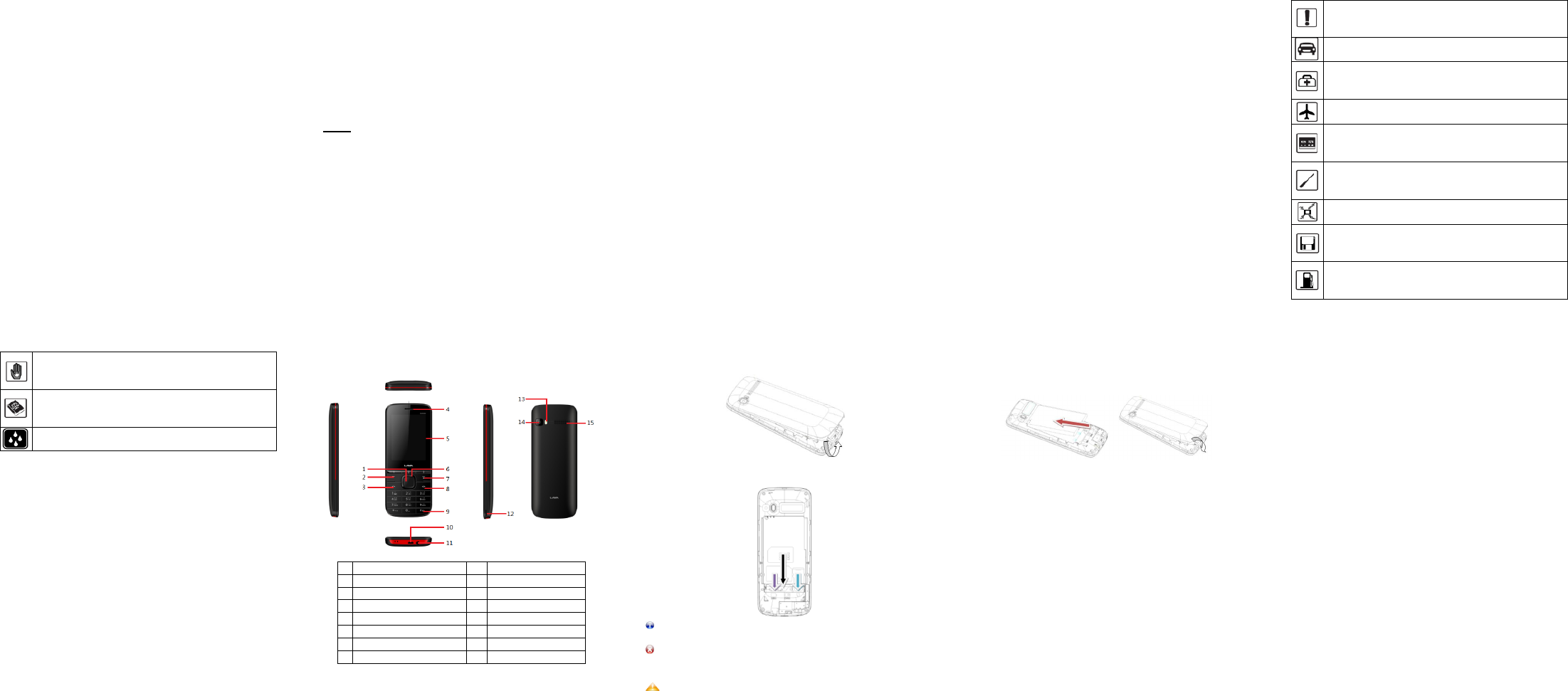
1. PRECAUTIONS
Read these simple guideline. Not following them may be
dangerous or illegal. Read the complete user manual for further
information.
Do not switch your phone on when the use of wireless
devices is prohibited or when the wireless device may
cause interference or danger.
Do not use your phone while driving.
Follow relevant rules or regulations in hospitals and
health care facilities. Switch your phone off near
medical devices.
Switch your phone off in aircraft. The radio signal from
it may cause interference in signals of the aircraft.
Switch your phone off near high-precision electronic
devices. It may affect the performance of these
devices.
Do not attempt to disassemble your phone or its
accessories. Only qualified personnel may service or
repair the phone.
Do not place your phone and its accessories in
containers with strong electromagnetic field.
Do not place magnetic storage media near your
phone. Radiation from the phone may erase the
information stored on them.
Do not put your phone in a high-temperature place or
use it in a place with flammable gas such as a petrol
pumps.
6
Keep your phone and its accessories away from
children. Do not allow children to use your phone
without guidance.
Observe any laws or regulations on the use of phone.
Respect others' privacy and legal rights when using
your phone.
Your device is not water resistant. Keep it dry.
7
2. KNOW YOUR PHONE
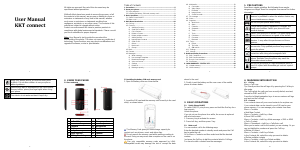
2.1 Keys and parts
1
Center key
9
Keypad
2
Left soft key
10
Charger port
3
Dial/Answer key
11
Headset port
4
Earpiece
12
Microphone
5
Display
13
Torch
6
Navigation key
14
Camera
7
Right soft key
15
Speaker
8
Ending/Power key
8
2.2 Installing the battery, SIM card, memory card
1. Open the battery cover as shown below.
2. Insert the SIM card and the memory card correctly in the card
slot(s) as shown below.
The Memory Card gives you extra storage capacity for
content such as pictures, music and video clips.
Do not remove the memory card while reading or writing to
the card. Doing so may cause data corruption on the card or on
the phone.
Use only compatible memory cards approved by LAVA.
Incompatible cards may damage the slot or corrupt the data
9
stored in the card.
3. Finally, insert the battery and the rear cover of the mobile
phone as shown below.
3. BASIC OPERATIONS
3.1. Switch Phone ON/OFF
To switch ON/OFF your phone, press and hold the End key for a
few seconds.
Unlock the phone
If you do not use the phone for a while, the screen is replaced
with a locked screen.
1. Press any key to activate the screen.
2. Press Left key, and then press * key.
3.2. Make a call
You can make a call in the following ways:
Enter the desired number in standby mode and press the Call
key to make the call.
Go to Menu > Contacts and then select and dial the desired
number.
Just press the Call key to dial the contacts listed in Call logs.
You can also dial a contact from the messages.
10
4. MAIN MENU INTRODUCTION
4.1. Call log
Menu > Call Logs
Tip: Directly access the call logs of by pressing the Call key in
idle mode.
The Call log lists the calls you have recently dialed, received,
missed for SIM1 and SIM 2.
Press the Left/right navigation keys to access various call logs
and work on the call logs.
4.2. Contacts
Your contacts stores all your saved contacts for anytime use.
Your contacts data can be stored in your SIM card or your
phone memory. You can manage your contacts from here.
Menu > Contacts
a) Add New Contact
Menu > Contacts > Left Key > New
b) Send SMS or MMS
Menu > Contacts > Left Key >Write message > SMS or MMS
c) Call a Contact
Menu > Phonebook > Left Key > Call>Voice call
Allow you to make a call to the contact you are viewing. Or you
can just highlight a number and press the Call key.
d) Delete a Contact
Menu > Contacts > Left Key> Delete
In the Contacts list, select the entry you want to delete.
e) Delete multiple contacts
Menu > Contacts > Left Key> Delete multiple
In the Contacts list, select the entry you want to delete.
Download de handleiding in het Nederlands en/of Engels (PDF, 0.42 MB)
(Denk aan het milieu en print deze handleiding alleen als dat echt noodzakelijk is)

Loading…

Meer over deze handleiding

We begrijpen dat het prettig is om een papieren handleiding te hebben voor je Lava KKT Connect Mobiele telefoon. Je kunt de handleiding bij ons altijd downloaden en daarna zelf printen. Indien je graag een originele handleiding wilt hebben, raden we je aan contact op te nemen met Lava. Zij kunnen wellicht nog voorzien in een originele handleiding. Zoek je de handleiding van Lava KKT Connect Mobiele telefoon in een andere taal? Kies op de homepage je taal naar keuze en zoek daarna op het modelnummer om te zien of we deze beschikbaar hebben.

Specificaties

Merk Lava
Model KKT Connect
Categorie Mobiele telefoons
Bestandstype PDF
Bestandsgrootte 0.42 MB

Alle handleidingen voor Lava Mobiele telefoons
Meer handleidingen voor Mobiele telefoons

Veelgestelde vragen over Lava KKT Connect Mobiele telefoon

Ons supportteam zoekt dagelijks naar nuttige productinformatie en antwoorden op veelgestelde vragen. Als er onverhoopt toch een onjuistheid tussen onze veelgestelde vragen staat, laat het ons dan weten via het contactformulier.

Mijn SIM-kaart past niet in mijn mobiele telefoon, hoe kan dat? Geverifieerd

Er zijn meerdere formaten simkaart, regulier, micro en nano. Het is mogelijk om adapters te gebruiken of de simkaart kleiner te laten maken.

Ik vind dit nuttig (1533) Lees meer

Is het schadelijk als mijn ik mobiele telefoon gebruik terwijl ik hem oplaad? Geverifieerd

Nee, mobiele telefoons zijn gewoon te gebruiken tijdens het opladen. Het opladen zal hierdoor wel minder snel verlopen.

Ik vind dit nuttig (1354) Lees meer

Wat is een PUK code? Geverifieerd

PUK staat voor Personal Unblocking Code en is nodig om je telefoon te ontgrendelen nadat je 3 keer de onjuiste PIN code hebt ingevoerd. Indien de PUK code niet meer voorhanden is, dan kan deze vaak aangevraagd worden bij de provider.

Ik vind dit nuttig (790) Lees meer

Mijn telefoon verkeert in goede staat, maar als ik mensen bel kunnen zij mij slecht verstaan, hoe kan dit? Geverifieerd

Het is mogelijk dat er opgehoopt vuil in het rooster van de microfoon zit en dat dit het geluid dempt. De beste manier om dit te reinigen is door middel van perslucht. Laat dit in geval van twijfel doen door een professional.

Ik vind dit nuttig (685) Lees meer

Als mijn apparaat aansluit op de lader dan laadt deze niet of slecht op, hoe kan dit? Geverifieerd

Het is mogelijk dat er opgehoopt vuil in de opening zit waarop de lader wordt aangesloten en dat deze hierdoor slecht contact maakt. De beste manier om dit te reinigen is door middel van perslucht. Laat dit in geval van twijfel doen door een professional.

Ik vind dit nuttig (376) Lees meer

Is het nodig om mijn lithium-ion batterij steeds helemaal leeg te laten lopen en weer volledig op te laden? Geverifieerd

Nee dit is niet nodig. Bij oudere type batterijen was dit het geval. Lithium-ion batterijen kun je gerust opladen na gebruik en uit de oplader halen wanneer je deze nodig hebt.

Ik vind dit nuttig (370) Lees meer

Waar staat IMEI voor? Geverifieerd

IMEI staat voor International Mobile Equipment Identity en is een (vaak) uniek nummer dat wordt gebruikt om mobiele apparaten zoals tablets en smartphones te identificeren en beschermen tegen diefstal.

Ik vind dit nuttig (332) Lees meer

Als ik een koptelefoon op mijn apparaat aansluit dan doet deze het niet goed, wat kan ik doen? Geverifieerd

Het is mogelijk dat er opgehoopt vuil in de opening zit waarop de koptelefoon wordt aangesloten en dat deze hierdoor slecht contact maakt. De beste manier om dit te reinigen is door middel van perslucht. Laat dit in geval van twijfel doen door een professional.

Ik vind dit nuttig (292) Lees meer

Werkt bluetooth door muren en plafonds heen? Geverifieerd

Een bluetooth signaal kan door muren en plafonds heen, tenzij deze van metaal zijn. Afhankelijk van de dikte en het materiaal van de muur zal het signaal wel in sterkte afnemen.

Ik vind dit nuttig (273) Lees meer

De batterij van mijn telefoon loopt heel snel leeg als ik buiten ben, hoe kan dit? Geverifieerd

Lithium-ion batterijen kunnen niet goed tegen kou. Als de buitentemperatuur in de buurt komt van het vriespunt, dan zal de batterij sneller leeg zijn dan normaal, zelfs zonder de telefoon te gebruiken. Wanneer de telefoon weer terug op kamertemperatuur is, zal deze hoogstwaarschijnlijk weer bijna het originele batterijpercentage tonen.

Ik vind dit nuttig (263) Lees meer

Waarmee kan ik het scherm van mijn mobiele apparaat het beste schoonmaken? Geverifieerd

Het beste is om gebruik te maken van een microvezeldoekje, eventueel met een speciaal reinigingsmiddel. Gebruik nooit keukenpapier of andere papieren doekjes, deze kunnen krassen achterlaten!

Ik vind dit nuttig (246) Lees meer

Hoe kun je een lithium-ion batterij het beste voor langere tijd opslaan? Geverifieerd

Je kunt deze het beste opslaan bij een temperatuur tussen de 5 en 25 graden Celcius. Daarnaast is het raadzaam om de batterij op te laden tot ongeveer 67% voordat deze de kast in gaat.

Ik vind dit nuttig (241) Lees meer

Wat betekent VoIP? Geverifieerd

VoIP staat voor Voice over IP (Internet Protocol) en is een technologie waarbij spraak via het internet of ander IP-netwerk wordt getransporteerd.

Ik vind dit nuttig (240) Lees meer

Wat zijn goede condities voor lithium-ion batterijen? Geverifieerd

Lithium-ion batterijen functioneren het beste bij temperaturen tussen de 5 en 45 graden Celcius. Bij koud of warm weer kun je dan ook merken dat de batterij sneller leegloopt. Bij temperaturen lager dan 5 graden en hoger dan 45 graden Celcius wordt opladen afgeraden.

Ik vind dit nuttig (237) Lees meer

Moet ik het scherm van mijn apparaat eerst schoonmaken voordat ik er een screenprotector op doe? Geverifieerd

Ja, een screenprotector blijft het beste zitten op een vet- en stofvrij oppervlak.

Ik vind dit nuttig (231) Lees meer

Beoordeling

Laat ons weten wat je van de Lava KKT Connect Mobiele telefoon vindt door een beoordeling achter te laten. Wil je je ervaringen met dit product delen of een vraag stellen? Laat dan een bericht achter onderaan de pagina.
Bent u tevreden over de Lava KKT Connect Mobiele telefoon?
Ja Nee
Beoordeel dit product als eerste
0 stemmen

Praat mee over dit product

Laat hier weten wat jij vindt van de Lava KKT Connect Mobiele telefoon. Als je een vraag hebt, lees dan eerst zorgvuldig de handleiding door. Een handleiding aanvragen kan via ons contactformulier.

Handleiding Lava KKT Connect Mobiele telefoon

Gerelateerde producten

Gerelateerde categorieën

×
Download