Handleiding SilverCrest IAN 101438 Luidspreker

Handleiding voor je SilverCrest IAN 101438 Luidspreker nodig? Hieronder kun je de handleiding gratis bekijken en downloaden als PDF in het Nederlands en/of Engels. Dit product heeft 6 veelgestelde vragen, 0 comments en heeft 1 stem met een gemiddelde score van 0/100. Is dit niet de handleiding die je zoekt, neem dan contact met ons op.

Is je product kapot en biedt de handleiding geen oplossing meer? Dan kun je voor reparatie gratis terecht bij Repair Café.

Handleiding

Loading…
such cases, the device should not be used
until it has been inspected by authorised
service personnel. Only have the device
repaired by qualified personnel. Never
open the housing of the device. Only use
a clean, dry cloth for cleaning and never
use any corrosive liquids. To remove
stubborn dirt use a slightly moistened
cloth and a mild cleaning agent. Never
try to open the housing of the device as
this would void your warranty.
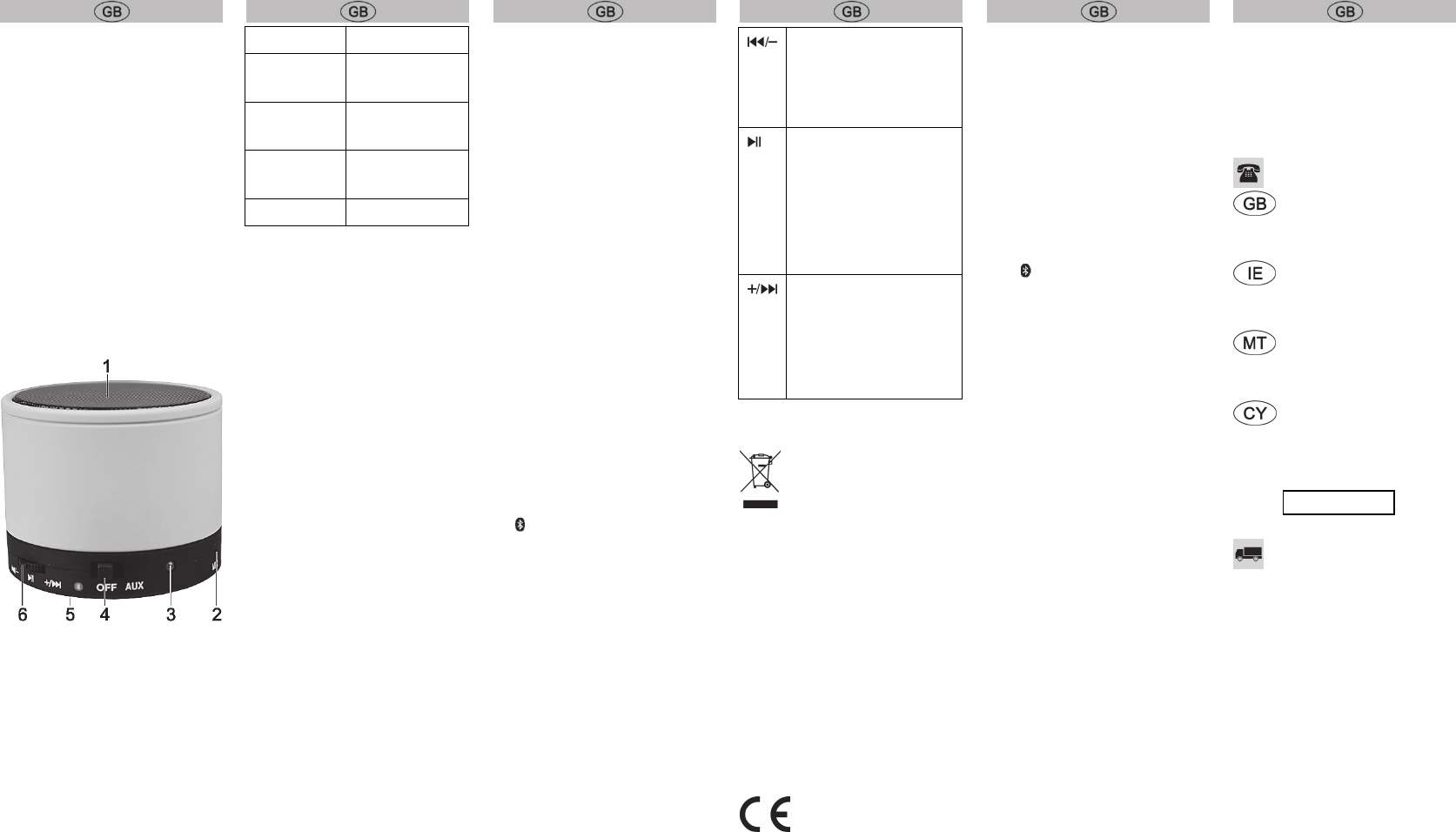
Control elements
1 Loudspeaker
2 Microphone
3 LED
4 Mode selection switch
5 Micro USB socket (at the back)
6 Multifunction button
LED
Refer to the table below for the different
statuses of the LED (3):
AUX operation Lights up green
Pairing mode Flashes alternately
orange/blue
Bluetooth
®
operation
Flashes blue every
5 seconds
Battery is
charging
Lights up orange
Battery low Flashes orange
First use
Before using for the first time, remove the
film from the bottom of the loudspeaker.
Charging the battery
Before the first use or when the built-in
battery is empty, you charge it as follows:
Set the mode selection switch (4) to
"OFF".
Connect the micro USB to USB cable to
the micro USB socket (5) and a free
USB socket of your computer when it is
switched on or a USB power supply
(not supplied).
The LED (3) lights up orange while the
battery is being charged and goes out
when the battery is fully charged.
Never cover the device while it is
charging, as it can become heated.
AUX operation
Set the volume of your audio source to
a low level.
Set the mode selection switch (4) to
"AUX".
Connect the micro USB to 3.5mm jack
cable to the micro USB socket (5) and
the 3.5mm jack plug to an external
audio source.
Adjust the volume on the external
audio source. In this mode the
multifunction button is disabled.
Bluetooth
®
operation
Bluetooth
®
operation enables wireless
hands-free operation of mobile phones,
for example. This loudspeaker allows you
to use a Bluetooth
®
enabled device. The
range of Bluetooth
®
operation is restricted
to approx. 10 metres. If your playback
device supports the Bluetooth
®
profile
A2DP, you can also transfer music
wirelessly to your loudspeaker. To be
able to remotely control the playback
device with the loudspeaker, it must also
support the AVRCP profile.
Depending on the manufacturer, model
and software version of the mobile phone
or playback device which is used, the
complete functionality of the loudspeaker
cannot be guaranteed in all cases.
Proceed as follows to connect the
loudspeaker with your mobile phone:
Set the mode selection switch (4) to
“.
The LED (3) now flashes blue a few
times. Wait until the LED (3) flashes
alternately blue/orange.
Now connect your mobile phone with
the loudspeaker via Bluetooth
®
. For
further details, please read the
instructions of your mobile phone.
Select the device "SBL 3.0 A1" from the
list of devices which are found and
establish the connection. If you are
asked for a PIN, enter "0000".
The loudspeaker confirms this with a
dual tone and the LED (3) flashes blue
approximately every 5 seconds as
soon as the connection has been
established.
The multifunction button (6) has the
following functions:
Turn briefly: Previous title
Turn for a longer
period:
Volume down
Press briefly: Play/Pause
or accept a call or terminate
dialling or the connection,
Press twice: Redial,
Press for 2 seconds:
Reject calls
Turn briefly:
Next title
Turn for a longer
period:
Volume up
Environmental information
The product bears the symbol
of a crossed-out wheelie bin. It
is therefore subject to the
European Directive 2012/19/EU.
All old electrical and electronic devices
must be separated from normal
household waste and disposed of at
designated state facilities. For further
information contact your local authorities,
waste disposal office or the shop where
you bought the device.
The built-in battery cannot be removed for
disposal.
Conformity information
This device meets the basic
requirements and other
relevant regulations of the EMC Directive
2004/108/EC, the Low Voltage
Directive 2006/95/EC, the R&TTE
Directive 1999/5/EC and the RoHS
Directive 2011/65/EU. The
full conformity declaration can be
downloaded from www.lidl-service.com.
Troubleshooting
The loudspeaker cannot be
switched on.
Charge the battery.
The Bluetooth
®
connection is not
established.
Set the mode selection switch (4) to
“.
The distance between the devices is
too large, reduce it.
The speaker is buzzing while
charging.
Set the mode selection switch (4) to
"OFF" or use the supplied micro USB
to USB cable for charging.
Warranty
Warranty of TARGA GmbH
This device is sold with three years
warranty from the date of purchase.
Please keep the original receipt in a safe
place as proof of purchase. Before using
your product for the first time, please read
the enclosed documentation. Should any
problems arise which cannot be solved in
this way, please call our hotline. Please
have the article number and, if available,
the serial number to hand for all
enquiries. If it is not possible to solve the
problem on the phone, our hotline
support staff will initiate further servicing
procedures depending on the fault.
Within the warranty period the product
will be repaired or replaced free of
charge as we deem appropriate. No new
warranty period commences if the
product is repaired or replaced.
Consumables such as batteries,
rechargeable batteries and lamps are not
covered by the warranty.
Your statutory rights towards the seller
are not affected or restricted by this
warranty.
Service
Phone: 0207 – 36 50 744
E-Mail:
Phone: 01 – 242 15 83
E-Mail:
Phone: 800 – 62 175
E-Mail:
Phone: 800 – 92 496
E-Mail:
IAN: 101438
Manufacturer
TARGA GmbH
Coesterweg 45
59494 SOEST
GERMANY
Download de handleiding in het Nederlands en/of Engels (PDF, 1.2 MB)
(Denk aan het milieu en print deze handleiding alleen als dat echt noodzakelijk is)

Loading…

Meer over deze handleiding

We begrijpen dat het prettig is om een papieren handleiding te hebben voor je SilverCrest IAN 101438 Luidspreker. Je kunt de handleiding bij ons altijd downloaden en daarna zelf printen. Indien je graag een originele handleiding wilt hebben, raden we je aan contact op te nemen met SilverCrest. Zij kunnen wellicht nog voorzien in een originele handleiding. Zoek je de handleiding van SilverCrest IAN 101438 Luidspreker in een andere taal? Kies op de homepage je taal naar keuze en zoek daarna op het modelnummer om te zien of we deze beschikbaar hebben.

Specificaties

Merk SilverCrest
Model IAN 101438
Categorie Luidsprekers
Bestandstype PDF
Bestandsgrootte 1.2 MB

Alle handleidingen voor SilverCrest Luidsprekers
Meer handleidingen voor Luidsprekers

Veelgestelde vragen over SilverCrest IAN 101438 Luidspreker

Ons supportteam zoekt dagelijks naar nuttige productinformatie en antwoorden op veelgestelde vragen. Als er onverhoopt toch een onjuistheid tussen onze veelgestelde vragen staat, laat het ons dan weten via het contactformulier.

Wat is het modelnummer van mijn SilverCrest product? Geverifieerd

Hoewel sommige SilverCrest producten een alternatief modelnummer hebben, zijn ze allemaal voorzien van een IAN nummer waarmee het product te indentificeren is.

Ik vind dit nuttig (3758) Lees meer

Ik wil een speaker aansluiten op mijn televisie via HDMI, welke poort moet ik gebruiken? Geverifieerd

Hiervoor dient de HDMI-ARC poort gebruikt te worden, die specifiek gemaakt is voor het aansluiten van audioapparatuur.

Ik vind dit nuttig (1478) Lees meer

Wat zeggen de frequenties over mijn luidspreker? Geverifieerd

Het bereik aan frequenties van een luidspreker geeft aan hoe vol het geluid zal zijn. Hoe groter het bereik, des te groter de variatie in geluid en hoe natuurlijker het geluid overkomt.

Ik vind dit nuttig (788) Lees meer

Wanneer staat mijn muziek te hard? Geverifieerd

Geluid vanaf 80 decibel (dB) kan gehoorschade opleveren. Geluiden vanaf 120 dB levert direct gehoorschade op. Hoeveel schade hangt af van hoe vaak en hoe lang je het geluid hoort.

Ik vind dit nuttig (470) Lees meer

Werkt bluetooth door muren en plafonds heen? Geverifieerd

Een bluetooth signaal kan door muren en plafonds heen, tenzij deze van metaal zijn. Afhankelijk van de dikte en het materiaal van de muur zal het signaal wel in sterkte afnemen.

Ik vind dit nuttig (230) Lees meer

Tot welk geluidsniveau is het veilig voor kinderen? Geverifieerd

Kinderen kunnen sneller gehoorschade oplopen dan volwassenen. Het is daarom belangrijk kinderen nooit bloot te stellen aan geluid harder dan 85dB. In het geval van koptelefoons zijn er speciale modellen voor kinderen. Bij luidsprekers of andere situaties moet er zelf opgelet worden dat het geluid dit niveau niet overstijgt.

Ik vind dit nuttig (207) Lees meer

Beoordeling

Laat ons weten wat je van de SilverCrest IAN 101438 Luidspreker vindt door een beoordeling achter te laten. Wil je je ervaringen met dit product delen of een vraag stellen? Laat dan een bericht achter onderaan de pagina.
Bent u tevreden over de SilverCrest IAN 101438 Luidspreker?
Ja Nee
0%
100%
1 stem

Praat mee over dit product

Laat hier weten wat jij vindt van de SilverCrest IAN 101438 Luidspreker. Als je een vraag hebt, lees dan eerst zorgvuldig de handleiding door. Een handleiding aanvragen kan via ons contactformulier.

Handleiding SilverCrest IAN 101438 Luidspreker

Gerelateerde producten

Gerelateerde categorieën

×
Download