3 port ultra HD HDMI switch
Item no.: 1272706
5 port ultra HD HDMI switch
Item no.: 1273558
Version 01/15
Intended use
This product is designed to connect multiple HD signal sources to an HDTV monitor via HDMI
cable connections. The product can connect an HDMI-ready playback device to multiple HDMI-
ready output devices. A channel's signal can be switched. The input signal that you wish to
display can be selected manually with a button on the switch or with the infra-red remote control
included with the product. Power is supplied via the power adapter included.
It is intended for indoor use only. Do not use it outdoors. Contact with moisture, e.g. in
bathrooms, must be avoided under all circumstances.
For safety and approval purposes (CE), you must not rebuild and/or modify this product. If you
use the product for purposes other than those described above, the product may be damaged.
In addition, improper use can cause hazards such as short circuiting, re, electric shock etc.
Read the instructions carefully and keep them. Make this product available to third parties only
together with its operating instructions.
This product complies with the statutory national and European requirements. All company
names and product names are trademarks of their respective owners. All rights reserved.
HDMI is a registered trademark of HDMI Licensing L.L.C.
Delivery content
• HDMI switch
• Power adapter
• Remote control including CR2025 button cell battery
• Operating instructions
Safety instructions
Read the operating instructions carefully and especially observe the safety
information. If you do not follow the safety instructions and information
on proper handling in this manual, we assume no liability for any resulting
personal injury or damage to property. Such cases will invalidate the
warranty/guarantee.
a) Persons / Product
• The device is not a toy. Keep it out of the reach of children and pets.
• Do not leave packaging material lying around carelessly. These may become dangerous
playing material for children.
• Protect the product from extreme temperatures, direct sunlight, strong jolts, high humidity,
moisture, ammable gases, vapours and solvents.
• Do not place the product under any mechanical stress.
• If it is no longer possible to operate the product safely, take it out of operation and protect it
from any accidental use. Safe operation can no longer be guaranteed if the product:
- is visibly damaged,
- is no longer working properly,
- has been stored for extended periods in poor ambient conditions or
- has been subjected to any serious transport-related stresses.
• Please handle the product carefully. Jolts, impacts or a fall even from a low height can
damage the product.
• Also observe the safety and operating instructions of any other devices which are connected
to the product.
• The mains outlet must be located near to the device and be easily accessible.
• As power supply, only use the supplied mains adaptor.
• Only connect the power adaptor to a normal mains socket connected to the public supply.
Before plugging in the power adaptor, check whether the voltage stated on the power adaptor
complies with the voltage of your electricity supplier.
• Never connect or disconnect power adaptors if your hands are wet.
• Never unplug the power adaptor from the mains socket by pulling on the cable; always use
the grips on the plug.
• When setting up the product, make sure that the cable is not pinched, kinked or damaged
by sharp edges.
• Always lay the cables so that nobody can trip over or become entangled in them. This poses
a risk of injury.
• For safety reasons, disconnect the power adaptor from the mains socket during storms.
• Before connecting to the mains, make sure that your local AC mains voltage matches the
specications on the nameplate.
• The power adapter is constructed with protection class II. Only a proper mains socket (230 V/
AC, 50 Hz) of the public supply net must be used as voltage source.
• If the wall plug transformer is damaged, do not touch it; there is danger to life from electric
shock! First, switch off the mains voltage to the mains socket to which the wall plug transformer
is connected (switch off at the corresponding circuit breaker or remove the safety fuse, then
switch off at the corresponding RCD protective switch, so that all poles of the mains socket
are disconnected). You can then unplug the wall plug transformer from the mains socket.
Dispose of the faulty wall plug transformer in an environmentally friendly way; do not use it
any more. Replace it with a wall plug transformer of the same design.
• Never pour any liquids over electrical devices or put objects lled with liquid right next to the
device. If liquid or an object enters the interior of the device nevertheless, rst power down
the respective socket (e.g. switch off circuit breaker) and then pull the mains plug from the
mains socket. Do not operate the product anymore afterwards, but take it to a specialist
workshop.
• Never use the product immediately after it has been brought from a cold room into a warm
one. The condensation generated could destroy the product. The plug-in power supply unit
also involves danger to life by electric shock! Allow the product to reach room temperature
before connecting it to the power supply and putting it to use. This may take several hours.
b) Batteries
• Correct polarity must be observed while inserting the batteries.
• Batteries should be removed from the device if it is not used for a long period of time to
avoid damage through leaking. Leaking or damaged batteries might cause acid burns when
in contact with skin, therefore use suitable protective gloves to handle corrupted batteries.
• Batteries must be kept out of reach of children. Do not leave batteries lying around, as there
is a risk, that children or pets may swallow them.
• All batteries should be replaced at the same time. Mixing old and new batteries in the device
can lead to battery leakage and device damage.
• Batteries must not be dismantled, short-circuited or thrown into re. Never recharge non-
rechargeable batteries. There is a risk of explosion!
c) Miscellaneous
• Consult an expert when in doubt about operation, safety or connection of the device.
• Maintenance, modications and repairs are to be performed exclusively by an expert or at
a qualied shop.
• If you have questions which remain unanswered by these operating instructions, contact our
technical support service or other technical personnel.
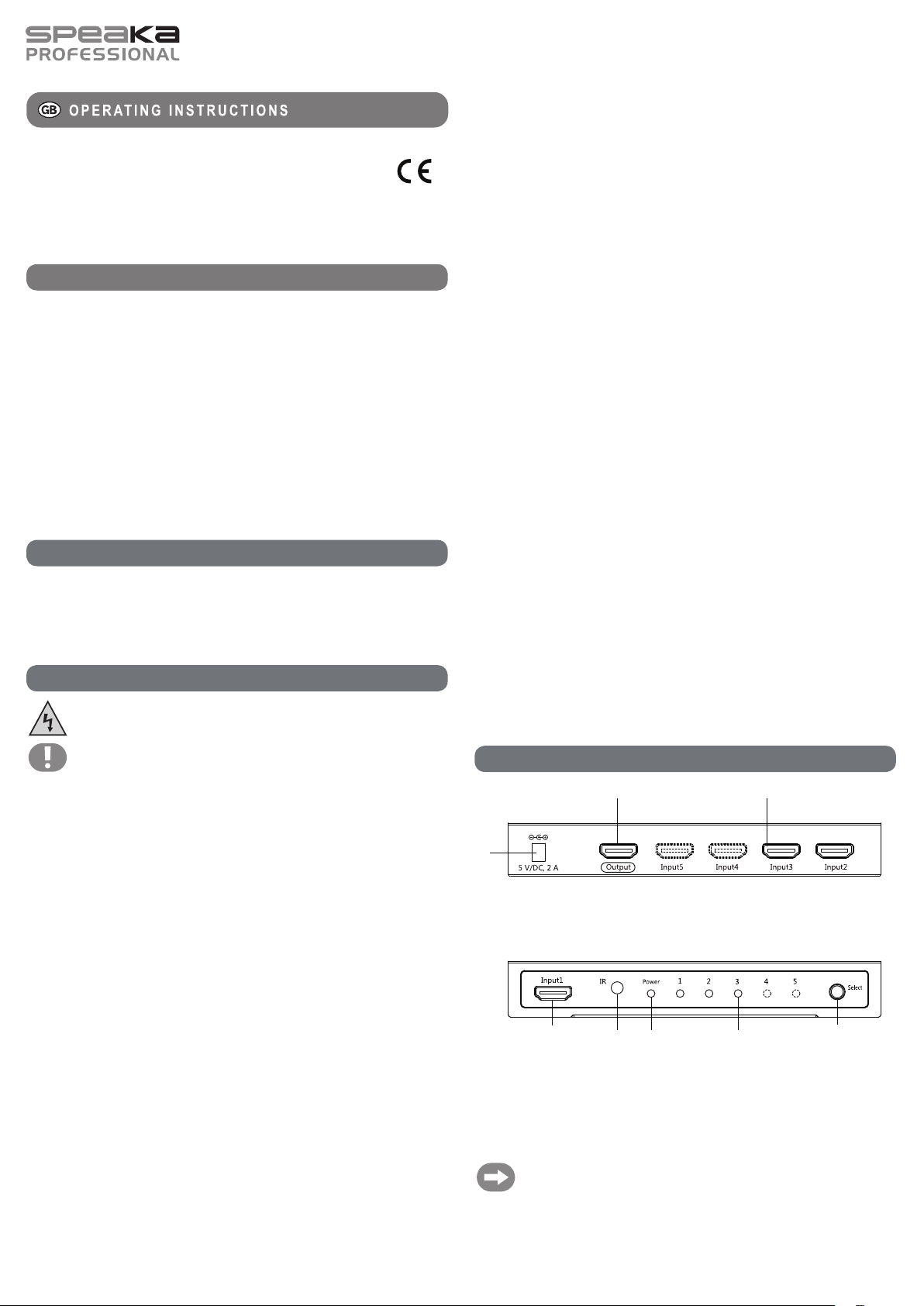
Operating elements
Rear side
Front side
1
2 3
6
4
8 5
7
1 Low voltage socket 5V/DC, 2A 5 LED control light 1-5
2 HDMI OUTPUT 6 LED indicator POWER
3 HDMI INPUT 2-5 7 IR sensor
4 Select button 8 HDMI INPUT 1
Parts marked in dots (HDMI input 4+5, LED control light 4+5) are not available for
item no. 1272706!
Item no. 1272706: 3 x HDMI input
Item no. 1273558: 5 x HDMI input




Praat mee over dit product
Laat hier weten wat jij vindt van de Speaka 1272706 HDMI Switch. Als je een vraag hebt, lees dan eerst zorgvuldig de handleiding door. Een handleiding aanvragen kan via ons contactformulier.