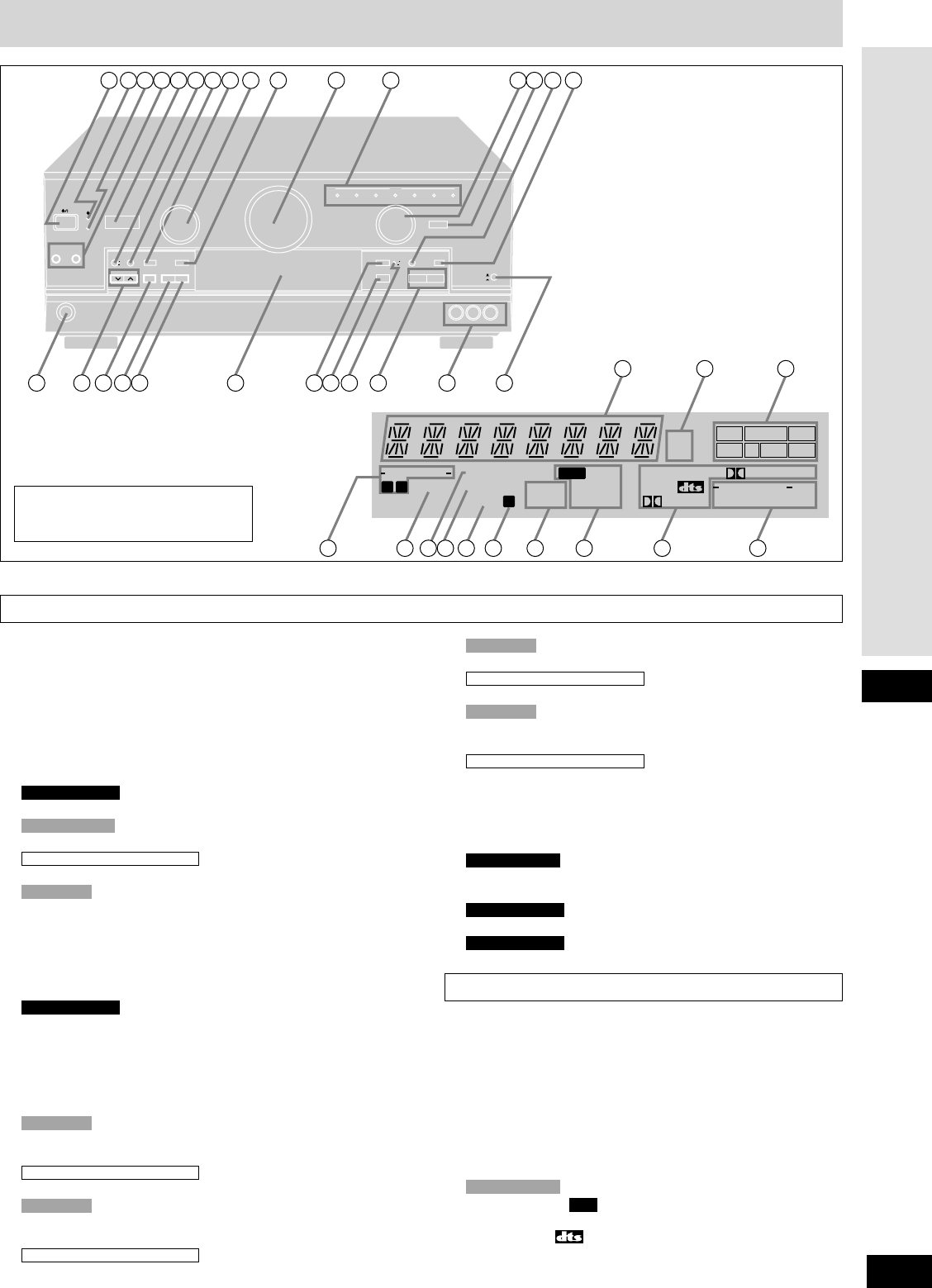
Main unit
Display section
qq
Standby/on switch [8]........................................................(13)
Press to switch the unit from on to standby mode or vice versa.
In standby mode, the unit is still consuming a small amount of power.
ww
Standby indicator [^]
When the unit is connected to the AC mains supply, this
indicator lights up in standby mode and goes out when the unit
is turned on.
ee
Wake indicator [WAKE] .......................................................(27)
rr
Speaker select buttons [SPEAKERS, A, B]..................(13, 18)
tt
MOS-FET light [MOS-FET]...................................................(12)
yy
RDS button [RDS].................................................................(24)
Timer button [TIMER, -MODE, –TIME] ................................(27)
uu
Timer button [TIMER, -MODE, –TIME] ................................(27)
ii
Memory button [MEMORY]..................................................(23)
oo
SFC mode selector [SFC MODE] ........................................(18)
!!00
DSP sound mode select button
[DSP SOUND MODE]............................................................(18)
!!11
Volume control [VOLUME] ..................................................(18)
!!22
Input indicators [INPUT] ......................................................(18)
!!33
Input selector [INPUT SELECTOR]...............................(13, 18)
!!44
Digital input select button/indicator [DIGITAL INPUT]......(18)
!!55
Help/reset button [-HELP, –RESET]....................................(28)
!!66
DVD 6ch input select button/indicator [DVD 6CH INPUT]
.....(19)
!!77
Headphone jack [PHONES] .................................................(20)
!!88
Tuning/PTY select buttons
[TUNING, PTY SELECTOR, 2, 1]..................................(22, 24)
Tuning buttons [TUNING 2, 1]...........................................(22)
!!99
Preset channel/display mode button
[PRESET, DISPLAY MODE] ...........................................(23, 24)
Preset channel buttons [PRESET]......................................(23)
For Australia and New Zealand
For Europe
For Australia and New Zealand
For Europe
SA-DX1050 only
For Europe
For Australia and New Zealand
Only for Europe
SA-DX1050 only
@@99
Display
##00
Frequency unit indicators [kHz, MHz] ................................(22)
##11
Program format indicators [L, C, R, LS, S, LFE, RS].........(18)
##22
Front speaker indicators [-SPEAKERS-, Å, ı].................(18)
##33
Low impedance indicator [LOW IMP].................................(14)
##44
Tuned indicator [TUNED].....................................................(22)
##55
Stereo indicator [STEREO]..................................................(22)
##66
Monaural indicator [MONO].................................................(22)
##77
Memory indicator [˜] ..........................................................(23)
##88
Timer indicators [SLEEP, WAKE] .......................................(27)
##99
RDS indicators [ , PS, RT, PTY, EON] .........................(24)
$$00
Signal format indicators
[FIXED, PCM, , % DIGITAL, % PRO LOGIC].....(16, 18)
$$11
DSP sound mode indicators
[-SOUND MODE-, SFC, STEREO, SURROUND].................(18)
RDS
Only for Europe
Reference pages are given in parentheses.
Refer to the separate booklet,“Remote
Control”, for a guide to the remote
control’s buttons.
@@00
Band select/EON button [BAND, EON].........................(22, 25)
Band select buttons [BAND] ...............................................(22)
@@11
FM mode select/PTY search button
[FM MODE, PTY SEARCH].............................................(22, 24)
FM mode select button [FM MODE]....................................(22)
@@22
Display section
@@33
Tape monitor button [TAPE MONITOR]..............................(21)
@@44
Tone and balance select button
[BASS/TREBLE, BALANCE]................................................(20)
@@55
Tape monitor indicator ........................................................(21)
@@66
Tone and balance adjust buttons [–, +, L, R].....................(20)
@@77
VCR 2 terminals [VCR 2]........................................................(6)
@@88
VCR 1/VCR 2 select button [VCR 1 l, VCR 2 k] ...............(20)
SA-DX1050 only
SA-DX1050 only
SA-DX950 only
For Australia and New Zealand
For Europe
For Australia and New Zealand
For Europe


Praat mee over dit product
Laat hier weten wat jij vindt van de Technics SA-DX950 Receiver. Als je een vraag hebt, lees dan eerst zorgvuldig de handleiding door. Een handleiding aanvragen kan via ons contactformulier.
beantwoord | Ik vind dit nuttig (1) (Vertaald door Google)