Handleiding Vivanco UR 850 LCD Afstandsbediening

Handleiding voor je Vivanco UR 850 LCD Afstandsbediening nodig? Hieronder kun je de handleiding gratis bekijken en downloaden als PDF in het Nederlands en/of Engels. Dit product heeft 6 veelgestelde vragen, 2 comments en heeft 1 stem met een gemiddelde score van 100/100. Is dit niet de handleiding die je zoekt, neem dan contact met ons op.

Is je product kapot en biedt de handleiding geen oplossing meer? Dan kun je voor reparatie gratis terecht bij Repair Café.

Handleiding

Loading…
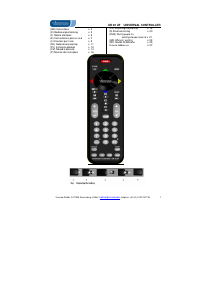
UR 850 LCD Universal Controller
Vivanco GmbH, Ewige Weide 15, D-22926 Ahrensburg, e-Mail: [email protected] 1
(GB) Operating Instructions
Vivanco UR 850 LCD remote control for
practically all TV, audio, video and other
infrared-controllable devices
Inserting the batteries
Open the battery compartment on the back of the
device, push the flap down lightly and insert 2 AA
alkaline batteries. Make sure that the polarity on the
batteries and in the battery compartment correspond
(thick spring = cell at bottom = -) and then close the
lid carefully. – Use undamaged batteries only.
Adapting to devices
In order to control your devices you must adapt or
set the remote control to them. There are two ways
of doing so: direct control code entry or code
search.
If the UR 850 LCD does not understand you it
displays ERROR and you can then repeat the entry.
Direct control code entry
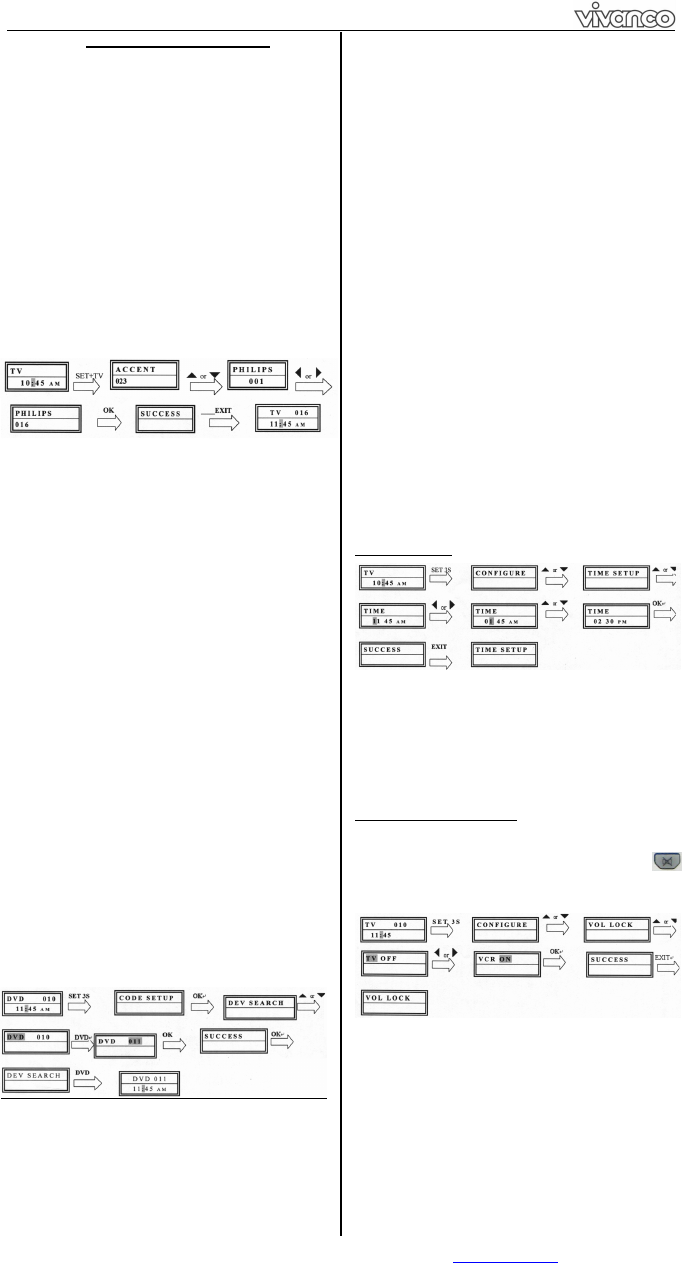
Example: setting the remote control for a Philips TV
set:
1. Switch on your device, e.g. the TV, set to any
station.
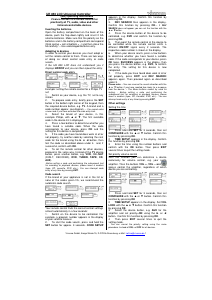
2. To prepare code entry, briefly press the SET
button in the bottom right corner of the keypad, then
the required device button, e.g. TV. A brand and a
code number appear, see diagram.
– You cannot enter
a new code if you have activated the code entry lock.
3. Select the brand of your device, in this
example Philips, with or . The first available
code in the device list is displayed.
4. Press a few buttons to determine whether you
have found a suitable code. When the code
corresponds to your device, press OK and the
setting for this device is completed.
5. If the code you have found does work at all or
not properly, try another code by selecting the next
code for the brand using the or button, then
test the code as described above under 4. and, if
successful, confirm with OK.
6. To set the remote control for other devices,
proceed in the same way. Instead of the TV device
button, press another button, e.g. VCR, CBL/SAT
(DVB-T, DECODER), DVD, TUNER, TAPE, CD,
AUX).
-Before setting a code and performing the subsequent test
for recording or playback devices, please insert a medium
(tape, CD, cassette, DVD, etc.).- You can interrupt code
entry at any time by pressing EXIT.
Code search
If the brand of your appliance is not in the list or
none of the codes given fits, we recommend the
automatic code search.
Your remote control finds the correct control settings
almost automatically in a few seconds:
1. Switch on the device to be controlled. For
example, a program number appears in the display
of your satellite receiver.
2. To start the code search, press and hold the
SET button for approx. 3 seconds. CODE SETUP
appears in the display. Confirm this function by
pressing OK.
3. DEV SEARCH then appears in the display.
Confirm this function by pressing OK.
If DEV
SEARCH does not appear you can set the function with the
or button.
4. Press the device button of the device to be
controlled, e.g. DVD and confirm the function by
pressing OK.
5. Then point the remote control at the device to
be controlled while the remote control emits a
different ON/OFF signal every 2 seconds. The
respective code number is shown in the display.
6. When your device reacts, press a few buttons
to determine whether you have found a suitable
code. If the code corresponds to your device, press
OK twice. SUCCESS appears in the display, then
you press the device button, e.g. DVD, to confirm
the entry. The setting for this device is now
completed.
7. If the code you have found does work at all or
not properly, press EXIT and DEV SEARCH
appears again. Then proceed again as described
under 3.
Please note: - You can reverse the search direction with the
or button if you have reacted too slowly to a response
from the device. – The Menu buttons cannot by used for
testing. - Before setting a code and performing the
subsequent test for recording or playback devices, please
insert a medium (tape, CD, cassette, DVD, etc.).- You can
interrupt code entry at any time by pressing EXIT.
Other settings
Setting the time
1 Press and hold SET for 3 seconds, then set
CONFIGURE with the or button. Confirm this
function by pressing OK.
2 TIME SETUP appears in the display. Confirm
this function by pressing OK.
3 Enter the time using the number buttons and
confirm with the OK button. Then press EXIT
several times to quit the setting mode.
Set priority volume control
With this function you can determine a device
exclusively for volume control, e.g. your audio
amplifier. Then the buttons VOL +, VOL and
always control the amplifier, regardless of which
device you are controlling.
1 Press and hold SET for 3 seconds, then set
CONFIGURE with the or button. Confirm this
function by pressing OK
2 TIME SETUP appears in the display. Set VOL
LOCK with the or button. Confirm this function
by pressing OK.
3 Select the device button, e.g. AUX for the
amplifier and set priority=ON using the or
button. Confirm this function by pressing OK.
4 Then press EXIT several times to quit the
setting mode.
- You can cancel the priority setting using the same
procedure. Instead of ON, set OFF for all devices.
Download de handleiding in het Nederlands en/of Engels (PDF, 2.71 MB)
(Denk aan het milieu en print deze handleiding alleen als dat echt noodzakelijk is)

Loading…

Meer over deze handleiding

We begrijpen dat het prettig is om een papieren handleiding te hebben voor je Vivanco UR 850 LCD Afstandsbediening. Je kunt de handleiding bij ons altijd downloaden en daarna zelf printen. Indien je graag een originele handleiding wilt hebben, raden we je aan contact op te nemen met Vivanco. Zij kunnen wellicht nog voorzien in een originele handleiding. Zoek je de handleiding van Vivanco UR 850 LCD Afstandsbediening in een andere taal? Kies op de homepage je taal naar keuze en zoek daarna op het modelnummer om te zien of we deze beschikbaar hebben.

Specificaties

Merk Vivanco
Model UR 850 LCD
Categorie Afstandsbedieningen
Bestandstype PDF
Bestandsgrootte 2.71 MB

Alle handleidingen voor Vivanco Afstandsbedieningen
Meer handleidingen voor Afstandsbedieningen

Veelgestelde vragen over Vivanco UR 850 LCD Afstandsbediening

Ons supportteam zoekt dagelijks naar nuttige productinformatie en antwoorden op veelgestelde vragen. Als er onverhoopt toch een onjuistheid tussen onze veelgestelde vragen staat, laat het ons dan weten via het contactformulier.

Hoe koppel ik een universele afstandsbediening aan mijn televisie? Geverifieerd

Om je universele afstandsbediening te koppelen heb je zowel het modelnummer en het merk van de afstandsbediening als die van de televisie nodig. In de handleiding van de afstandsbediening is een lijst te vinden met merken en/of modelnummers met een bijbehorende code.

Ik vind dit nuttig (7979) Lees meer

Waarom staan er letters bij de cijfers op de afstandsbediening? Geverifieerd

Het kan mogelijk zijn dat het voor bepaalde instellingen van de televisie nodig is om letters in te voeren. Er staan doorgaans drie letters of andere tekens op een knop. Wanneer letterinvoer nodig is, kan er 1 keer op die knop gedrukt worden worden de eerste letter, 2 keer gedrukt voor de tweede letter en 3 keer gedrukt voor de derde letter. Zo kan er tekst geschreven worden met een minimaal aantal knoppen.

Ik vind dit nuttig (681) Lees meer

Werkt mijn afstandsbediening ook op andere modellen televisie van hetzelfde merk? Geverifieerd

Vaak werkt een afstandsbediening van een televisie ook op vergelijkbare modellen van hetzelfde merk. Het is echter ongebruikelijk dat hij op alle modellen van dat merk werkt. Universele afstandsbedieningen zijn daar beter voor geschikt.

Ik vind dit nuttig (524) Lees meer

Wat is het gemiddelde bereik van een infrarood afstandsbediening? Geverifieerd

Een gemiddelde infrarood afstandsbediening heeft een bereik van tussen de 3 en 6 meter. Het is ook zo dat hoe verder weg het apparaat staat, hoe moeilijker het is om te mikken.

Ik vind dit nuttig (412) Lees meer

Er is een batterij in mijn apparaat gaan oxideren, kan ik het nog veilig gebruiken? Geverifieerd

Ja, het apparaat kan nog veilig gebruikt worden. Verwijder eerst de geoxideerde batterij. Doet dit niet met blote handen. Reinig daarna het batterijcompartiment met een wattenstaafje gedipt in azijn of citroensap. Laat het drogen en doe nieuwe batterijen in het apparaat.

Ik vind dit nuttig (369) Lees meer

Kan ik een verwisselbare batterij een lange tijd in een apparaat laten? Geverifieerd

Verwisselbare batterijen kunnen een lange periode in een apparaat blijven indien dit apparaat gebruikt wordt. Als een apparaat voor een lange periode wordt opgeslagen is het aan te raden de batterijen er uit te halen om oxidatie te voorkomen.

Ik vind dit nuttig (271) Lees meer

Beoordeling

Laat ons weten wat je van de Vivanco UR 850 LCD Afstandsbediening vindt door een beoordeling achter te laten. Wil je je ervaringen met dit product delen of een vraag stellen? Laat dan een bericht achter onderaan de pagina.
Bent u tevreden over de Vivanco UR 850 LCD Afstandsbediening?
Ja Nee
100%
0%
1 stem

Praat mee over dit product

Laat hier weten wat jij vindt van de Vivanco UR 850 LCD Afstandsbediening. Als je een vraag hebt, lees dan eerst zorgvuldig de handleiding door. Een handleiding aanvragen kan via ons contactformulier.

Minusvata 13-01-2020
Hallo, ik probeer een code van mijn LG te plaatsen en het werkt niet voor mij, ik heb er verschillende geprobeerd, is er een manier om het te weten?Bedankt.

beantwoord | Ik vind dit nuttig (1) (Vertaald door Google)
Minusvata 03-04-2021
Het lukt me om verbinding te maken met mijn loewe, maar ik kan alleen de kanalen wijzigen, de andere functies maken geen verbinding

beantwoord | Ik vind dit nuttig (1) (Vertaald door Google)
Handleiding Vivanco UR 850 LCD Afstandsbediening

Gerelateerde producten

Gerelateerde categorieën

×
Download