Handleiding Garmin vivoki Stappenteller

Handleiding voor je Garmin vivoki Stappenteller nodig? Hieronder kun je de handleiding gratis bekijken en downloaden als PDF in het Nederlands en/of Engels. Dit product heeft 1 veelgestelde vraag, 0 comments en heeft 0 stemmen. Is dit niet de handleiding die je zoekt, neem dan contact met ons op.

Is je product kapot en biedt de handleiding geen oplossing meer? Dan kun je voor reparatie gratis terecht bij Repair Café.

Handleiding

Loading…
vívokí
Owner's Manual
WARNING
See the Important Safety and Product Information guide in the
product box for product warnings and other important
information.
Always consult your physician before you begin or modify any
exercise program.
Getting Started
When using your device for the first time, you must complete
these tasks to set up the device and learn about the basic
features.
1
Go to www.garmin.com/wellness/start, and select your
wellness program.
2
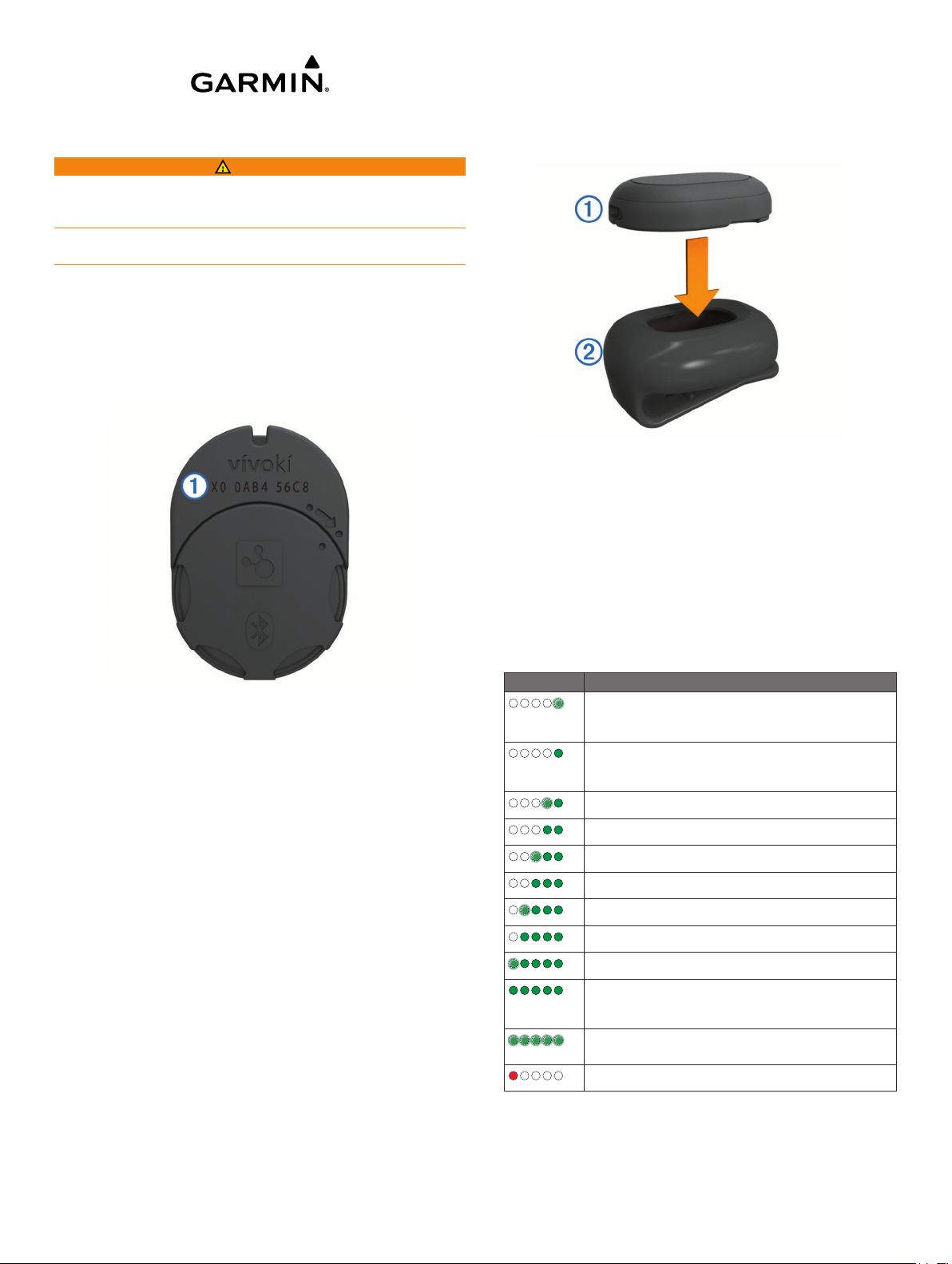
Locate the serial number
À
on the back of the device.
3
Follow the on-screen instructions to register the device.
4
Go to www.garmin.com/apps, and download the Garmin
Connect
Mobile app (optional).
5
Go to www.garminconnect.com/start, and follow the on-
screen instructions to register the device with Garmin
Connect (optional).
6
Insert the device in the silicone clip, or carry the device in
your pocket (Wearing the Device).
7
Go for a short walk (at least 1 minute).
8
Check your progress toward your daily goal (Checking Your
Activity Progress).
Using Garmin Connect Mobile
To synchronize data using your compatible mobile device, you
must pair your vívokí device directly through the Garmin
Connect Mobile app.
NOTE: Your compatible Android
or iOS
®
mobile device must
support Bluetooth
®
4.0 in order to pair with your vívokí device
and synchronize data.
1
From your mobile device, go to the Garmin Connect Mobile
app.
2
Follow the on-screen instructions to pair the device and
update your preferences.
Software Update
Software updates for your vívokí device are made available
through the Garmin Connect Mobile app. When a software
update is available, your device automatically downloads and
installs the update the next time you synchronize your device
using the Garmin Connect Mobile app.
Wearing the Device
1
Insert the device
À
into the flexible silicone clip
Á
by
stretching the clip material around the device.
2
Attach the clip to your waistband, belt, or torso, or carry the
device in your pocket.
3
Carry or wear the device all day.
Checking Your Activity Progress
While you are wearing the device, it is active and sending data,
but no LEDs are showing.
Tap the device two or three times in succession until the
LEDs flash.
NOTE: You should remain stationary when checking your
activity progress.
Up to five green LEDs appear to indicate your daily progress.
LED Pattern Progress Toward Goal
0-10%
Each flashing LED represents up to 10% of your
progress toward the daily goal.
11-20%
Each solid LED represents up to 20% of your
progress toward the daily goal.
21-30%
31-40%
41-50%
51-60%
61-70%
71-80%
81-90%
91-100%
When you are close to your daily goal, all five LEDs
are solid.
>100%
When you exceed your daily goal, all five LEDs flash.
Low battery
Pair your device with the Garmin Connect Mobile app to view
your activity progress in real time (Using Garmin Connect
Mobile).
January 2015
Printed in Taiwan 190-01735-00_0B
Download de handleiding in het Nederlands en/of Engels (PDF, 0.9 MB)
(Denk aan het milieu en print deze handleiding alleen als dat echt noodzakelijk is)

Loading…

Meer over deze handleiding

We begrijpen dat het prettig is om een papieren handleiding te hebben voor je Garmin vivoki Stappenteller. Je kunt de handleiding bij ons altijd downloaden en daarna zelf printen. Indien je graag een originele handleiding wilt hebben, raden we je aan contact op te nemen met Garmin. Zij kunnen wellicht nog voorzien in een originele handleiding. Zoek je de handleiding van Garmin vivoki Stappenteller in een andere taal? Kies op de homepage je taal naar keuze en zoek daarna op het modelnummer om te zien of we deze beschikbaar hebben.

Specificaties

Merk Garmin
Model vivoki
Categorie Stappentellers
Bestandstype PDF
Bestandsgrootte 0.9 MB

Alle handleidingen voor Garmin Stappentellers
Meer handleidingen voor Stappentellers

Veelgestelde vragen over Garmin vivoki Stappenteller

Ons supportteam zoekt dagelijks naar nuttige productinformatie en antwoorden op veelgestelde vragen. Als er onverhoopt toch een onjuistheid tussen onze veelgestelde vragen staat, laat het ons dan weten via het contactformulier.

Hoeveel stappen is de aanbevolen dagelijkse hoeveelheid voor volwassenen tot 65 jaar? Geverifieerd

Om genoeg te bewegen is het nodig om dagelijks ten minste 10.000 stappen te zetten. Voor mensen ouder dan 65 is dit aantal 8.000.

Ik vind dit nuttig (447) Lees meer

Beoordeling

Laat ons weten wat je van de Garmin vivoki Stappenteller vindt door een beoordeling achter te laten. Wil je je ervaringen met dit product delen of een vraag stellen? Laat dan een bericht achter onderaan de pagina.
Bent u tevreden over de Garmin vivoki Stappenteller?
Ja Nee
Beoordeel dit product als eerste
0 stemmen

Praat mee over dit product

Laat hier weten wat jij vindt van de Garmin vivoki Stappenteller. Als je een vraag hebt, lees dan eerst zorgvuldig de handleiding door. Een handleiding aanvragen kan via ons contactformulier.

Handleiding Garmin vivoki Stappenteller

Gerelateerde producten

Gerelateerde categorieën

×
Download